77
Managing Programs and Presets 77 Managing Programs and Presets
Edit or rename a Basal Program
To edit or rename a Basal Program:
1. Write a list of all of the revised basal
segments to guide you through re-
entering the values for each segment.
Tip: You can write this list on the pages
at the end of this User Guide.
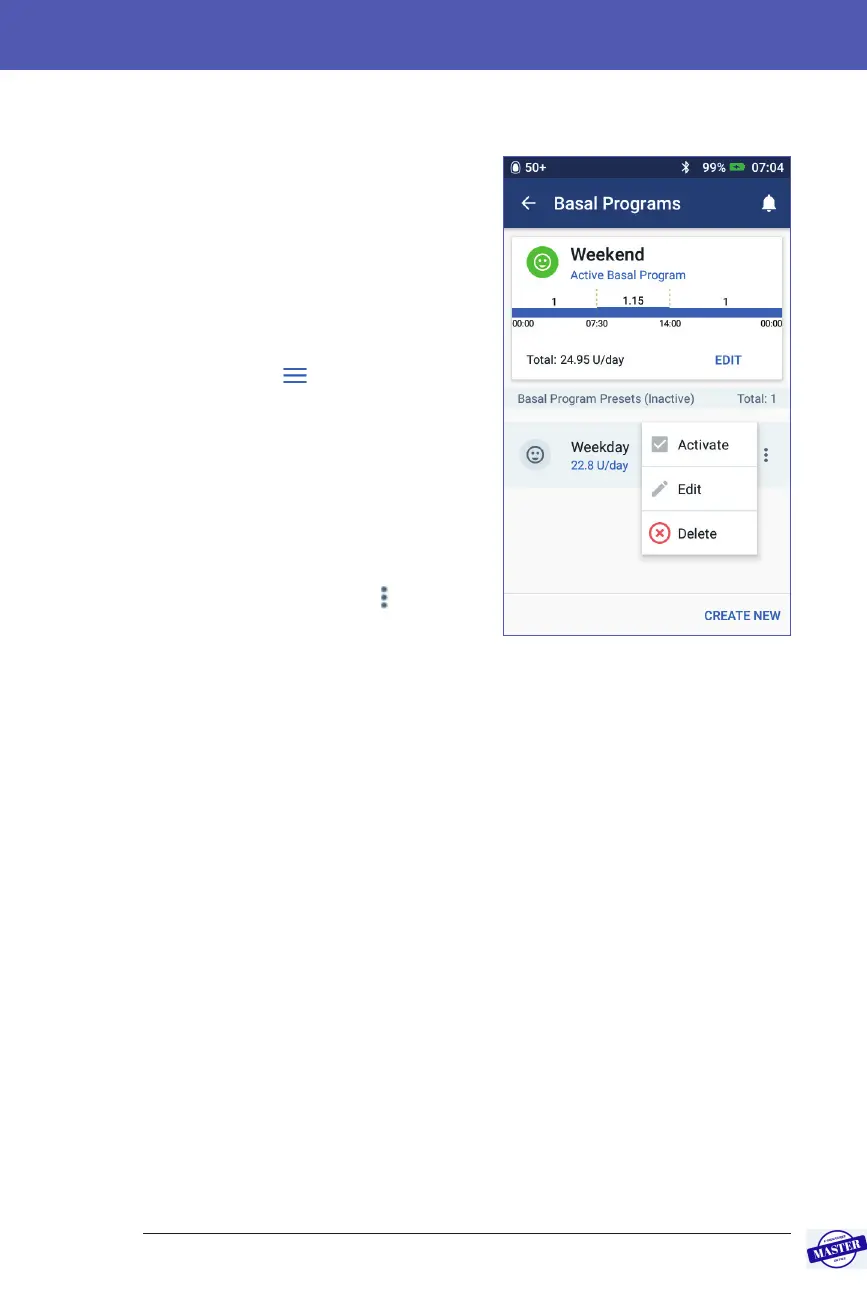
2. Navigate to the list of Basal Programs:
Menu icon (
) > Basal Programs
3. Swiping up or down as necessary,
select the Basal Program to edit:
• To edit the active Basal Program,
tap EDIT beneath the graph of
the active program. en tap
SUSPEND INSULIN.
• To edit an inactive Basal Program,
tap the Options icon (
) next to
the Basal Program you would like
to edit. en tap Edit.
4. To rename the Basal Program, tap the Program Name eld and enter the new
name.
5. To change the tag, tap a dierent tag. Tap again to deselect a tag.
6. Tap NEXT.
7. To change an end time or basal rate for a segment:
a. Tap the row containing the segment you would like to change.
b. Tap the End Time eld and enter the new end time for the segment.
c. Tap the Basal Rate eld and enter the desired basal rate.
d. Tap NEXT.
e. en dene the end time and basal rate for any following segments, as
needed.
Effective Date: 27SEP2019, ECO-000240



 To Next Page