65
Delivering a Bolus of Insulin 55 Delivering a Bolus of Insulin
Tracking the Progress of a Bolus
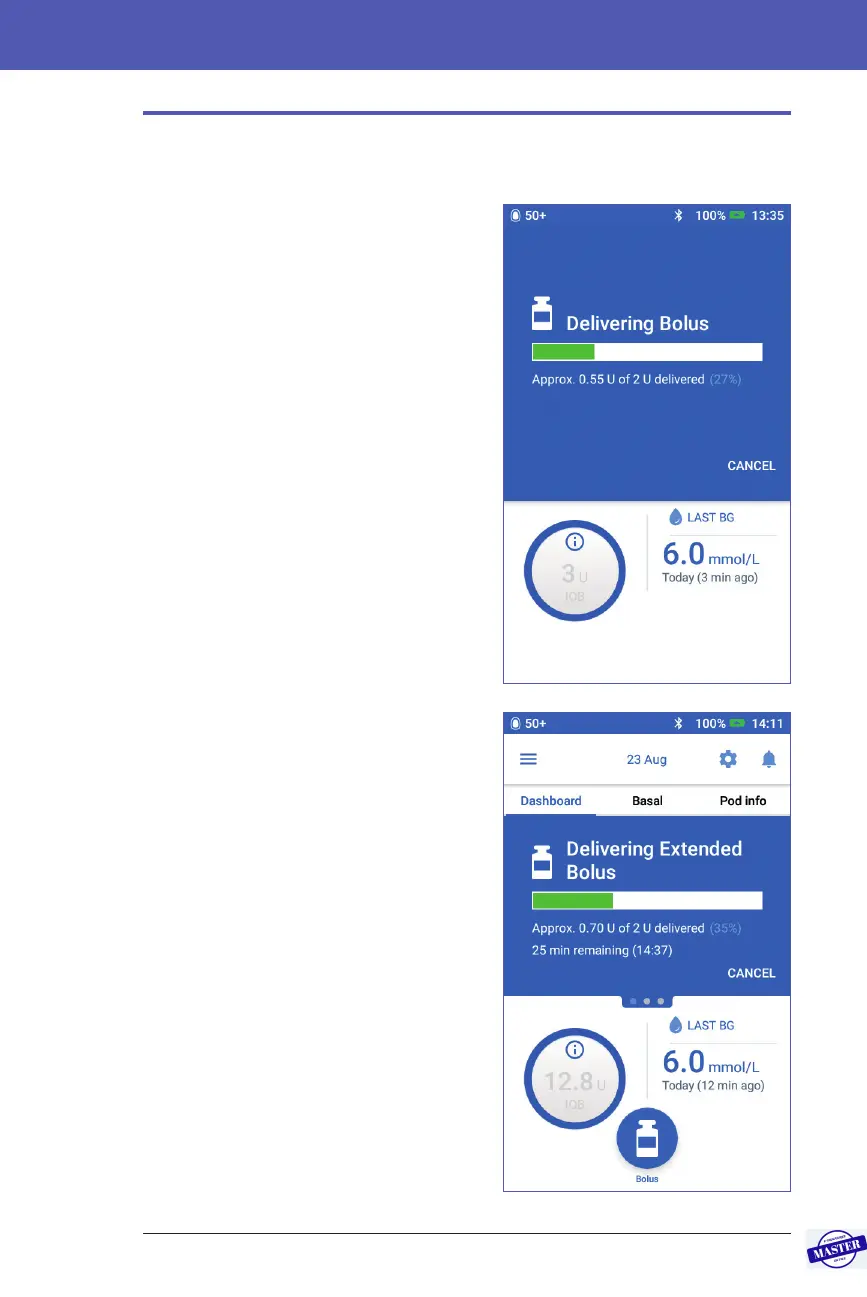
During a bolus, the Home screen displays a progress bar.
Immediate bolus progress
During an immediate bolus, the Home
screen displays a Delivering Bolus message
along with a progress bar and details.
If the Bolus Calculator is on, an estimate of
the IOB is displayed in the lower le of the
screen.
If the Bolus Calculator is o (not shown),
the amount of the last completed bolus is
displayed in the lower le of the screen.
You cannot use your PDM during an
immediate bolus.
To cancel or replace a bolus, see “Altering
a Bolus in Progress” on page 66.
Extended bolus progress
During an extended bolus, the Home
screen’s Dashboard tab displays a
Delivering Extended Bolus message along
with a progress bar and other details.
Note: If the Bolus Calculator is o,
theDashboard tab only appears when
anextended bolus is in progress.
If the Bolus Calculator is on, the displayed
IOB is updated with estimated amounts
from the ongoing bolus.
If the Bolus Calculator is o (not shown),
the amount of the last completed bolus is
displayed in the lower le of the screen.
You can use your PDM for most actions
during an extended bolus.
Unless you cancel the bolus, the Pod
nishes delivering a bolus whether or
not it is in range of the PDM. To cancel
or replace a bolus, see “Altering a Bolus in
Progress” in the next section.
Effective Date: 27SEP2019, ECO-000240



 To Next Page