Initial PDM Setup 2
26
2 Initial PDM Setup
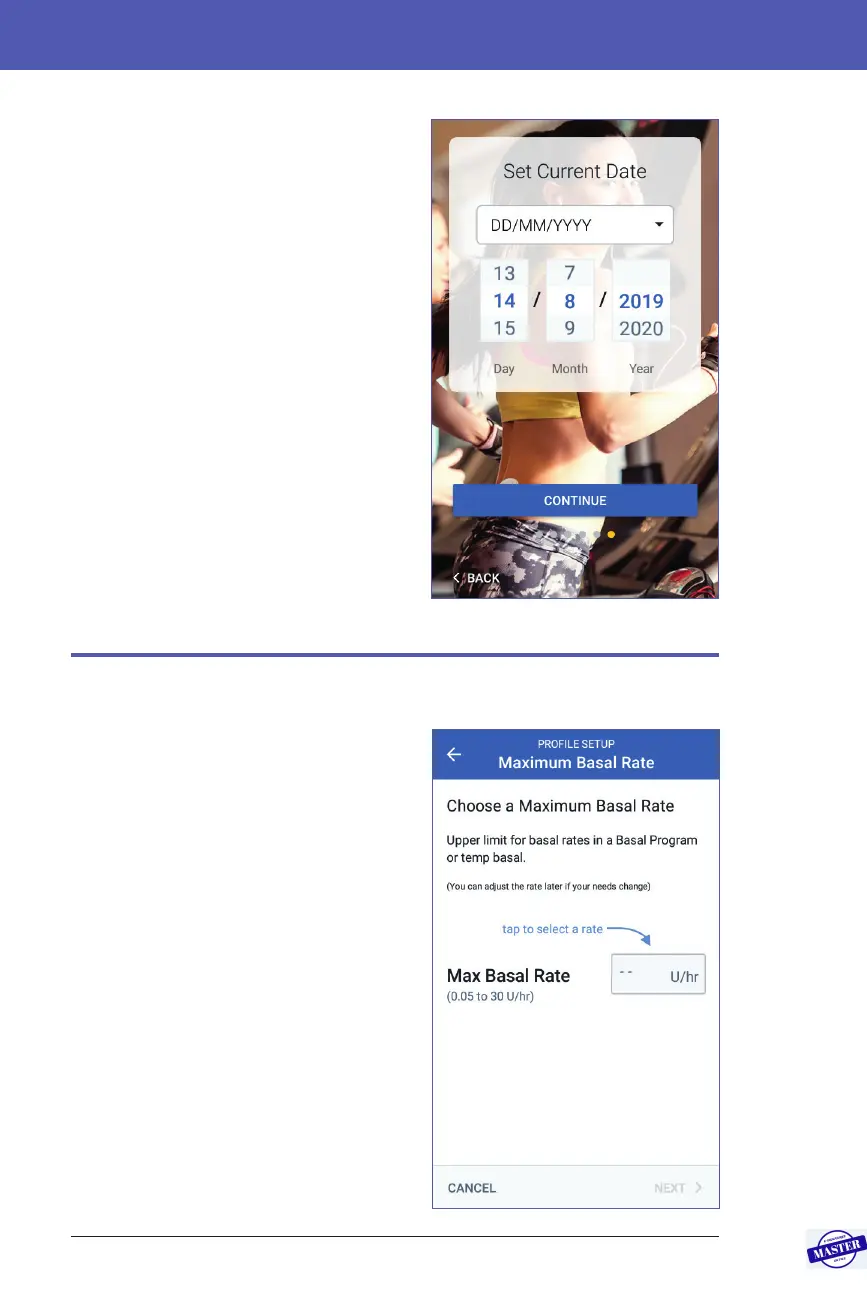
Set the date
On the Set Current Date screen:
1. Tap DD/MM/YYYY to display a list
of date formats. Tap the desired date
format.
2. Set the Day, Month and Year elds by
scrolling their respective wheels one
at a time.
3. Review the date and date format, then
tap CONTINUE.
4. On the Conrm Time & Date screen,
review the time zone, time and date. If
correct, tap CONTINUE.
Basal Insulin Settings
Maximum Basal Rate
e Maximum Basal Rate sets the upper
limit of any basal insulin rate that you can
use.
1. Tap SET UP PROFILE.
2. Review the description of basal
insulin, then tap the arrow (>).
3. Tap the Max Basal Rate eld.
4. Scroll to your desired Maximum Basal
Rate. When the correct number is in
the centre of the scroll wheel, tap the
number to select it.
Tip: Alternatively, tapping outside of
the scroll wheel selects the value in the
centre of the scroll wheel.
5. Tap NEXT.
Effective Date: 27SEP2019, ECO-000240



 To Next Page