Blood Glucose Readings 4
54
4 Blood Glucose Readings
How Blood Glucose Readings are Displayed
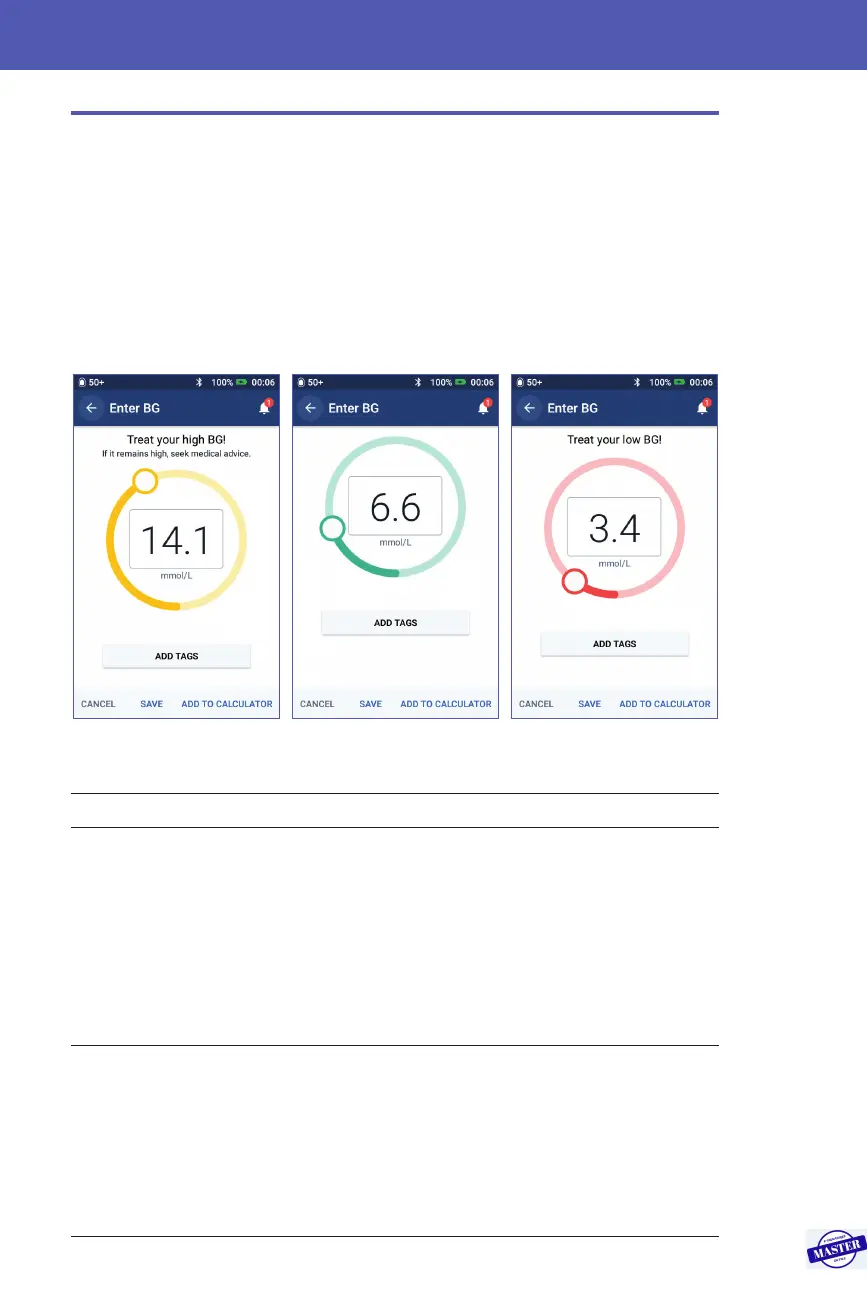
e PDM displays the blood glucose reading inside a coloured circle. e circle is:
• Yellow if your blood glucose is above your BG Goal Range.
• Green if your blood glucose is within your BG Goal Range.
• Red if your blood glucose is below your BG Goal Range.
To change your BG Goal Range, see “Blood Glucose Settings - BG Goal Range”
on page 104.
e PDM adds a warning message for high and low blood glucose readings.
Blood glucose reading Screen display Screen warning message
Above 33.3 mmol/L or HI HI Treat your high BG! If it remains
high, seek medical advice.
14.0-33.3 mmol/L <BG reading> Treat your high BG! If it remains
high, seek medical advice.
3.9-13.9 mmol/L <BG reading>
1.2-3.8 mmol/L <BG reading> Treat your low BG!
0-1.1 mmol/L or LO LO Treat your low BG!
If the blood glucose is HI or above 33.3 mmol/L, the PDM records “HI” in the
history. is indicates severe hyperglycaemia (high blood glucose). If the blood
glucose reading is LO or below 1.2 mmol/L, the PDM records “LO” in the history.
is indicates severe hypoglycaemia (low blood glucose). HI and LO readings are
saved in your blood glucose history, but are not used in averages.
Effective Date: 27SEP2019, ECO-000240



 To Next Page