47
Changing Your Pod 33 Changing Your Pod
Apply the Pod
Inspect and apply the Pod (screen step ):
1. Examine the Pod. Tap CANCEL and dispose of the Pod if the adhesive pad
is folded, torn or damaged, and begin again with a new Pod.
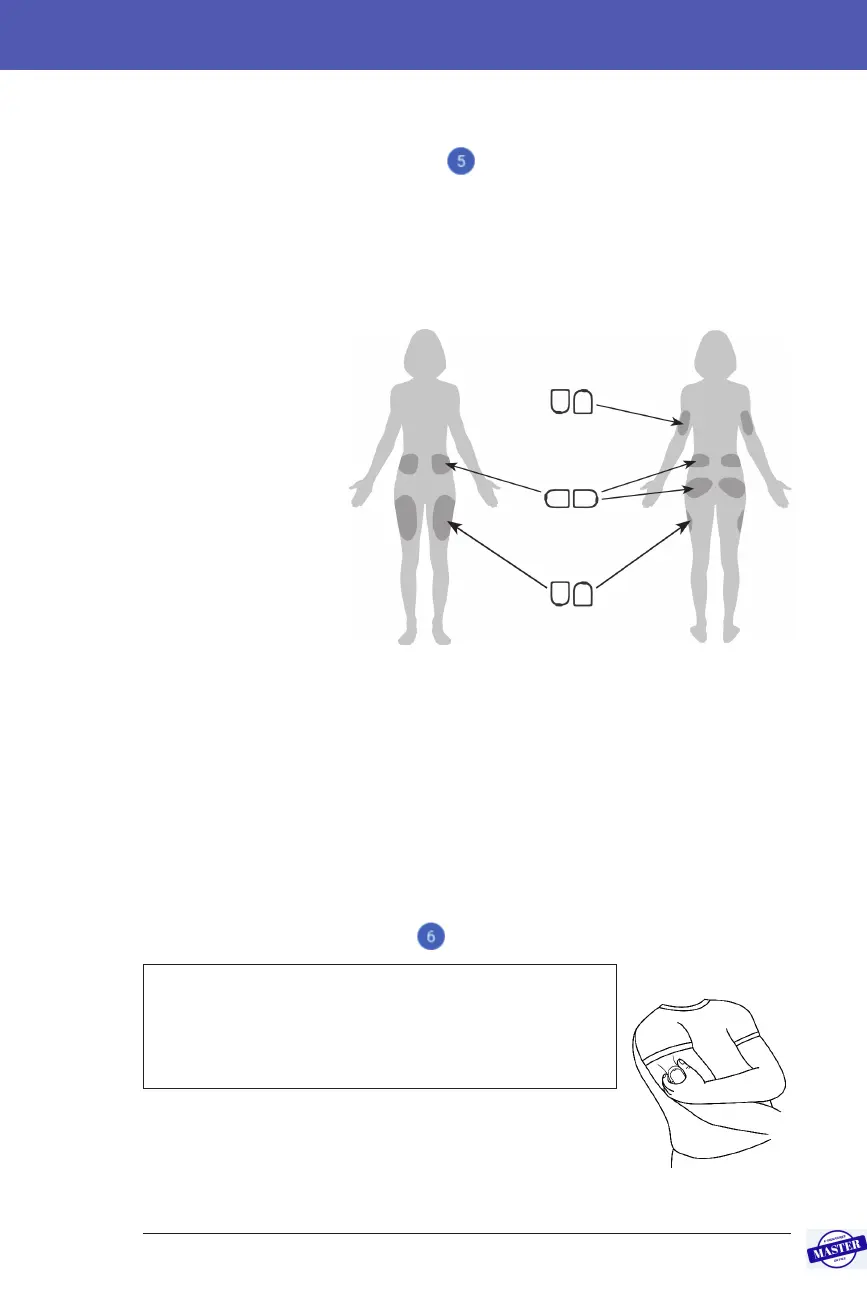
2. Orientate the Pod so it is:
• Horizontal or diagonal on your abdomen, hip, lower back or buttocks.
• Up and down
or at a slight
angle on your
upper arm or
thigh.
3. Apply the Pod
to the selected
infusion site,
pressing down
rmly to secure
the Pod to your
skin.
e adhesive is
designed for single
use. Once a Pod is
placed on your body, you cannot move that Pod to another infusion site.
Note: e Pod’s adhesive keeps it securely in place for up to three days.
However, if necessary, several products are available to enhance adhesion.
Ask your healthcare provider about these products. Avoid getting any lotion,
creams, sprays or oils near the infusion site as these products may loosen the
adhesive.
Begin insulin delivery
Begin insulin delivery (screen step ):
Warning: If you are applying a Pod in a place that does
not have a lot of fatty tissue, squeeze the skin around
the Pod throughout the next step. Occlusions may
result if you do not use this technique for lean areas.
1. If you applied the Pod to a lean area, squeeze the skin
around the Pod.
2. Tap START.
Back
Front
Up, down or slight angle
Horizontal or diagonal
Up, down or slight angle
Effective Date: 27SEP2019, ECO-000240



 To Next Page