31
Initial PDM Setup 22 Initial PDM Setup
Turn the Bolus Calculator on or o
1. Review the description of insulin boluses, then tap the arrow (>).
2. Toggle the Bolus Calculator setting on or o:
• Select the On position (blue and to the right) to have the Bolus
Calculator suggest boluses.
• Select the O position (grey and to the le) to turn o the Bolus
Calculator. You will have to calculate your own bolus amounts.
3. Tap NEXT.
4. If you turned the Bolus Calculator o, skip to “Other Bolus Settings” on
page 35.
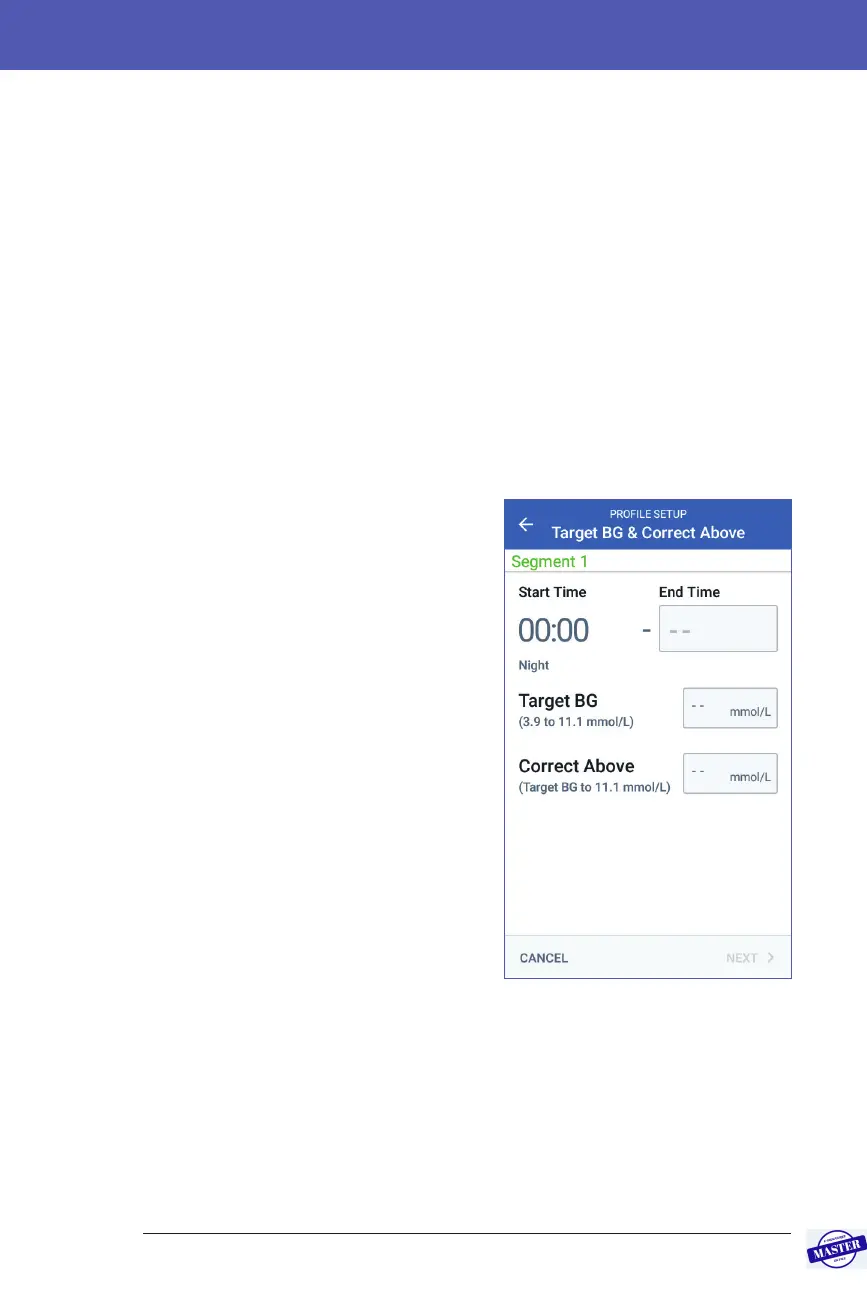
Target BG and Correct Above values
e Bolus Calculator aims to bring your
blood glucose to the Target BG value if
your current blood glucose level is above
the Correct Above value. You can establish
up to eight dierent blood glucose targets
for dierent times of day.
Dene the segments
Setting values for each segment follows the
same pattern that you used to create your
Basal Program:
1. Review the description of Target BG
and Correct Above, then tap NEXT.
2. Tap the End Time eld and enter an
end time for the segment.
3. Tap the Target BG eld and specify the
Target BG for that segment.
4. Tap the Correct Above eld and
specify the Correct Above value for
that segment.
5. Tap NEXT.
6. Repeat the above steps as needed until you have specied values for the
segment that ends at midnight.
Effective Date: 27SEP2019, ECO-000240



 To Next Page