Delivering a Bolus of Insulin 5
64
5 Delivering a Bolus of Insulin
3. To deliver the entire bolus immediately, tap CONFIRM. en skip to step 5.
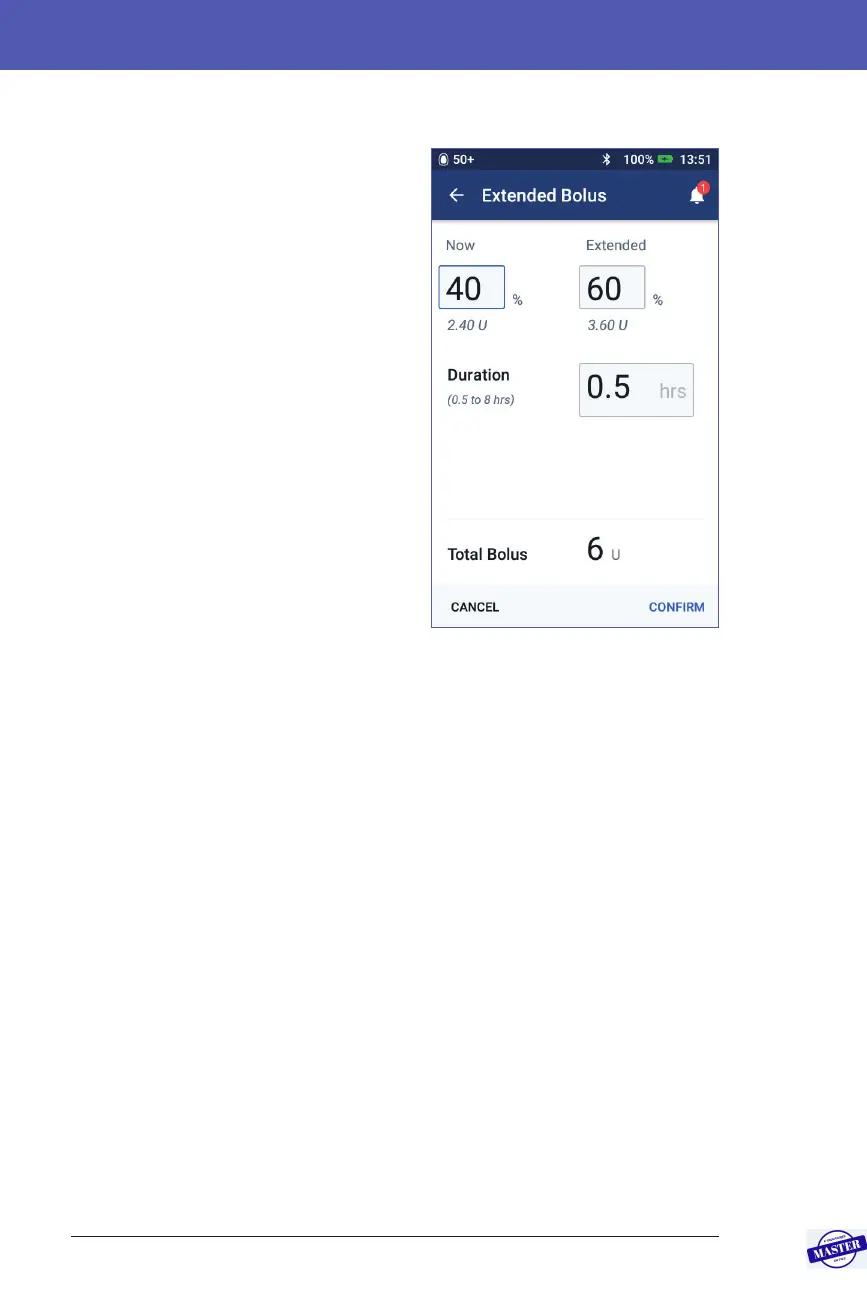
4. To extend the bolus:
a. Tap EXTEND BOLUS.
Note: e EXTEND BOLUS option
is only available if extended boluses
are enabled (see page 106).
b. Tap the Now eld and type in the
percentage of the bolus to be
delivered now. Alternatively, tap
the Extended eld and enter the
percentage to be extended.
e number of units to be
delivered now and over the
extended period appear below the
percentage (%).
Note: You can extend the entire
bolus.
c. Tap the Duration eld and enter
the duration for the extended
portion of the bolus.
d. Tap CONFIRM.
5. Review the bolus details on the Conrm Bolus screen.
6. Optional: Set up a reminder to check your blood glucose as follows:
a. Tap CREATE BG REMINDER.
b. Tap the Check BG in eld and enter the time for the reminder.
c. Tap SAVE.
Note: e CREATE BG REMINDER button appears only if the “Check BG
aer Bolus” reminder setting is turned on. To turn this setting on or o, see
“Check BG aer Bolus reminders” on page100.
7. Review the bolus details, then tap START to begin the bolus.
e bolus amount and details about the bolus preset, if a preset was used, are
stored in your history records. e Home screen tracks the delivery of an
immediate or extended bolus (see “Tracking the Progress of a Bolus” on page 65).
Effective Date: 27SEP2019, ECO-000240



 To Next Page