33
6.3 VR2 remote: Error codes and diagnostic codes
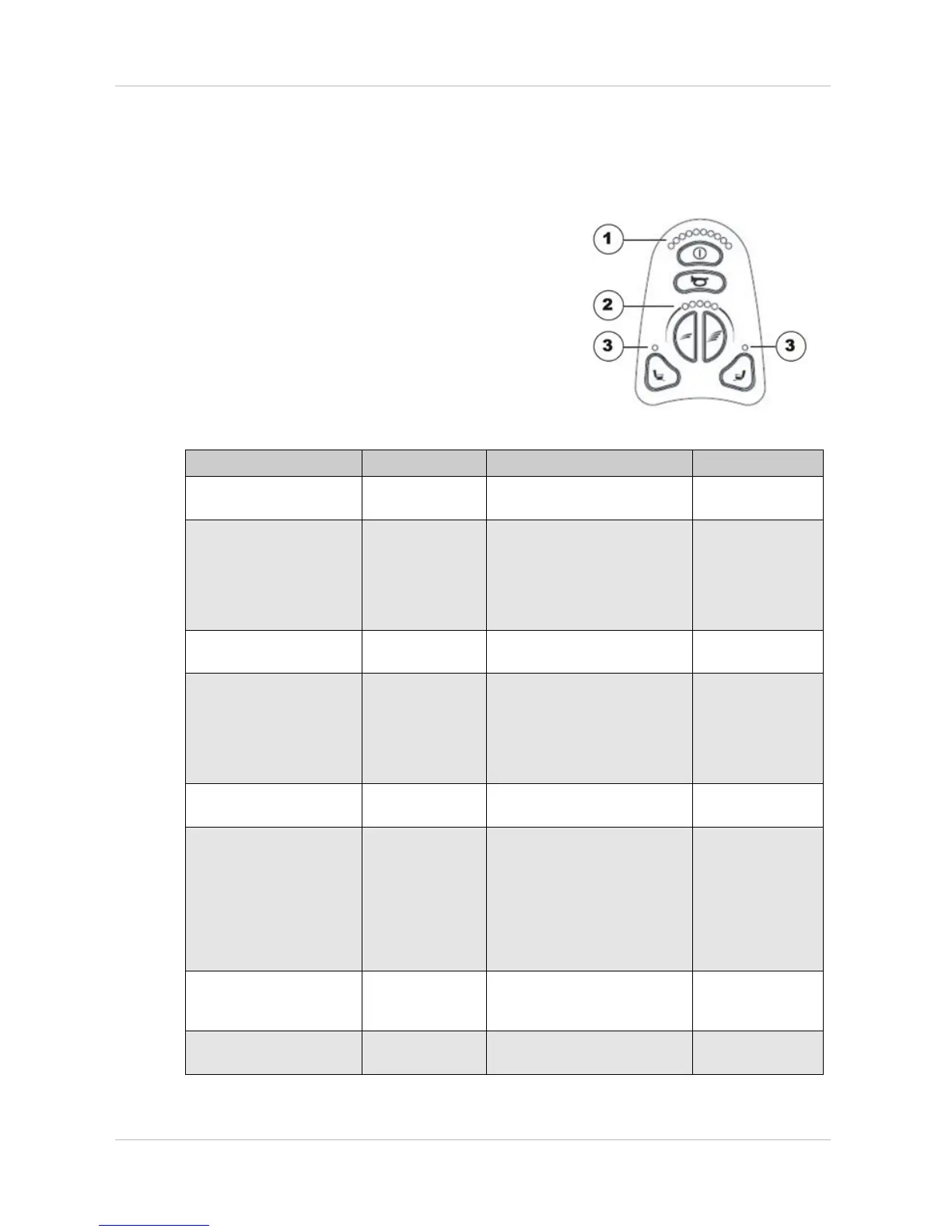
Evaluate the cause using the following blink codes. The following figure shows which LEDs are
located on the remote.
Error code Possible Cause Solution Documentation
1 LED battery display
Batteries
discharged
Charge battery
Check cable to batteries
See chapter 7.9.
2 LED battery display
Error at left-hand
motor
Connection
loose/defective
or motor
defective
Check connection plug, check
motor
See chapters 7.9
and 7.2
3 LED battery display
Short-circuit in
left-hand motor
Check connection plug, check
motor
See chapters 7.9
and 7.2
4 LED battery display
Error at right-
hand motor
Connection
loose/defective
or motor
defective
Check connection plug, check
motor
See chapters 7.9
and 7.2
5 LED battery display
Short-circuit in
right-hand motor
Check connection plug, check
motor
See chapters 7.9
and 7.2
6 LED battery display
The mobility
device has been
blocked by an
external signal,
for example
because the
charger is
connected.
Remove battery charger
7 LED battery display
Fault on drive
lever
Put the drive lever in a central
position before switching the
remote on.
8 LED battery display
Fault in the
electronics
Check cable See chapter 7.9.








 To Next Page