35
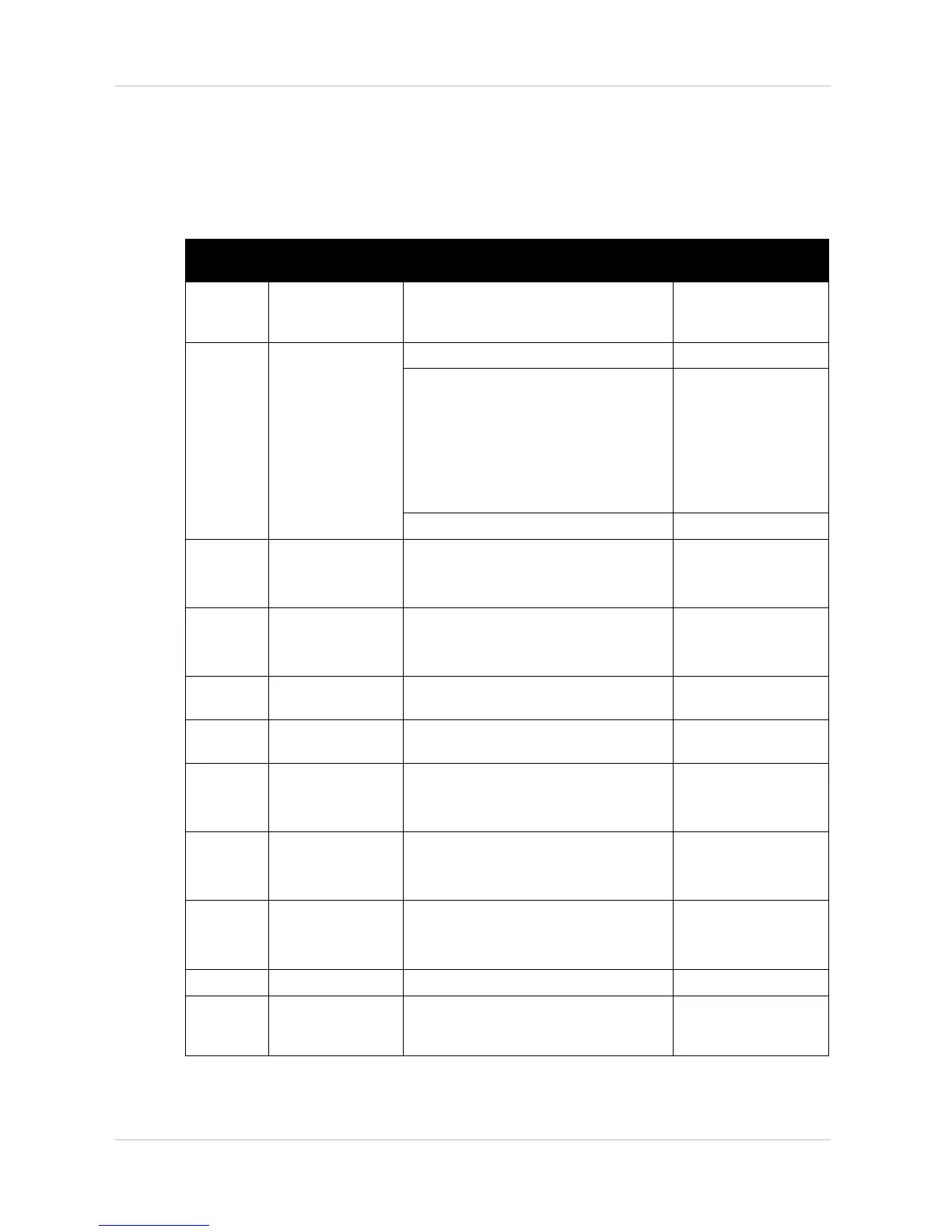
6.4 Shark II remote Error codes and diagnostic codes
The drive electronics can automatically rectify some faults. In this case the status display will stop
blinking. Switch the remote on and off again several times. Wait around 5 seconds each time
before switching the remote on again. If this does not rectify the fault, determine the cause using
the following link codes:
Blink
Code
Meaning Solution Documentation
1
Operating error Set drive lever to neutral central
position (just release drive lever) and
switch on again
2
Battery error Check battery and mains cable See chapter 7.9.
Charge batteries.
If you switch the mobility device off for a
few minutes, the batteries can often
charge themselves up enough to
enable a short journey. You should,
however, only use this solution in
emergency situations because it results
in excessive battery discharging.
See operating manual
Replace batteries See chapter 7.7.
3
Fault on left-hand
motor (M2)
Check motor cable and connecting
plug.
Check motor.
See chapters 7.7 and
7.2
4
Fault on right-hand
motor (M1)
Check motor cable and connecting
plug.
Check motor.
See chapters 7.7 and
7.2
5
Fault at left-hand
(M2) motor brake
Check cable and plug. See chapter 7.7.
6
Fault right-hand
(M1) motor brake
Check cable and plug. See chapter 7.7.
7
Error in Shark
remote
Check bus cable in remote and
connecting plug.
Replace remote.
See chapter 7.7.
8
Error in Shark
power module
Check all the cables and plugs in the
Shark system.
Replace electronics module
See chapters 7.7 and
7.2.9
9
Communication
error in Shark
system
Check all cables and connecting plugs
in the Shark system.
Replace remote.
See chapters 7.7 and
7.2.9
10
Unknown error Check all cables and connecting plugs. See chapter 7.7.
11
Incompatible
remote
The wrong remote has been connected.
Ensure that electronic module code and
the remote code match.
See chapter 7.2.9.








 To Next Page