EasyManua.ls Logo

Iridium 9555 - Receiving a Call with the Antenna Stowed

Iridium 9555
193 pages
Print Icon
To Next Page IconTo Next Page

To Previous Page IconTo Previous Page
Loading...
38 Iridium 9555 Satellite Phone User Manual
4: Getting Started
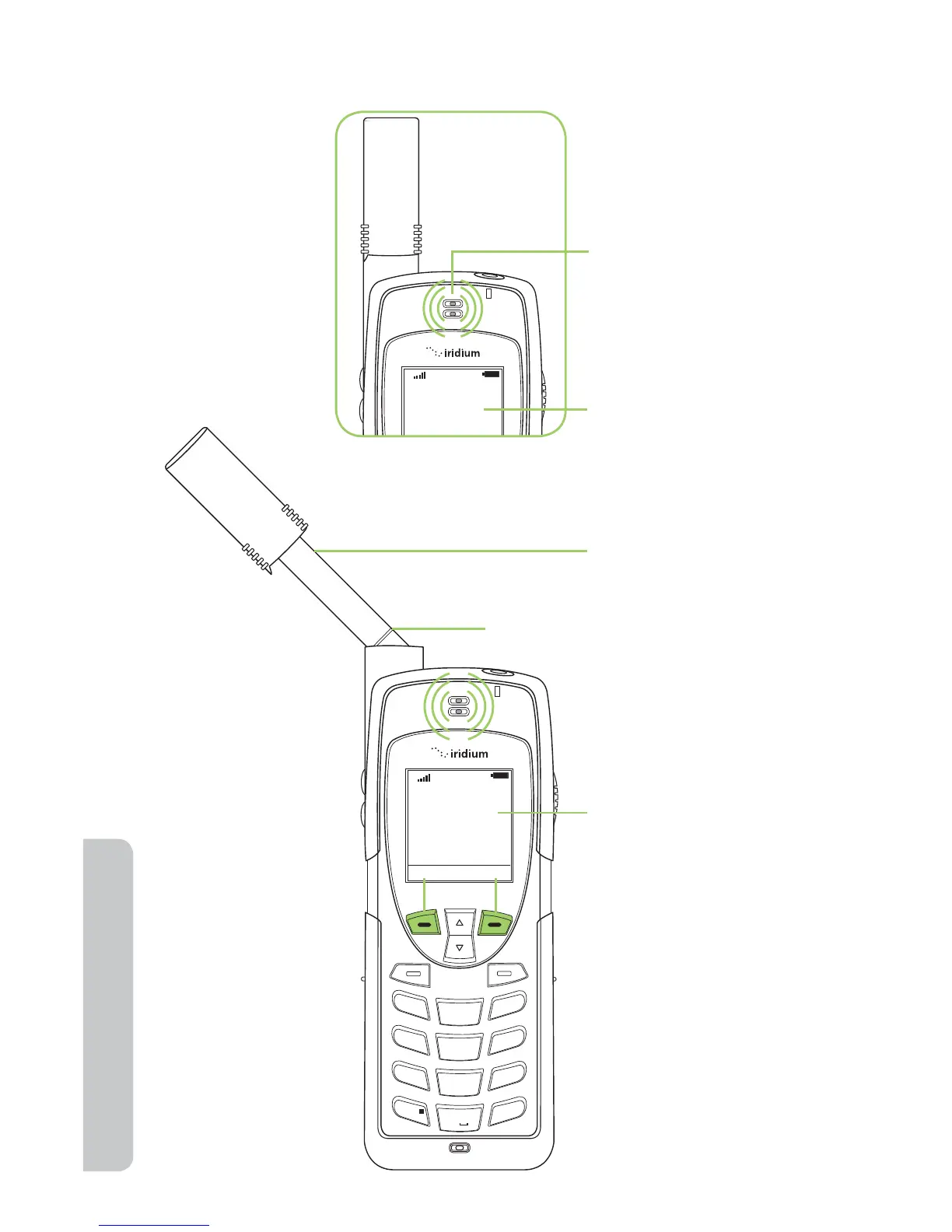
Receiving a Call with the Antenna Stowed
Call Attempt
T
2. The phone displays
Call Attempt.
1. The phone displays
the alert – or youre
prompted to extend
the antenna.
Incoming Call
Accept Reject
1
2
ABC
3
DEF
4
GHI
5 JKL
6
MNO
7
PQRS
8 TUV
9
WXYZ
0 +
#
*
«
T
3. Extend the antenna
directly up prior to
rotating left or right.
When the antenna
is fully extended
you see two lines
at the base of the
antenna.
4. After several
seconds, your
phone rings or
vibrates, and
displays Incoming
Call. Select
Accept, located
above the left soft
key, or Reject,
located above the
right soft key.
Antenna
lines

Table of Contents

Other manuals for Iridium 9555

Related product manuals