Chapter 2 OPERATION MODE
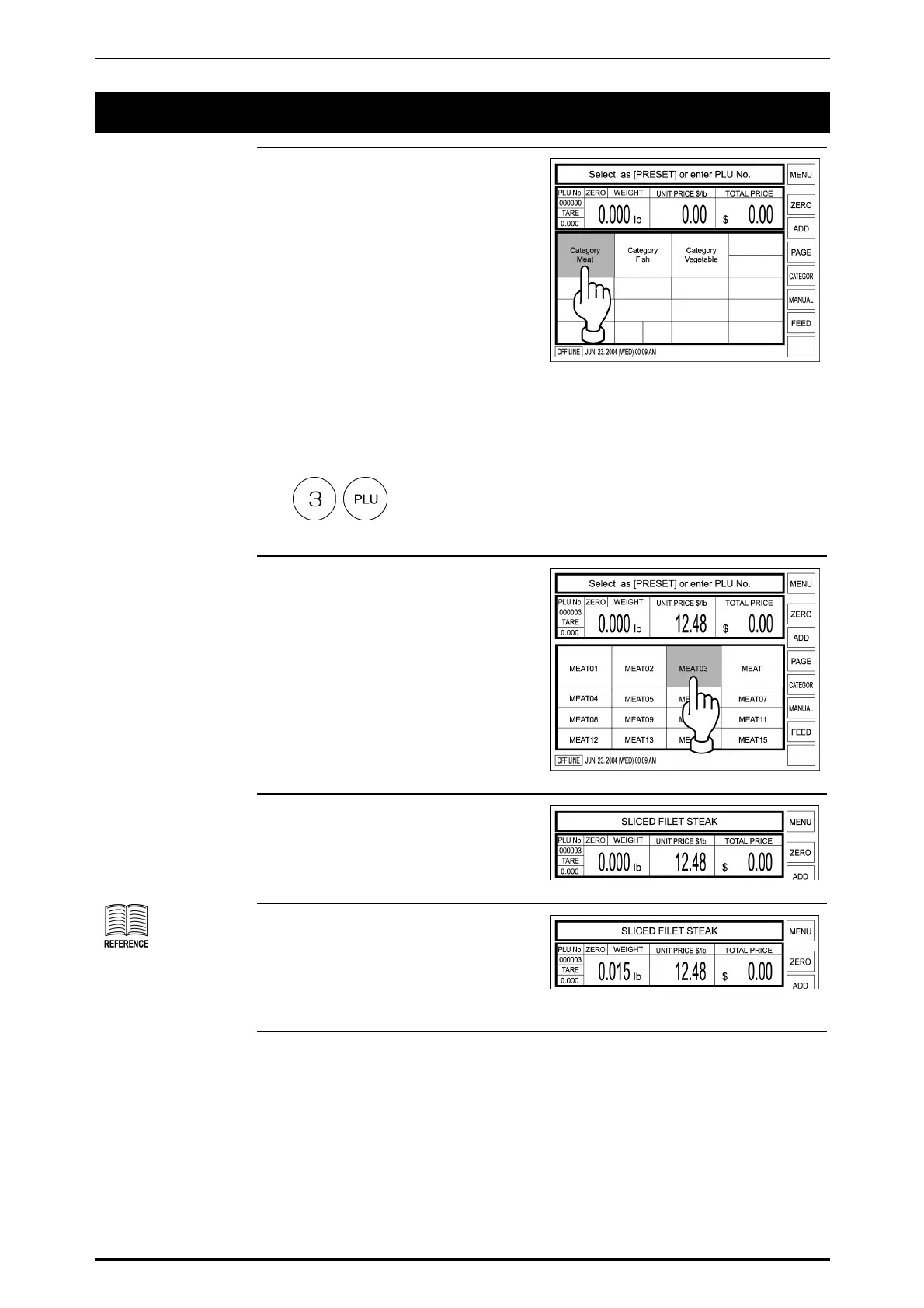
2.3 WEIGHING PRODUCT SALES
1. Confirm that the Initial screen is
displayed.
When the PLU is registered in the
preset key, touch the
corresponding product category
key.
Example: Category Meat
When the PLU is not registered in
the preset key, enter the desired
PLU number and press the PLU
key on the keypad.
Example: PLU number “3”
In this case, skip step 2 below.
2. When a category key has been
touched in step 1 above, the PLU
Select screen appears on the
display.
Then, touch a desired PLU key to
call.
Example: PLU “MEAT 03”
3. The PLU data appears on the
display.
See section 2.5 “Tare
Weight Subtraction” for
more detailed
procedure.
4. When a tare weight subtraction is
required, perform the tare weight
subtraction procedure.
SR-2000α User’s Manual (No. 0000A) 2-5



 To Next Page