Chapter 5 PROGRAMING MODE
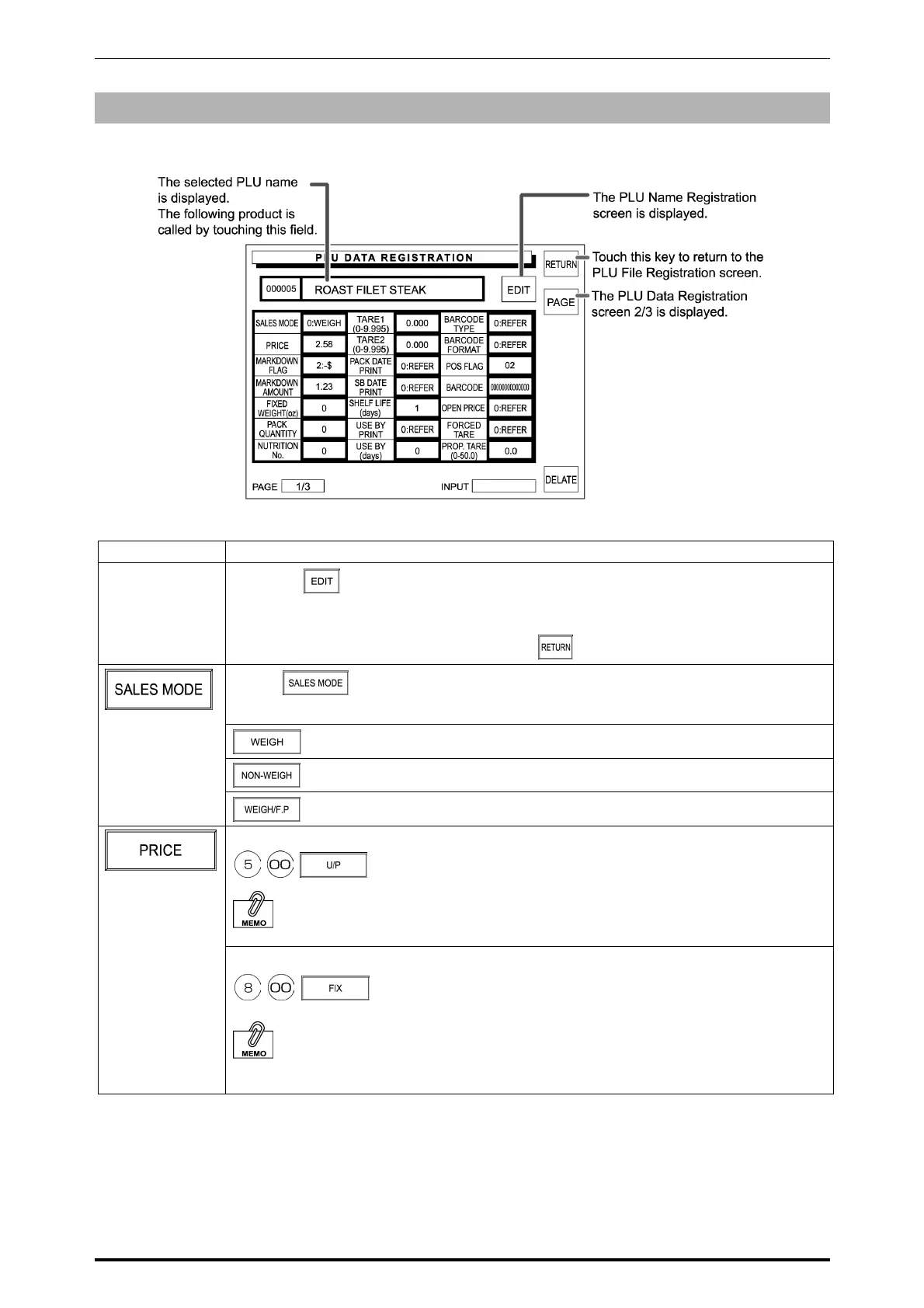
PLU Data Registration 1/3
Entry examples are shown below. Select necessary items to register.
Item Operation
PLU NAME
1. Touch
on the screen.
2. Enter desired characters and edit the text.
See Appendix “Text Editing” for further detailed edit operations.
3. When the text editing is complete, touch on the screen.
Touch on the screen to access to the selection screen.
Then, touch one of the following three buttons to select.
Weighing product
Fixed price product
Weighing product with a fixed price
Example: Unit price $ 5.00
When a unit price is entered, the Sales Mode becomes “Weigh” and “Fixed Price” becomes “0”.
Example: Fixed price $ 8.00
When a fixed price is entered, the Sales Mode becomes “Fixed Price” and “Unit Price” becomes
“0”.
5-4 SR-2000α User’s Manual (No. 0000A)



 To Next Page