Chapter 2 OPERATION MODE
2.7 TEMPORARY DATA CHANGE
This section explains about each function that can change the data temporarily.
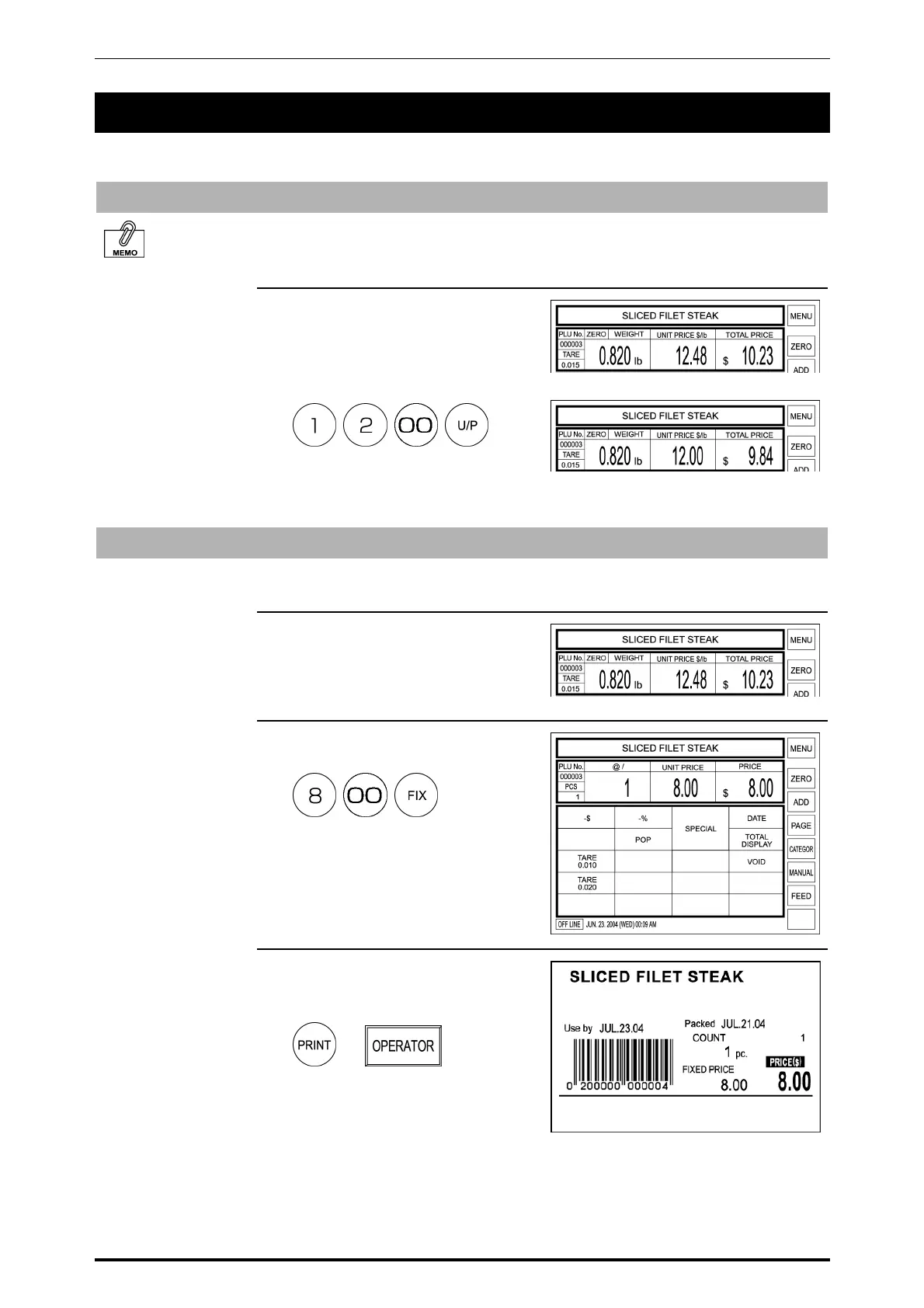
Unit Price Change
Unit price that is set to a PLU can be temporarily changed when a weighing
product is sold.
Example: Change the unit price from $12.48 to $12.00
Unit price change
cannot be performed
when the machine is
set not to allow open
price.
1. Enter a new price using the
keypad, and touch the U/P (Unit
Price) key on the keypad or touch
the Unit Price data field on the
screen.
T
Weighing Product Change to Fixed Price Product
Selling price of the displayed product can be temporarily sold with a fixed price.
Example: Change the unit price $12.48 to the fixed price $8.00.
1. Confirm that the weighing product
screen is displayed.
2. Enter the fixed price and press the
FIX key on the keypad.
3. Press the PRINT key on the
keypad or [OPERATOR] on the
screen to issue the label.
or
2-12 SR-2000α User’s Manual (No. 0000A)



 To Next Page