Chapter 2 OPERATION MODE
Advanced Labeling for Fixed Price Products
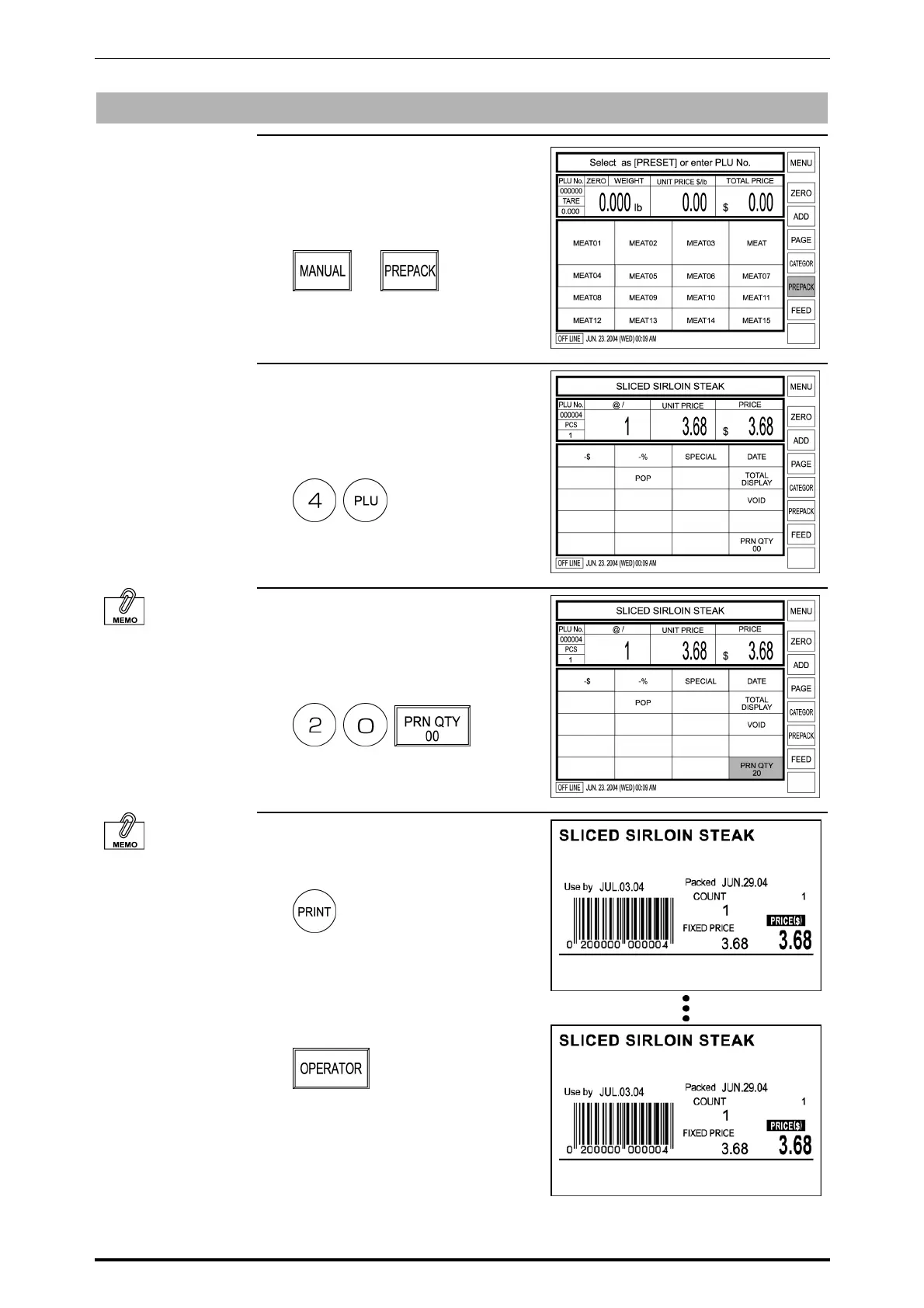
1. Confirm that [PREPACK] is
selected on the screen.
If not, touch [MANUAL] to change
to [PREPACK].
X
2. Enter the PLU number (Fixed price
product) and press the PLU key on
the keypad.
Example: PLU No. 4
To perform advanced
labeling, [PRN QTY]
key must have been
allocated on the
function key screen.
3. Enter the number of labels using
the keypad and touch [PRN QTY]
on the function key screen.
Example: 20 labels
When stopping the
label issue on the way,
press the CLEAR key
on the keypad.
4. Press the PRINT key on the
keypad to issue specified number
of labels.
When the operator system is used,
touch the [OPERATOR] preset key
on the screen to issue specified
number of labels.
2-20 SR-2000α User’s Manual (No. 0000A)



 To Next Page