USER MANUAL
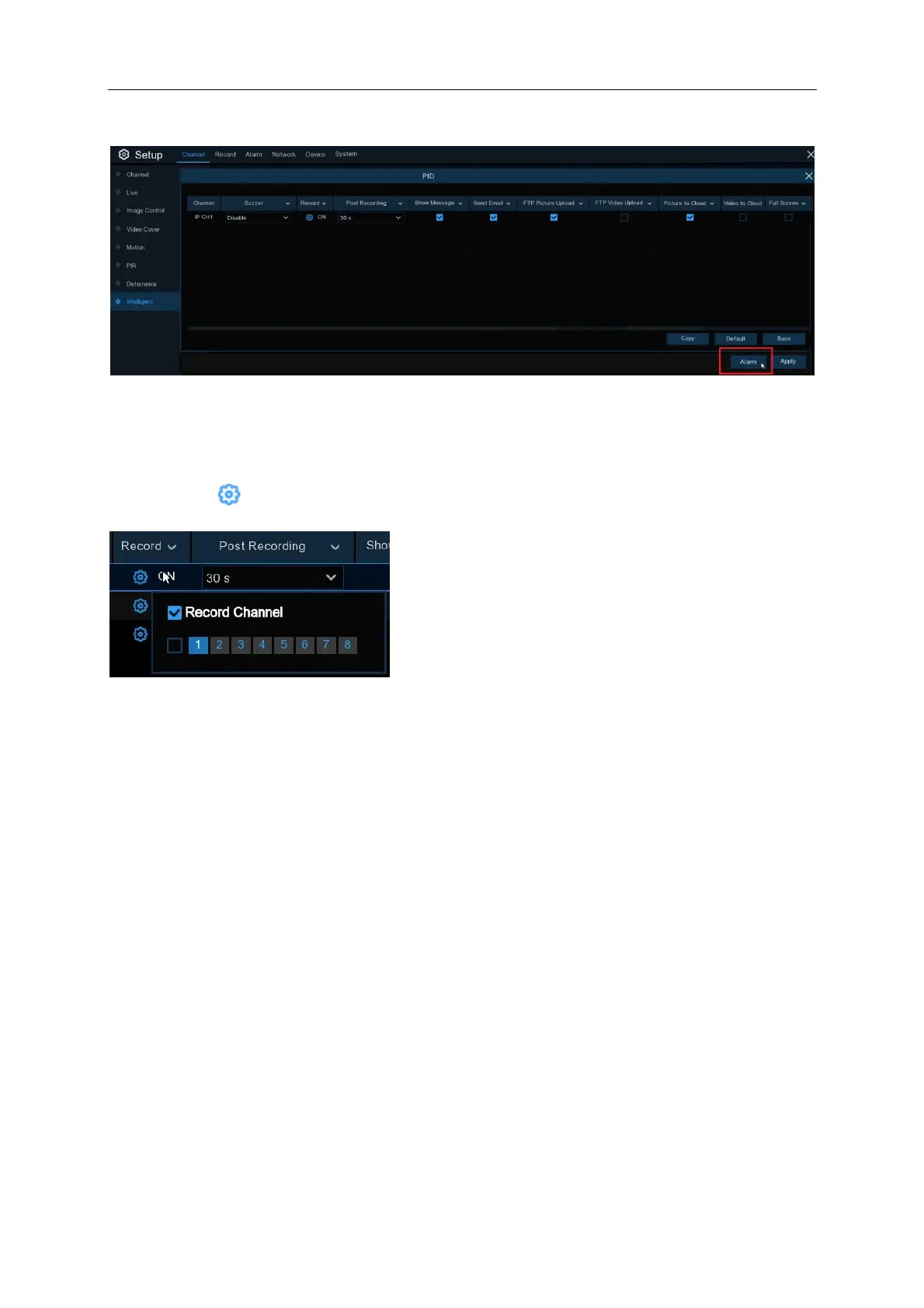
Click on the “Alarm” button on the bottom right hand of the screen for the menu (below) to appear
Alarm: Click on “Alarm” on the bottom right hand corner to access additional settings
Buzzer: Disable or to active the buzzer to emit an alarm tone in 10, 20, 40 or 60 seconds when the
detection is triggered
Record: Click icon and choose which channel(s) you want to record when the PID event is
triggered.
Post Recording: You can set how long after an event occurs that the NVR will continue to record.
Alarm Out: If your NVR supports to connect to external alarm device, you can set to emit an alarm
tone (NR532X* and NR564X* only).
Show Message: A letter “
S
” will be displayed on the live screen when a PID function is triggered.
Send Email: If an alarm is triggered, an Email will be sent to your preset email account.
FTP Picture Upload: Upload recorded pictures (snapshots) to an FTP Server.
FTP Video Upload: Upload recorded video to an FTP Server.
Picture to Cloud: Upload recorded pictures (snapshots) to Dropbox or Google Drive.
Video to Cloud: Upload recorded video to Dropbox or Google Drive. Maximum of 2 channels are
selectable at any time.
Full Screen: When the detection is triggered, the channel will be enlarged into full screen.



 To Next Page