27
12. Cleaning
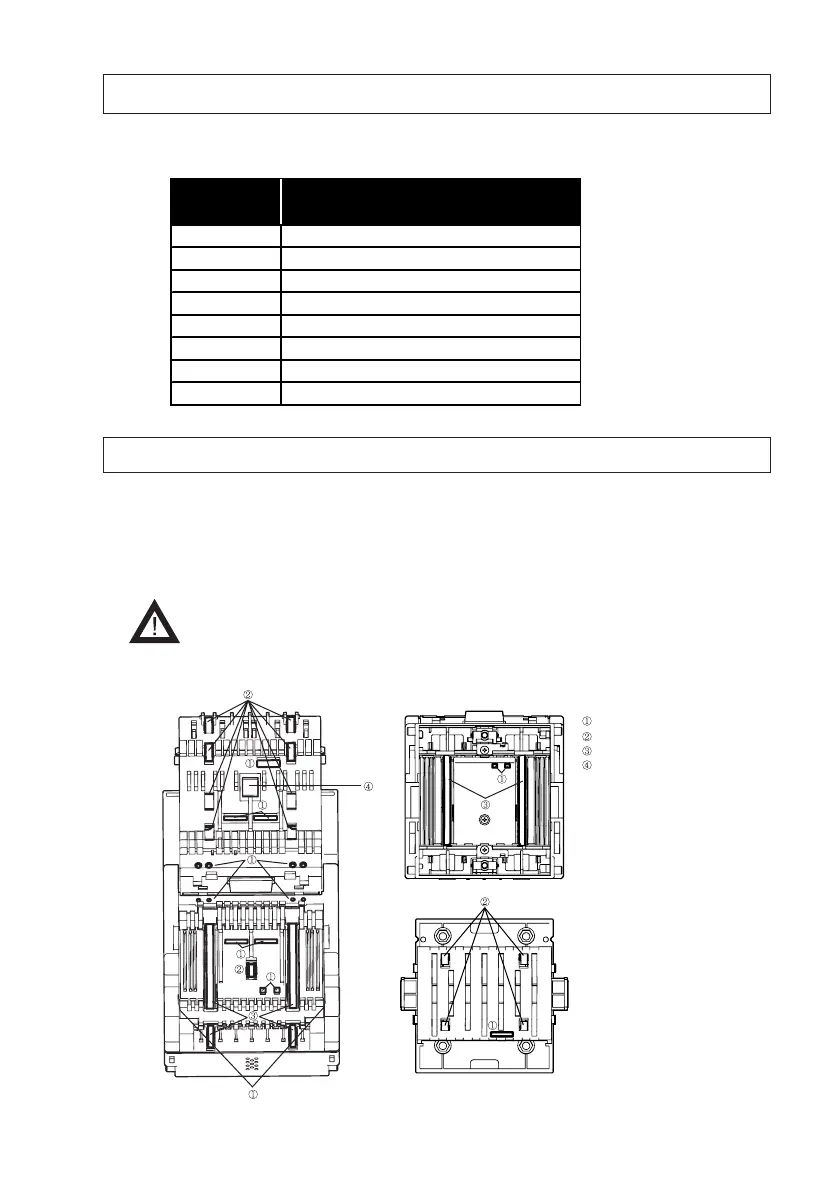
If paper or other type of dust or a foreign object adheres to the validation-related parts, the
acceptance rate may drop. Thus, it is recommended that validation-related parts be cleaned once a
month. Wipe any dirt off the sensors with lint-free cloth or cotton bud. Completely remove all
paper or the other type of dust, as well as any foreign objects, from the rollers.
- Do
NOT wipe the TAIKO unit with organic solvents such a thinner or
benzine.
Optical/Transparency Sensors
Pinch Rollers
Feed Rollers
MAG Sensor (PUB-11 Only)
With the upper lid open
With the lower lid open
Snesors/Rollers Location
11. Error Codes
The number of times the LED lamp flashes red indicates the type of error that has occurred in the
TAIKO unit. The LED lamp is located in the middle of the faceplate.
See=> “4. Names of Parts”
# of times
LED flashing
Description
Red 2 ROM error
Red 3 Banknote remains inside ejection slot
Red 4 Banknote remains inside transport path
Red 5 EEPROM read/write error
Red 6 Motor error
Red 8 Entrance solenoid sensor error
Red 9 Exit solenoid sensor error
Red 12 Fraud det ect ed



 To Next Page