ENGLISH
10
Introduction
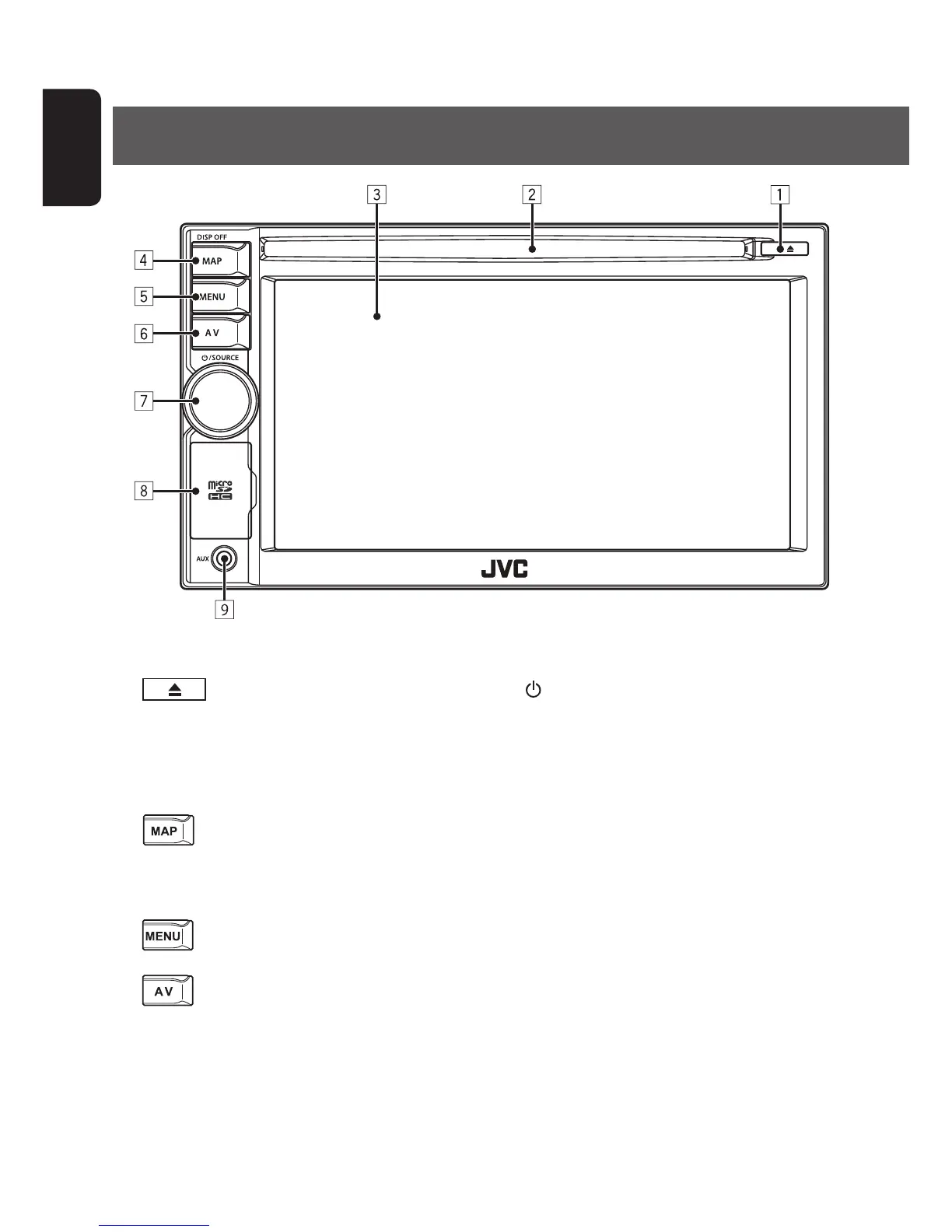
Parts identification
1 (Eject) button/Security indicator
Flashes when the unit is turned off if you have
enabled the security indicator. (☞ page 86)
2 Disc loading slot
3 Screen (touch panel)
4
/DISP OFF button
Displays the map for the current location.
(☞ page 14)
Turns off/on the screen.[Hold] (☞ page 11)
5
button
Displays the destination menu screen. (☞ page 14)
6 button
Displays the screen for the current source.
7
/SOURCE/Volume knob
• Adjusts the audio volume.
• Displays the source screen. (☞ page 15)
• Turns off the AV function.[Hold] (☞ page 43)
8 microSD card slot
9 AUX input terminal
EN_KW-NT510HDT_NT310[J].indb 10 11/8/2012 2:49:21 PM



 To Next Page