30
ENGLISH
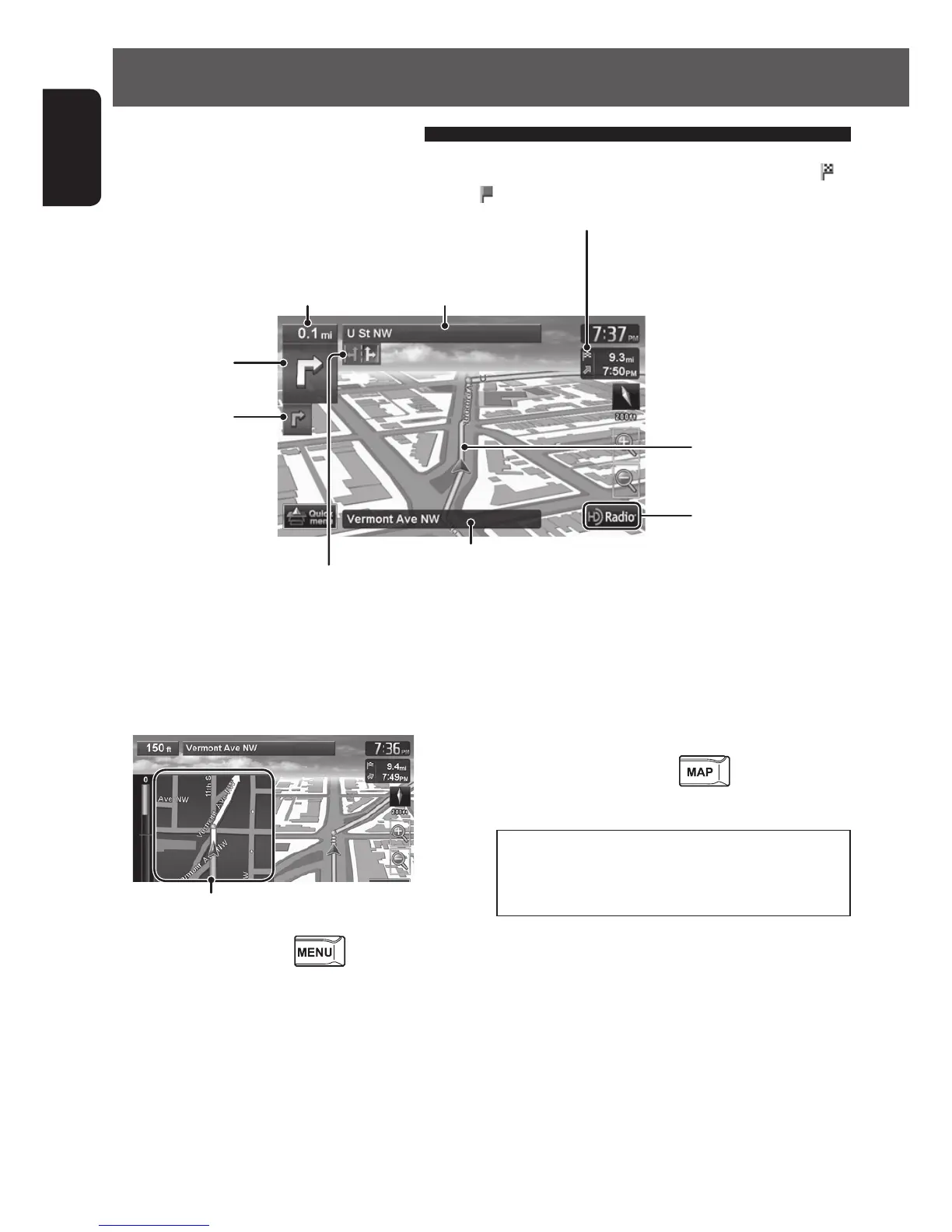
How you are guided
Distance to the next turn
Next street
Route to take
Guidance at turns
When you approach a turn, the System guides you with voice guidance and indications on the screen.
• Guidance voice comes out only through the front speakers (FRONT OUT of A/O cable).
Current street
Next turn to make
The second turn to
make (if any)
What if I miss a turn?
Don’t worry. The System calculates a new route
quickly.
Magnified map
• You can select whether or not to display the
magnified map through
- <Settings>
- <Navigation> - <Guide> - <Magnified View>.
(☞ page 40)
To hide the magnified map, touch the magnified
map. To show it again, press
.
• When you reach the area approximately within 90 ft (30 m) around the destination/via point, the Navigation
System considers you to have reached your destination/via point.
Shows AV control bar
About route guidance screen
Lanes to take
(Appears when coming within 1.2 mi (2 km) of it.)
Direction, distance, and estimated time of arrival (ETA) at the destination (
)
or a via point (
)
• Press to switch the information between the final destination and the
nearest via point.
EN_KW-NT510HDT_NT310[J].indb 30 11/8/2012 2:49:23 PM



 To Next Page