24
ENGLISH
Searching for a place
POI near a place/route
<Vicinity>
The System has a huge database of POIs (Point Of
Interest), such as restaurants, gas stations, hospitals,
etc.
You can search for a POI around the place where you are
now. While guided, you can also search for a POI near
the destination or via point
1
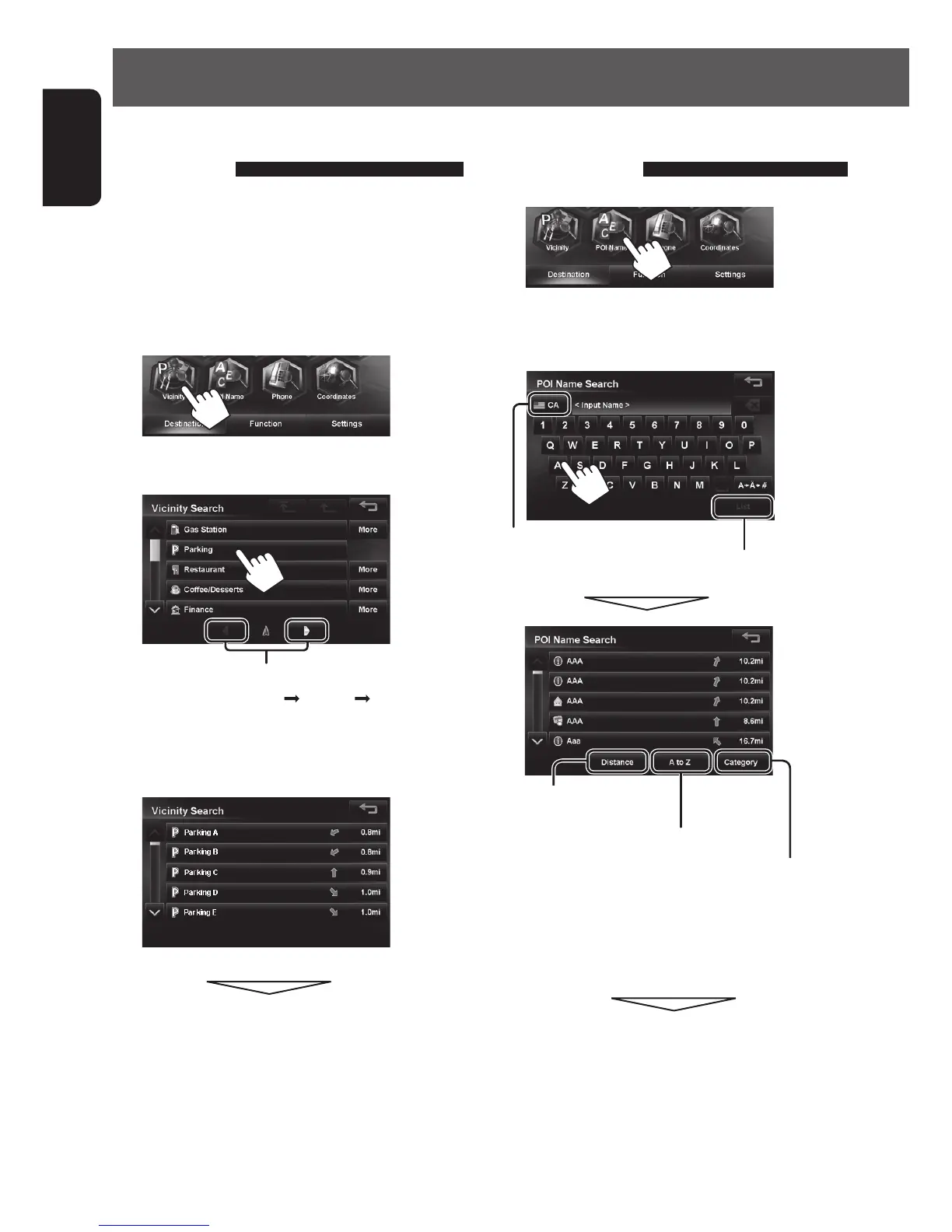
2 Select a category for the POI.
Switches locations for search
(Present location
via point destination)
• If you press [More], you can select sub-categories.
3 Select a POI from the list.
The search result is displayed.
• To start guidance, ☞ page 27.
From the list of POI
<POI Name>
1
2 Enter the POI name, then select from the list.
(☞ page 22)
Changes State or Province
Displays the list of matches
Displays POI based on their
distance
Displays POI in alphabetical order
Press to select a category of POI
The System displays up to 1000 POIs.
When you press [Category], [More] is displayed. By
pressing [More], you can select sub-categories.
The search result is displayed.
• To start guidance, ☞ page 27.
EN_KW-NT510HDT_NT310[J].indb 24 11/8/2012 2:49:22 PM



 To Next Page