17
ENGLISH
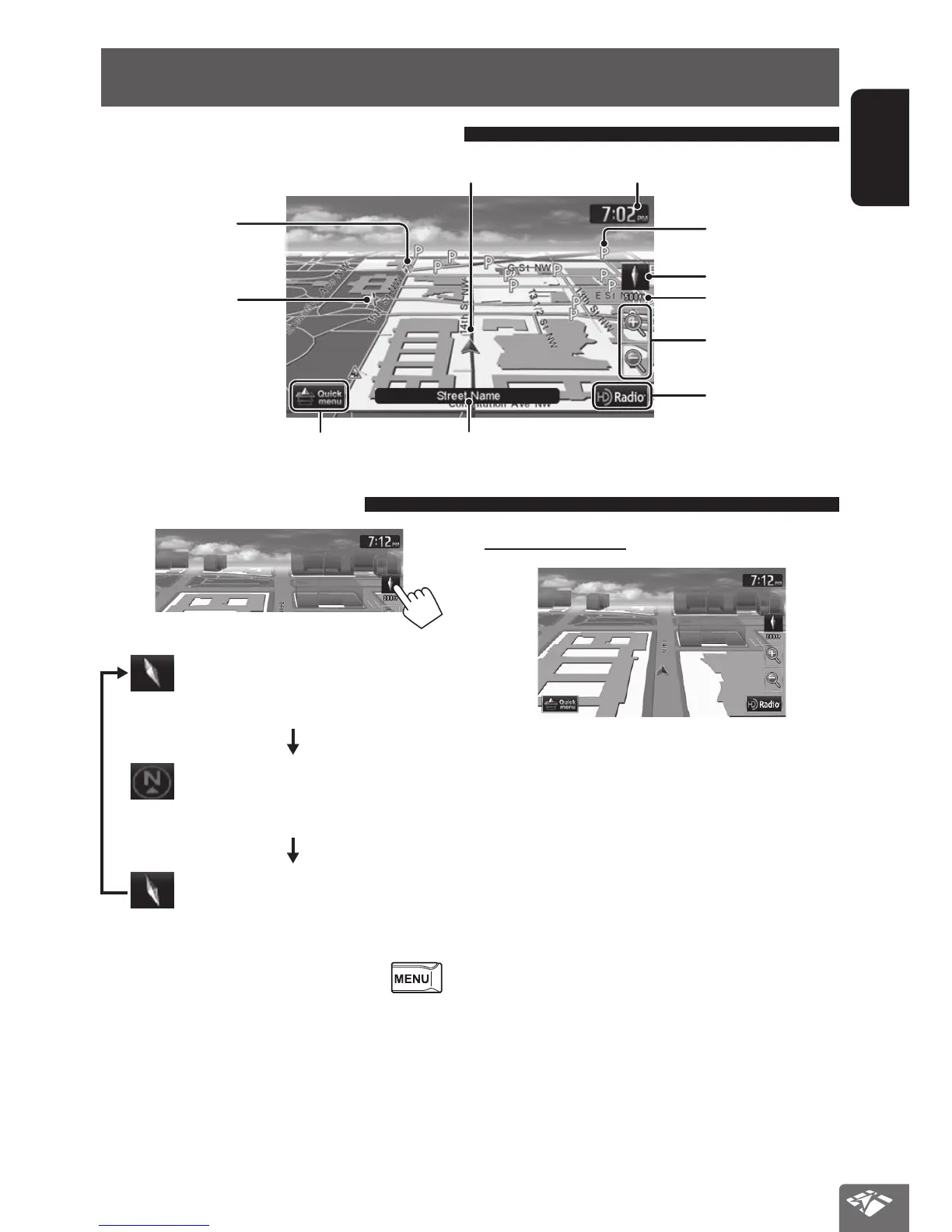
3D Map
The three dimensional map is displayed in
“heading up”.
2D North Up
The map view is oriented with north
“upwards”, as in usual paper maps.
2D Heading Up
The map rotates so that you are always
displayed heading “upwards”.
• You can also change the map view through
- <Settings> - <Navigation> - <Map> - <View
Mode>. (☞ page 39)
Basic operations
About the current position screen
Your position
Current street
Current time
Scale
Direction (☞ below)
Shows the quick menu (☞ page 13)
Favorite points
(☞ pages 20, 34)
Home
(☞ pages 20, 34)
Zoom buttons
(☞ page 18)
Shows the AV control
bar (☞ page 15)
About the 3D map
• When the scale is set between 80 ft (25 m) and 200
ft (65 m), the street map is displayed only when the
data is provided.
• When the 3D Map view is selected and the street
map is displayed, the map is shown in the three
dimensional virtual style depicting how the
surrounding buildings etc. look like.
To change the map view
POI (Point Of Interest)
(☞ “List of POI
icons”, page 42)
EN_KW-NT510HDT_NT310[J].indb 17 11/8/2012 2:49:22 PM



 To Next Page