32
ENGLISH
Arranging your route
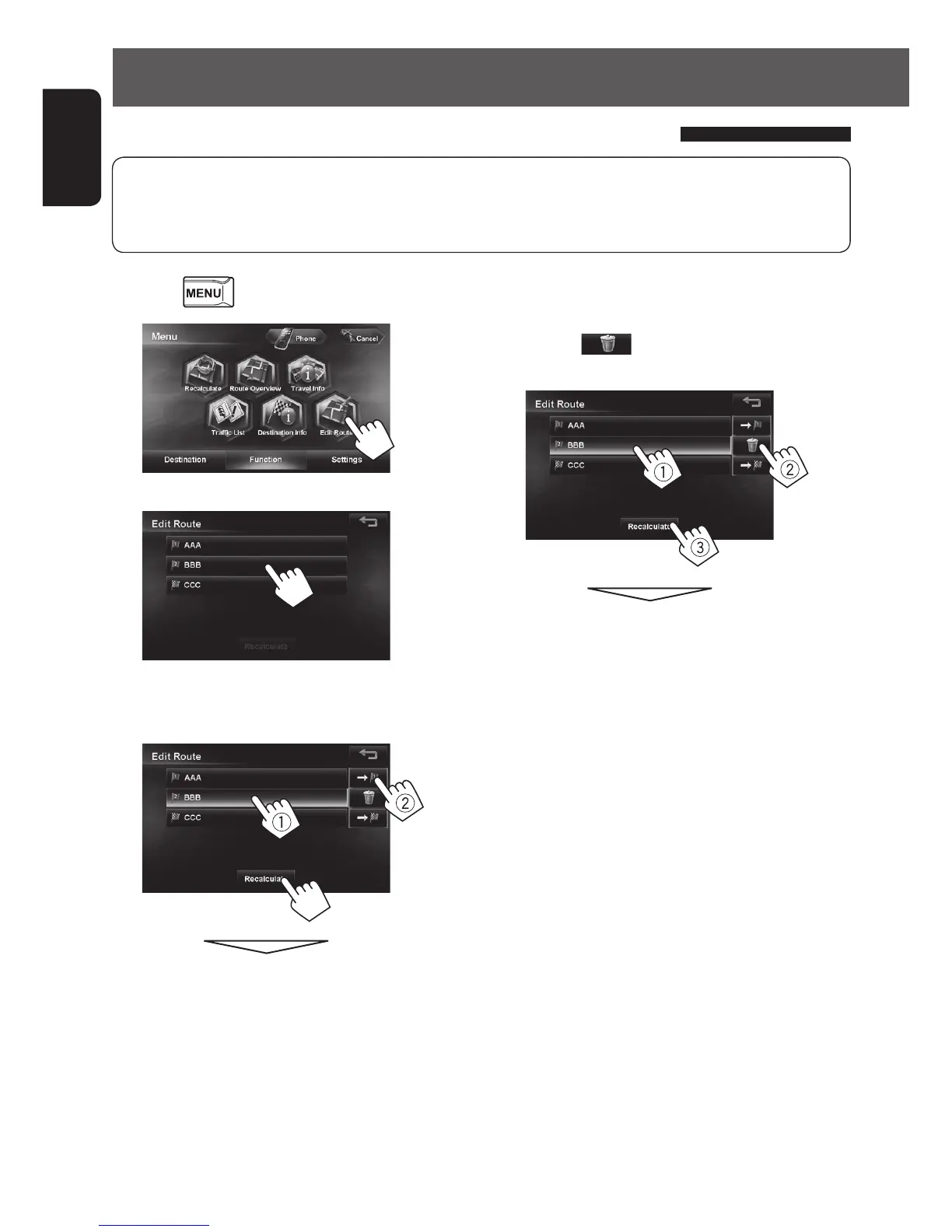
1 Press - <Function>.
2
3
4 Press the desired order of the selected point
(1, 2), then press [Recalculate] (3).
3
The System starts calculating the new route.
• To start guidance, ☞ page 27.
• Highways are always used to calculate the route if distance to a destination exceeds a certain distance.
• If the destination cannot be reached without using highways, ferries, or toll roads, they are used to calculate
the route without respect to the <Route> settings. (☞ page 28)
To delete a via point
In step 4 on the left, select the item to delete
(1), press [
] (2), then press [Recalculate]
(3).
The System starts calculating the new route.
• To start guidance, ☞ page 27.
Changing the sequence of the destination/via points
EN_KW-NT510HDT_NT310[J].indb 32 11/8/2012 2:49:24 PM



 To Next Page