61
ENGLISH
SD/USB operations
This unit can play the MP3/WMA/AAC/FLAC/MPEG4/MPEG4-AVC H.264/WMV files stored in microSD card/USB mass
storage class device.
• All tracks in the microSD card/USB device will be played repeatedly until you change the source.
• Make sure all important data has been backed up.
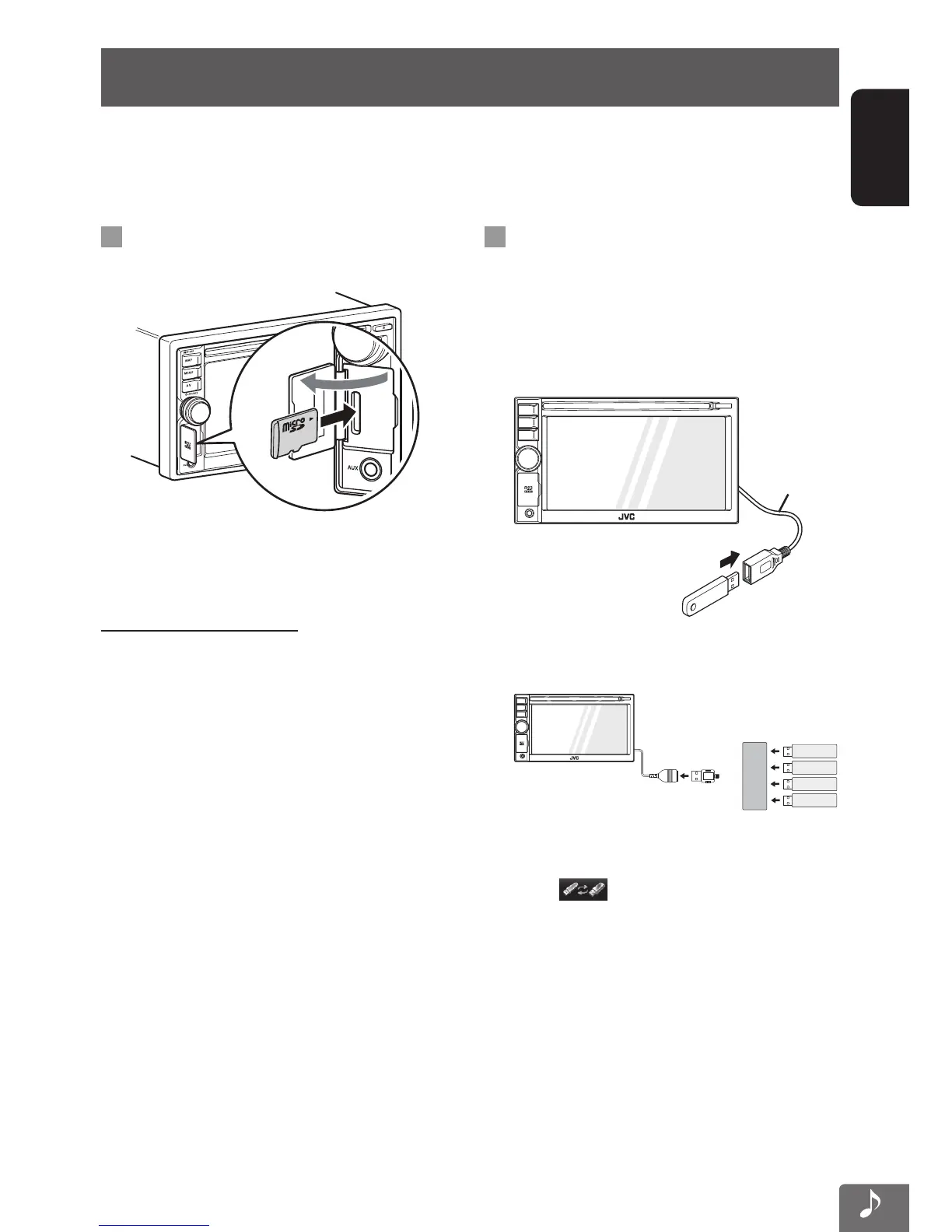
Playing back microSD card
1
Insert a microSD card.
Push in the microSD card until you hear a clicking
sound.
2 Select “SD” as the source.
To eject the microSD card
Push in the microSD card lightly.
Do not remove the microSD card during the playback.
Change the source from SD to other media, then remove
the microSD card.
Playing back USB device
You can connect a USB mass storage class device such as
a USB memory, Digital Audio Player, etc. to the unit.
• When connecting a USB device, refer also to its
instructions.
1 Connect the “USB” device.
USB cable
• Up to 4 USB devices can be connected to the USB
cable of this unit via a USB hub.
HUB
USB
USB
USB
USB
• When multiple USB devices are connected, you
can select the USB device to play by pressing
the [
] on the USB playback screen.
(☞ pages 63, 64)
2 Select “USB” as the source.
EN_KW-NT510HDT_NT310[J].indb 61 11/8/2012 2:49:28 PM



 To Next Page