104
ENGLISH
Using Bluetooth mobile phone
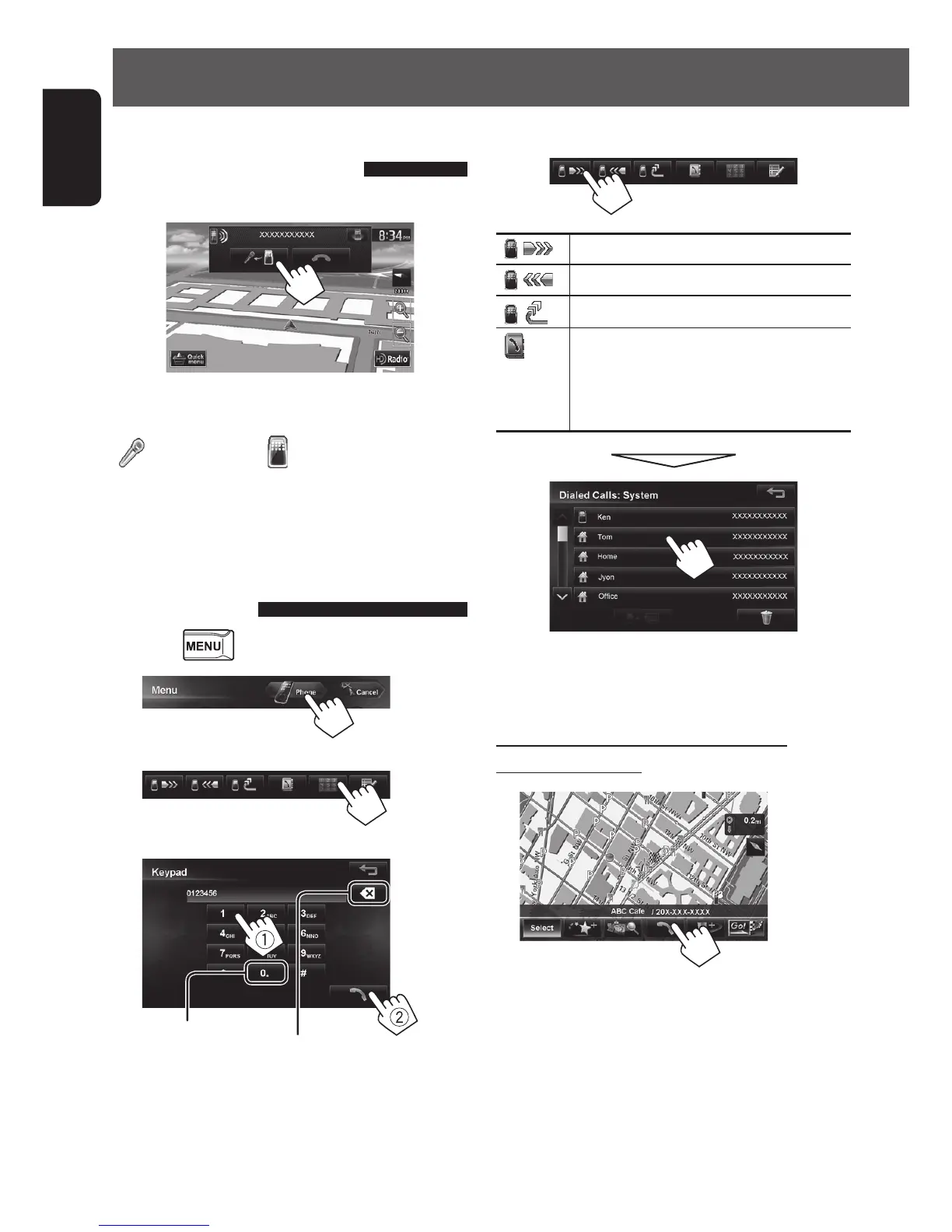
Switching between handsfree
mode and phone mode
While talking...
Each time you press the button, the talking method is
switched. The corresponding indicator is highlighted
(
: handsfree mode / : phone mode).
• The call may end automatically when switching to
the phone mode, depending on the type of mobile
phone.
Making a call
1 Press .
2
3
4
Press: Deletes last character
Hold: Deletes all characters
Hold: Adds “+”
• You can enter up to 30 numbers.
Using the phone book/call lists
[ ]
From dialed call list.
[
]
From received call list.
[ ]
From missed call list.
[
]
From phone book.
• For copying the phone book,
☞ page 105.
•
For searching for a number, ☞ page 105.
• If your mobile phone is compatible with Phone Book
Access Profile (PBAP), ☞ page 106.
Making a call while operating on the
navigation system
• You can display this screen from Destination Info.
(☞ page 31)
EN_KW-NT510HDT_NT310[J].indb 104 11/8/2012 2:49:34 PM



 To Next Page