52
ENGLISH
Listening to the radio (For KW-NT310)
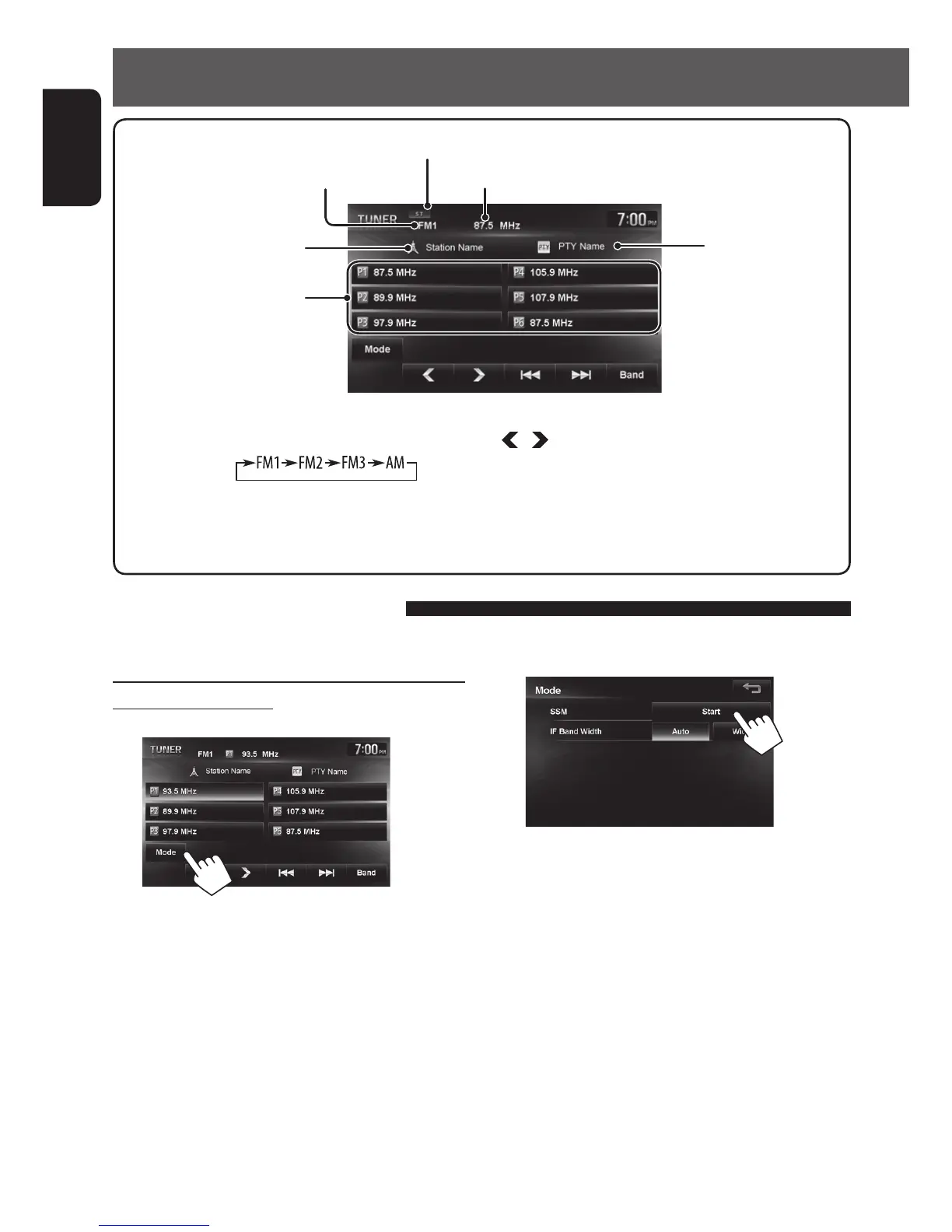
Station frequency currently tuned in
[Band] Selects the band.
[4] [¢] Searches for a station.
Press: Auto search
Hold: Manual search
[
] [ ] Selects a preset station.
[Mode] Appears only when FM is selected as
the source. (☞ page 52)
PTY code for the FM
RBDS
Buttons for selecting preset
stations/presetting stations.
The frequencies for the preset
stations are displayed (preset
names are displayed if station
names are registered).
Automatic presetting — SSM (Strong-station
Sequential Memory)
1
2
A confirmation message appears.
Local stations with the strongest signals are
searched and stored automatically.
To stop searching, press [4] or [¢].
• During SSM search, all stations including
conventional stations are searched and stored for the
selected band.
Storing stations in memory
You can preset six channels for each band.
Lights when receiving an FM stereo broadcast
The PS (station name) for
FM RBDS when PS signal is
coming in
Band
EN_KW-NT510HDT_NT310[J].indb 52 11/8/2012 2:49:27 PM



 To Next Page