96
ENGLISH
Setting the Sound
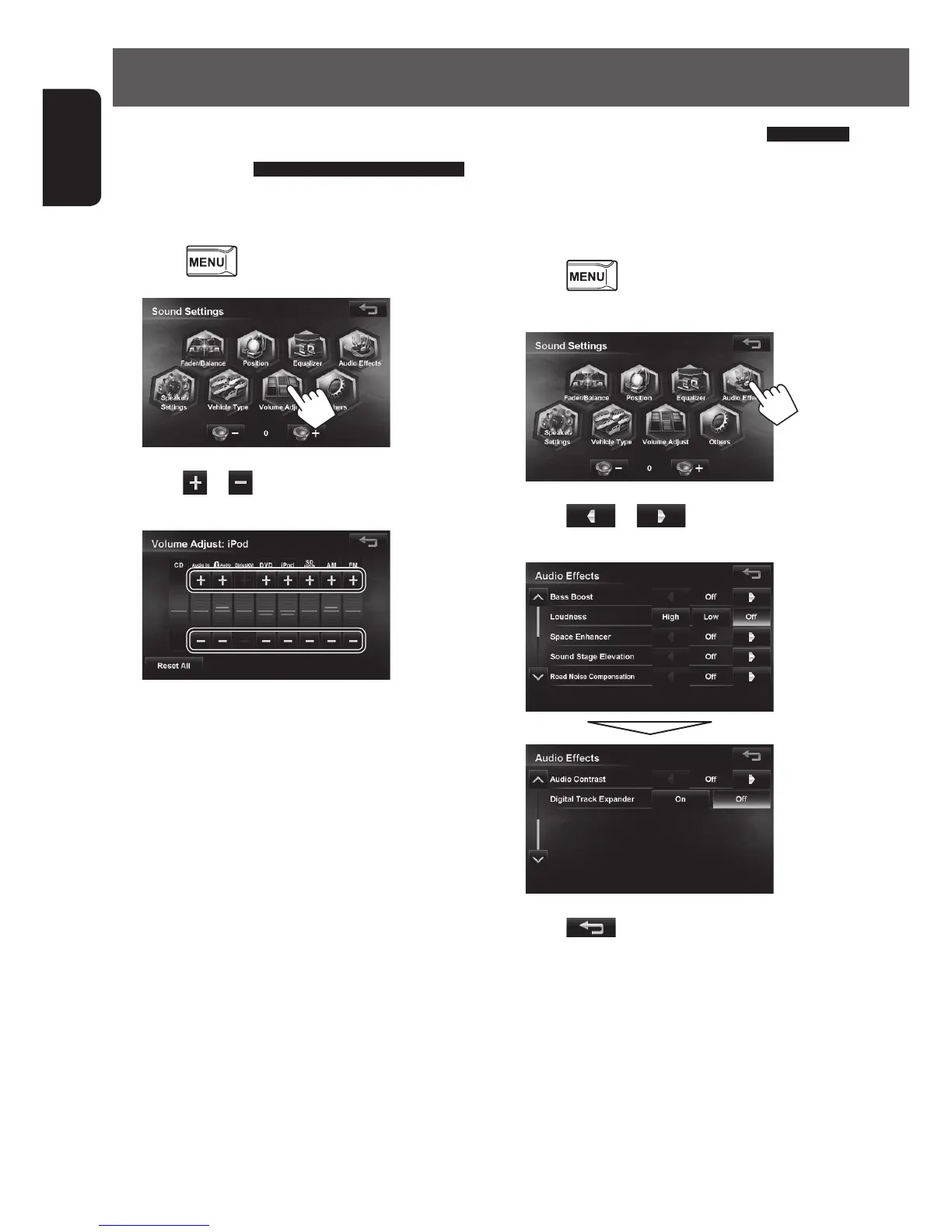
Setting the volume of each
source equal
Set the volume of each source equal against the volume
of CD (include music file DVD disc).
1 Press - <Settings> - <Sound>.
2
3 Press or of the present source and
adjust the volume.
• Touching [Reset All] displays a confirmation
message.
Touching [Yes] resets the level adjustments of
all source level to ±0.
• When setting the volume for AV-IN or Front AUX,
adjust the volume for Audio-IN on the screen.
• To make adjustments when listening to a
Pandora or iHeartRADIO source via your iPhone,
adjust “iPod”.
When listening to a Pandora source via your
Android device, adjust “BT-Audio”.
Setting the audio effects
You can set various audio effects here.
Set the audio effects when the AV source is selected.
They cannot be set when the AV source is turned off (on
standby).
1 Press - <Settings> - <Sound>.
2
3 Press or of each item and
adjust it.
4 Press .
The screen returns to the sound setting menu.
EN_KW-NT510HDT_NT310[J].indb 96 11/8/2012 2:49:33 PM



 To Next Page