66
ENGLISH
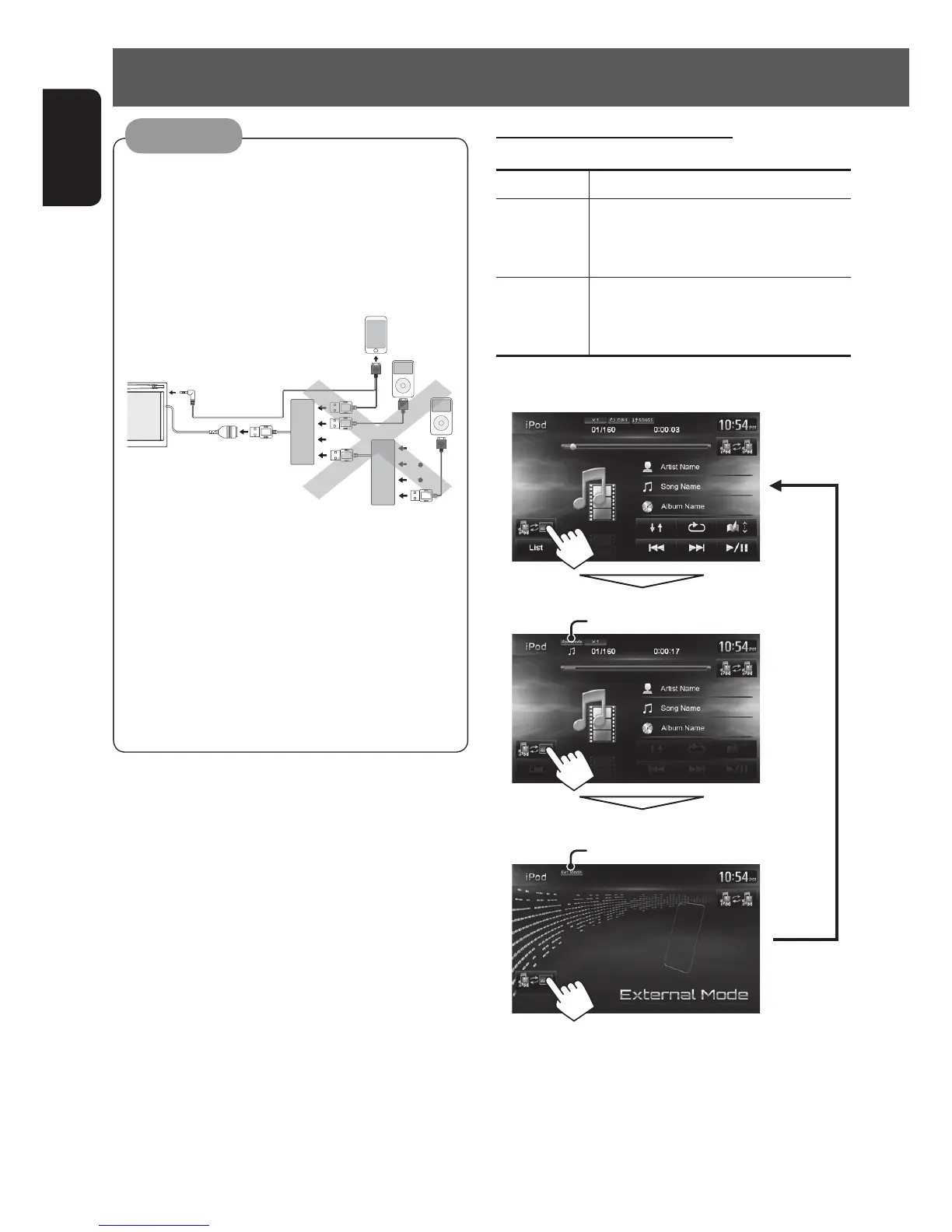
iPod/iPhone operations
• When you turn on this unit, the iPod/iPhone is
charged through the unit.
However, when connected via a USB hub, the
iPod/iPhone is not charged.
• Do not connect 2 or more USB hubs to the USB
cable of the unit.
HUB
HUB
iPod
iPod
• When connecting via a USB hub, connect the
USB hub to the USB cable first, then connect the
iPod/iPhone to the USB hub.
Do not connect the USB hub with iPod/iPhone
connected.
• You can connect USB devices and iPod/iPhone to
the same USB hub.
•
If you use a USB 2.0 cable (accessory of the iPod/
iPhone) or a USB hub, do not leave it inside the car.
Caution:
Setting the iPod control mode
iPod Control Mode
Head Mode Controls playback from this unit.
iPod Mode Controls audio/video playback from the
iPod/iPhone.
• Playback information is shown.
External
Mode
Allows any audio/video signals from
iPod/iPhone.
• No information is shown.
External Mode
Head Mode
iPod Mode
iPod mode indicator appears.
External mode indicator appears.
• When using iPod nano (1st Generation), only Head
mode is selectable.
EN_KW-NT510HDT_NT310[J].indb 66 11/8/2012 2:49:29 PM



 To Next Page