MP3/WAV/WMA/AAC
58
ENGLISH
Disc operations
[ ] [ ]
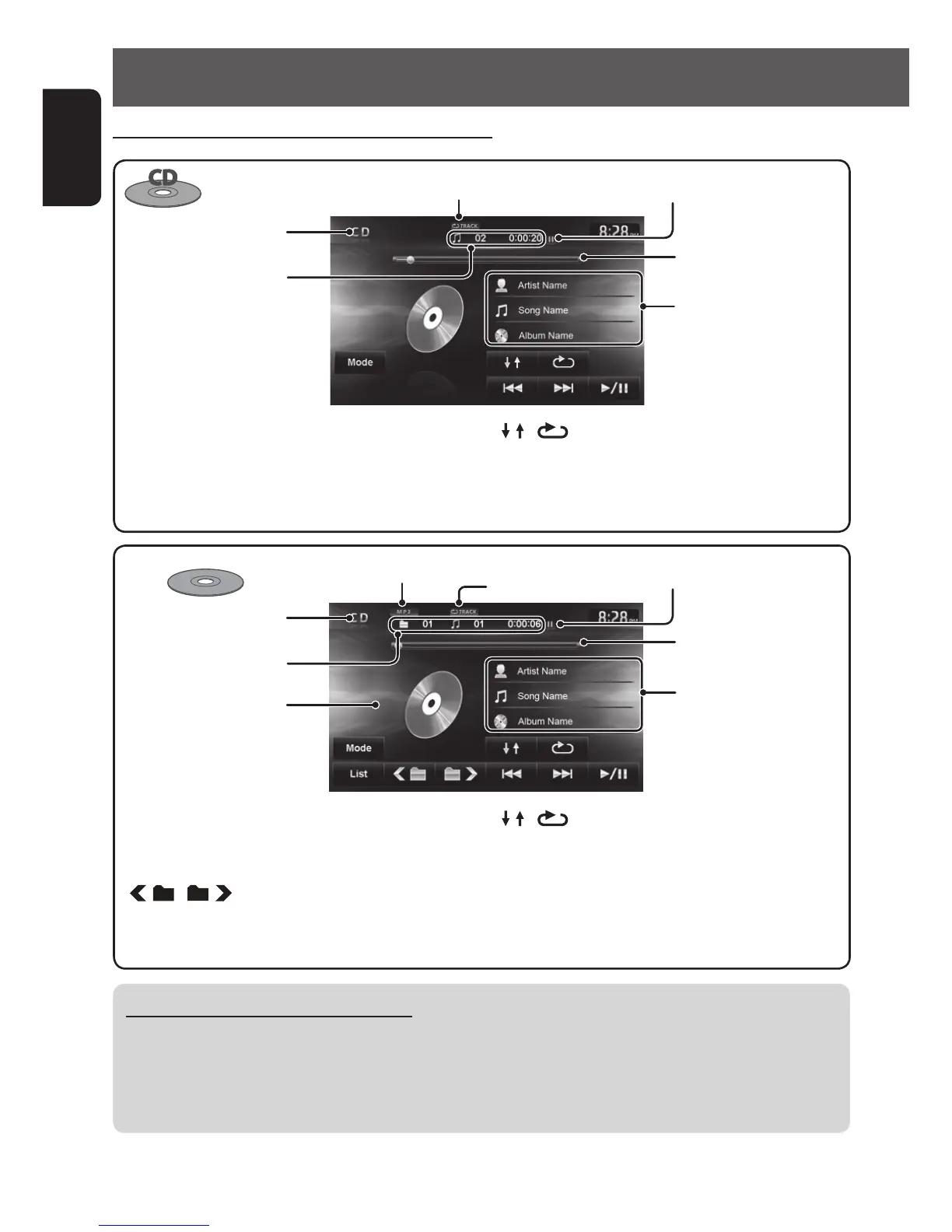
Selects playback modes.
(☞ page 59)
[Mode] Changes the settings for disc
playback. (☞ page 60)
[3 / 8] Starts playback/pauses.
[4] [¢] Press: Selects track.
Hold: Reverse/forward search.
Audio format
While playing, “Jacket
picture” is shown if the file
has the tag data including
“Jacket picture”. *
[3 / 8] Starts playback/pauses.
[4] [¢] Press: Selects track.
Hold: Reverse/forward search .
[
] [ ] Selects folder.
* “Jacket picture” is not shown on the AV control bar.
Folder no./Track no./
Playing time
Playback mode
Disc type
Tag data appears only
when it is recorded.
(Current folder name and
file name appear if not
recorded.)
[ ] [ ]
Selects playback modes.
(☞ page 59)
[Mode] Changes the settings for disc
playback. (☞ page 60)
[List] Displays Folder/Track Lists.
(☞ page 12)
Playing Recordable/Rewritable discs
• This unit can recognize a total of 5 000 files and 250 folders (a maximum of 999 files per folder).
• Use only “finalized” discs.
• This unit can play back multi-session discs; however, unclosed sessions will be skipped while playing.
• Some discs or files may not be played back due to their characteristics or recording conditions.
Listening to music Disc (CD/MP3/WAV/WMA/AAC)
Playback status (8: pause)
Seek bar
Track no./Playing time
Playback mode
Disc type
The track information
appears when it is recorded.
Playback status (8: pause)
Seek bar
EN_KW-NT510HDT_NT310[J].indb 58 11/8/2012 2:49:28 PM



 To Next Page