76
ENGLISH
Pandora® internet radio operations (For iPhone or Android device)
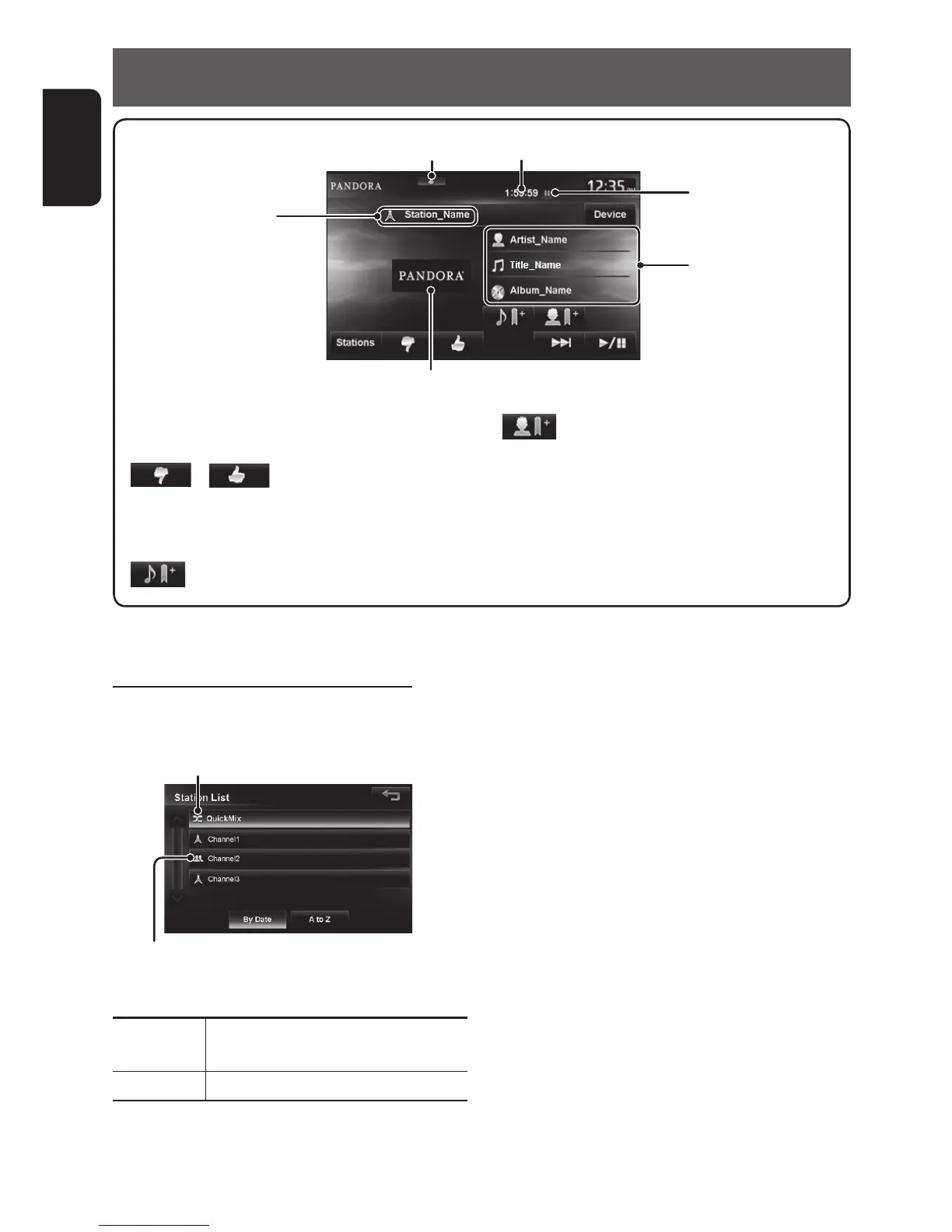
Thumb up/down indicator
[Stations] Displays the Station List.
(☞ below)
[
]/[ ]
Selects thumbs up/thumbs
down.
• If thumbs down is selected
current track is skipped.
[
]
Bookmarks the current track.
[
]
Bookmarks the artist.
[3 / 8] Starts/pauses playback.
[¢] Skips the current track.
• Not available when the Pandora
skip limit is reached.
[Device]
*
Displays the Bluetooth device
connection screen. (☞ page 102)
Playback status
(8: pause)
The picture data is displayed if available from the current content.
Track information
Playing time
Station name
Selecting station from the Station List
Appears when Quick Mix function is activated
(All tracks in the registered stations are played
randomly)
Appears when the station is shared
To sort the Station List
[By Date] Sorts the list in reverse chronological
order.
[A to Z] Sorts the list in alphabetical order.
* This is not displayed when using an iPhone.
EN_KW-NT510HDT_NT310[J].indb 76 11/8/2012 2:49:30 PM



 To Next Page