ESP32 Starter Kit
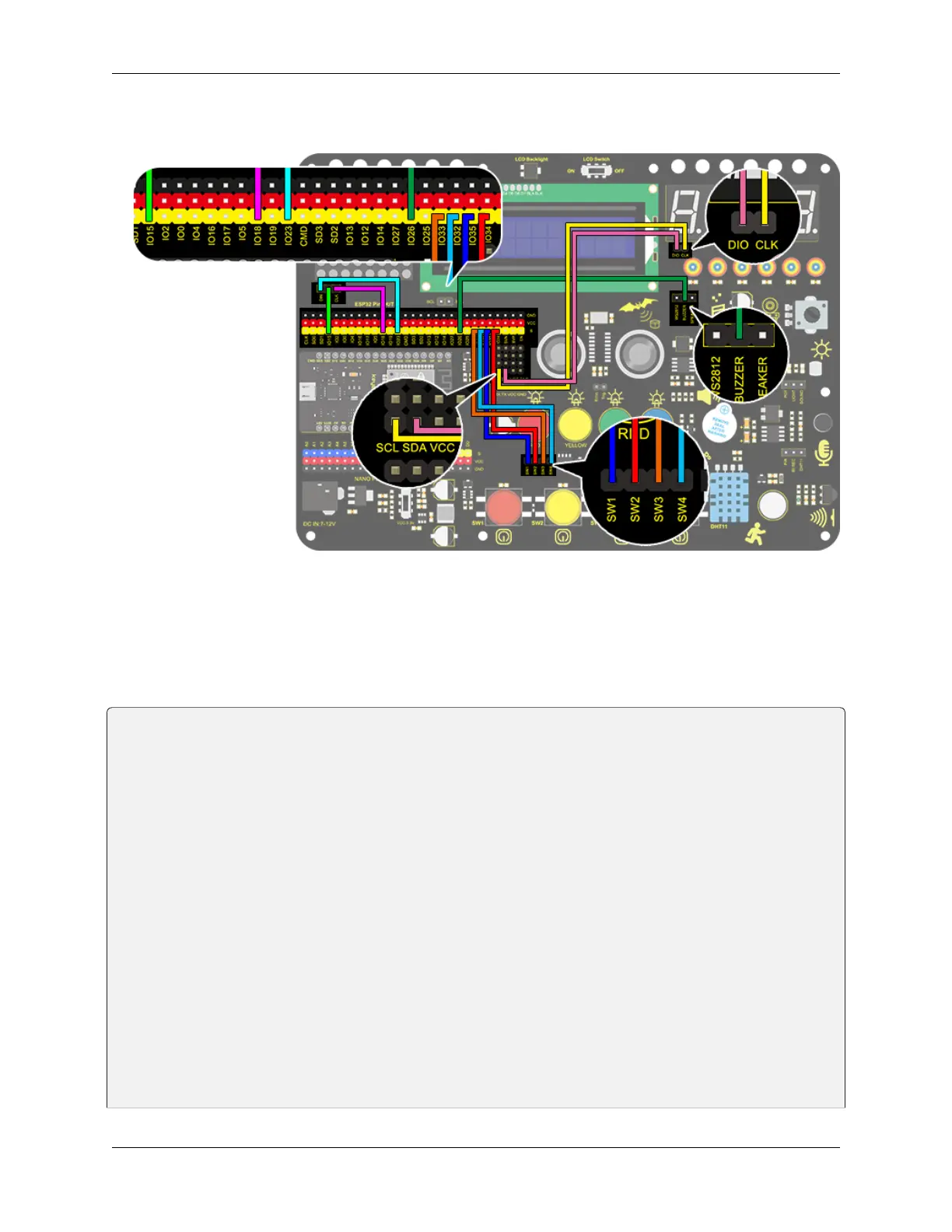
3. Wiring Diagram
4. Test Code
When mentioning a timebomb, we think of a timer and an activate button. In this project, however, it is an analog
bomb, so we also need a reset button. We set blue for plus, green for minus, yellow for counting down and red for
resetting. The time (unit: s) is displayed on digital tube and the 8x8 dot matrix shows the state of bomb(smile for safe
and cry for explosion).
/*
keyestudio ESP32 Inventor Learning Kit
Project 16 Timebomb
http://www.keyestudio.com
*/
#include "TM1650.h" //Upload TM1650 libraries
#include "LedControl.h"
//Dot matrix
int DIN = 23;
int CLK = 18;
int CS = 15;
LedControl lc=LedControl(DIN,CLK,CS,1);
byte smile[8]= {0x20,0x44,0x22,0x02,0x02,0x22,0x44,0x20};//Smile face
byte weep[8]= {0x20,0x42,0x24,0x04,0x04,0x24,0x42,0x20};//Crying face
// Button, buzzer and digital tube
int item = 0; //displayed value
TM1650 DigitalTube(22,21); //Set the SCL pin of the digital tube to 22 and the DIO pin␣
˓→to 21
(continues on next page)
102 Chapter 8. Arduino Tutorial



 To Next Page