ESP32 Starter Kit
5. Code Explanation
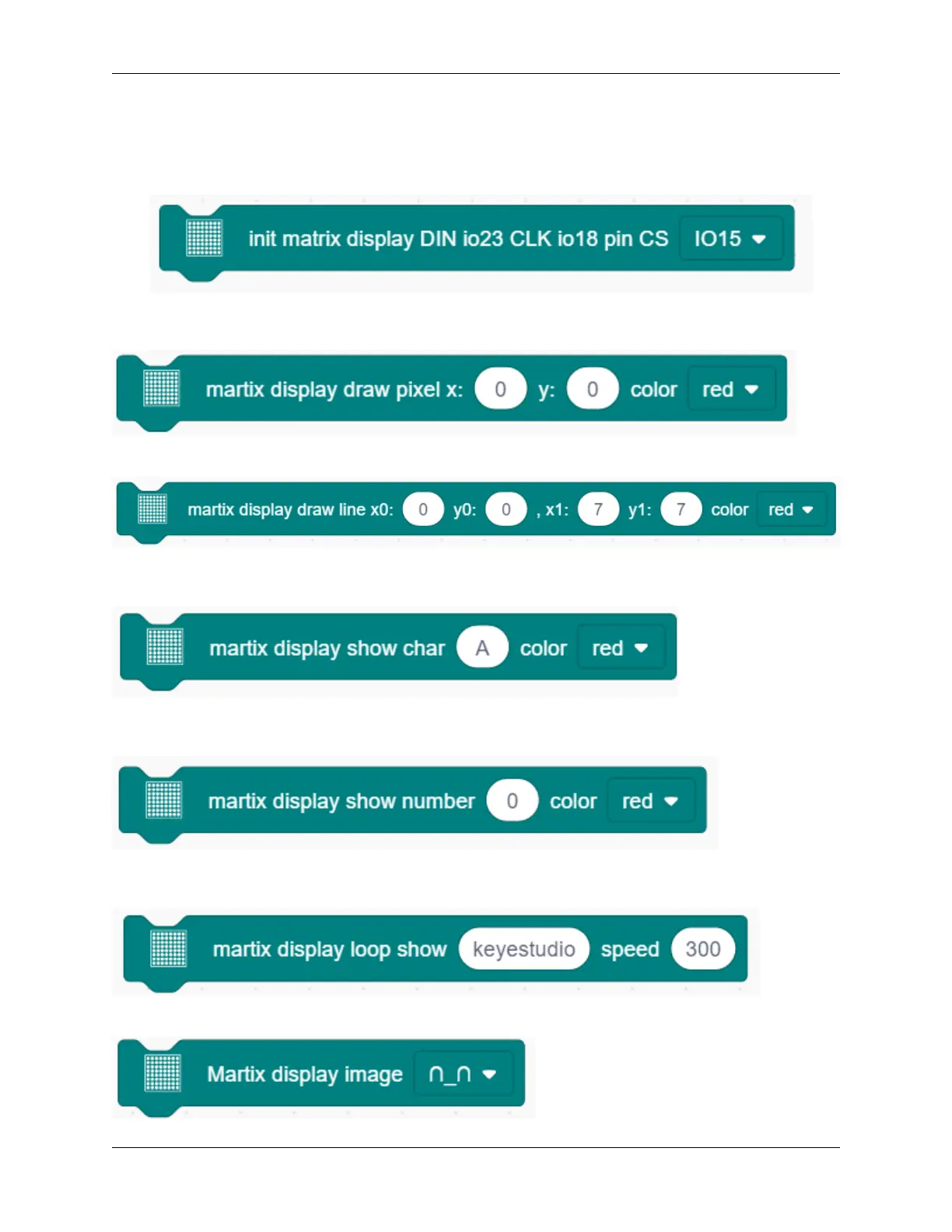
1. Set the CS pin. In the code, DIN is fixed to io23 and SLK to io18, while CS pin is optional. For convient wiring,
we select io15.
2. Draw pixels. This code block will light up or turn off pixels on the dot matrix by axis x and y, with red for on
and black for off.
3. Draw line. Locate the line by two group of coordinate points, also with red for on and black for off.
4. Show characters. We have add character libraries so you only need to type a letter to display it on the dot matrix.
Besides, it must be used cooperatively with a “rotation 180°” block.
5. Show numbers. Similarly, you only need to type a number to display it on the dot matrix, and it also must be
used cooperatively with a “rotation 180°” block.
6. Show scrolling character strings. Collocating a “rotation 180°” block, the specified scrolling strings will be
displayed after setting its speed.
7. Display image. For convenience, we have already integrated some emotion icons which can be selected directly.
216 Chapter 9. Scratch Tutorial



 To Next Page