ESP32 Starter Kit
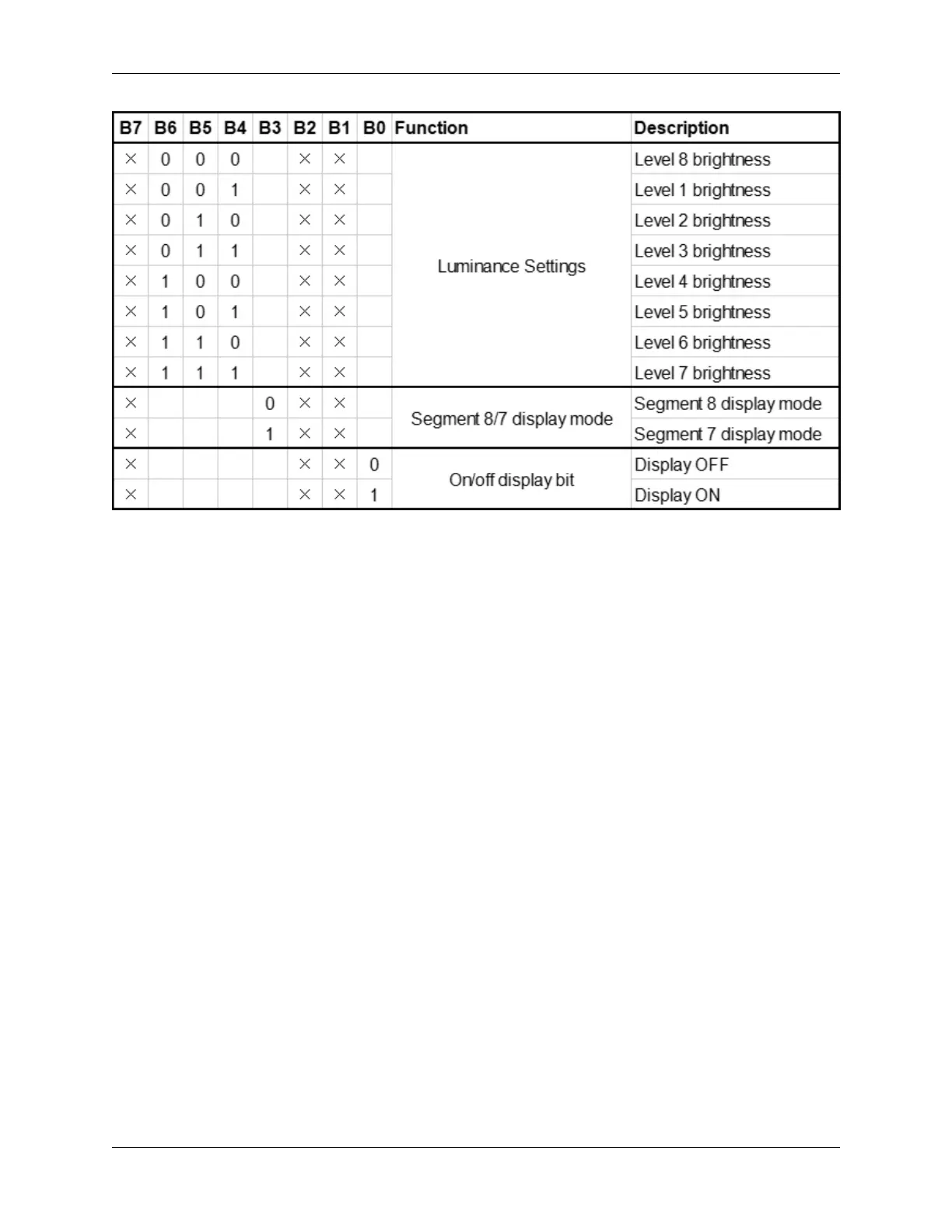
Actually, it is one byte of data with different bits representing different functions. bit[6:4]: Set the brightness of LED.
Note that 000 indicates the brightest. bit[3]: Determine whether there is a decimal dot. bit[0]: Determine whether to
turn on the display.
Digital Tube Turns on Take an example: Level 8 brightness without a dot signifies 0x05. Steps: Starting signal —
Send 0x48 — Slave-device receives — Send 0x05 — Slave-device receives — Ending signal After turning on, there
is no need to repeatedly send 0x48, as the function of digital tube has confirmed. Besides, the brightness and display
methods can be enumerated with multiple data in one place, so that it is clear and space-saving.
Digital Tube Turns off Steps: Starting signal — Send 0x48 — Slave-device receives — Send 0x00 — Slave-device
receives — Ending signal
Digital Tube Displays Numbers We firstly tell TM1650 to display numbers on the predetermined tube. And then the
number will be displayed. Its eight bit corresponds to eight segment, with 1 for lighting up and 0 for lighting off. If
there is a doubt of the corresponding relation, you may light up bit by bit in loop.
For example, when bit 1 is turned on and displays 8, the data is 0x68. If there is a dot, 8 will also be displayed when
sending 0x7f. Steps: Starting signal — Send 0x68 — Slave-device receives — Send 0x7f — Slave-device receives —
Ending signal Result: 8 is displayed on Bit 1.
For convenience, an array of corresponding value to 0~9 can be made. After further improvement, it is able to display
numbers, adjust brightness, shift the decimal dot and tubes.
8.5. Arduino Project 71



 To Next Page