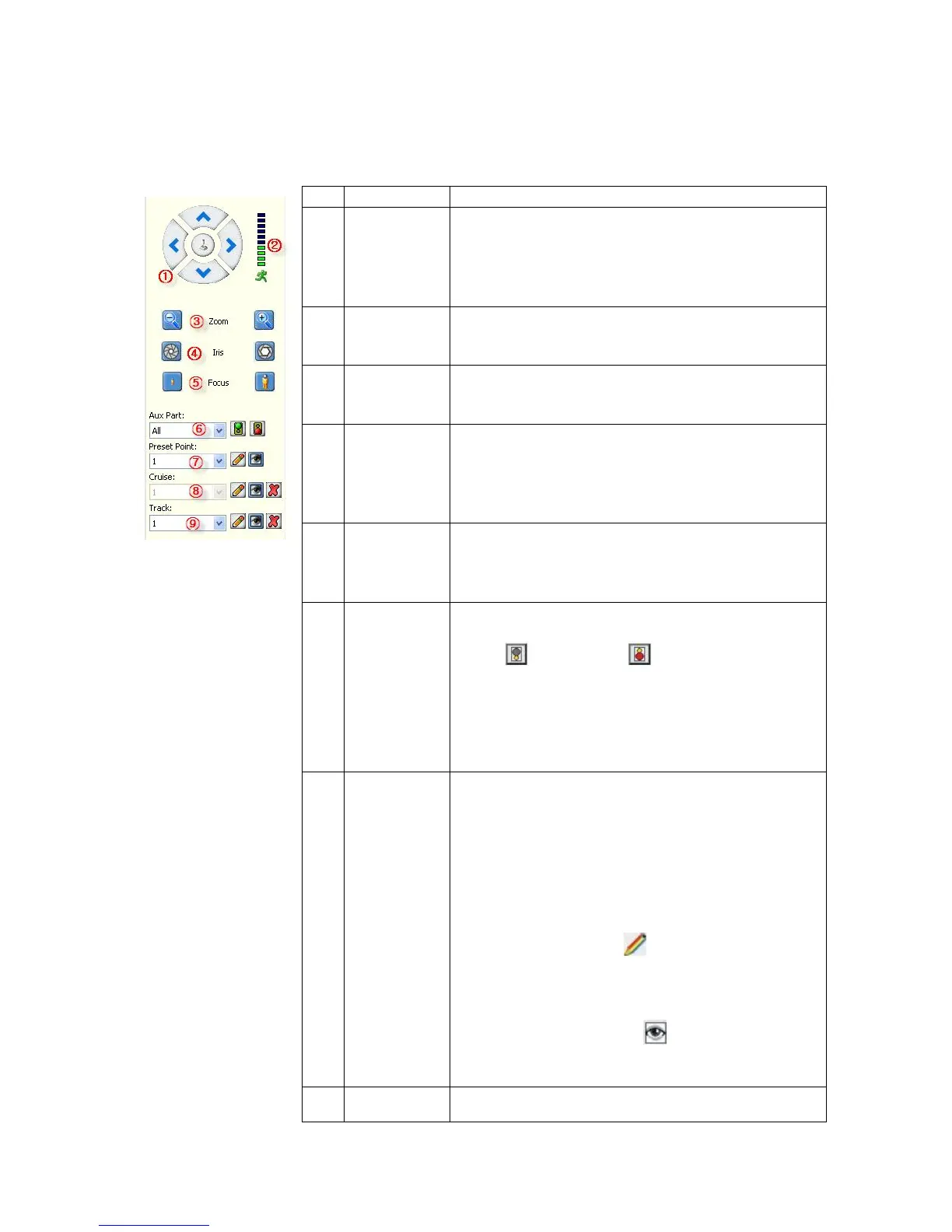
Name Description
1
Directional
buttons
Control the direction of the PTZ movement.
Please refer to your PTZ manual for details of PTZ
scanning mode.
2
Speed
Sets the turning speed of PTZ camera.
3
Zoom
Click to zoom in / zoom out
4
Iris
Click to make the image brighter or darker (this
function is disabled for cameras with automatic iris
adjustment).
5
Focus
Click to focus-in and focus-out (this function is
disabled for cameras with automatic focus).
6
Auxiliary
Open/close auxiliaries.
Click to open and to close. Different
functions respond to different protocols. The
auxiliaries include light, wiper, power, etc. Please
refer to PTZ manual for details.
7
Preset
Point
Setting preset camera position, focus, zoom, and
iris features, and then assigning numbers for easy
access to the pre-adjusted settings.
1. Select the preset number.
2. Adjust the camera as desired, including
direction, focus, iris and zoom values.
3. Click the Set button .
Calling the pre-adjusted settings:
1. Select the preset number you want to call.
2. Click the Start button .



 To Next Page