Loading data Loading data from SD card (Media–Load)
121
“A p p e n d ” willloadthesongintothesongnumberthat
followsthesong(s)currentlyexistingininternal
memory,withoutleavingavacantnumber.
“Clear”willeraseallsongsfrominternalmemory,and
loadthesongsintothenumbersfromwhichtheywere
saved.
6. PresstheOKbutton.Alldatafromthe.PCGfile
willbeloadedintotheKROME.
Neverremovethemediawhiledataisbeing
loaded.
Note: Youcanloadindividualbanksofprogramsor
combinations.Fordetails,pleasesee page 228and
followingoftheParameterGuide.
Loading individual data from a .PCG
file
TheKROMEletsyouloadPrograms,Combinations,
Drumkits,userDrumKitpatterns,UserArpeggio
patternsindividuallyorbyindividualbanks.Thisisa
convenientwaytorearrangeCombinationsinthe
orderinwhichyouwillusethemduringalive
performance.
BeawarethatifyouchangetheorderofPrograms,
thesoundsplayedbyCombinationsmayalsobe
affected.
Asanexamplehere,wewillexplainhowa
combinationsavedinbankAcanbelo
adedintoD000.
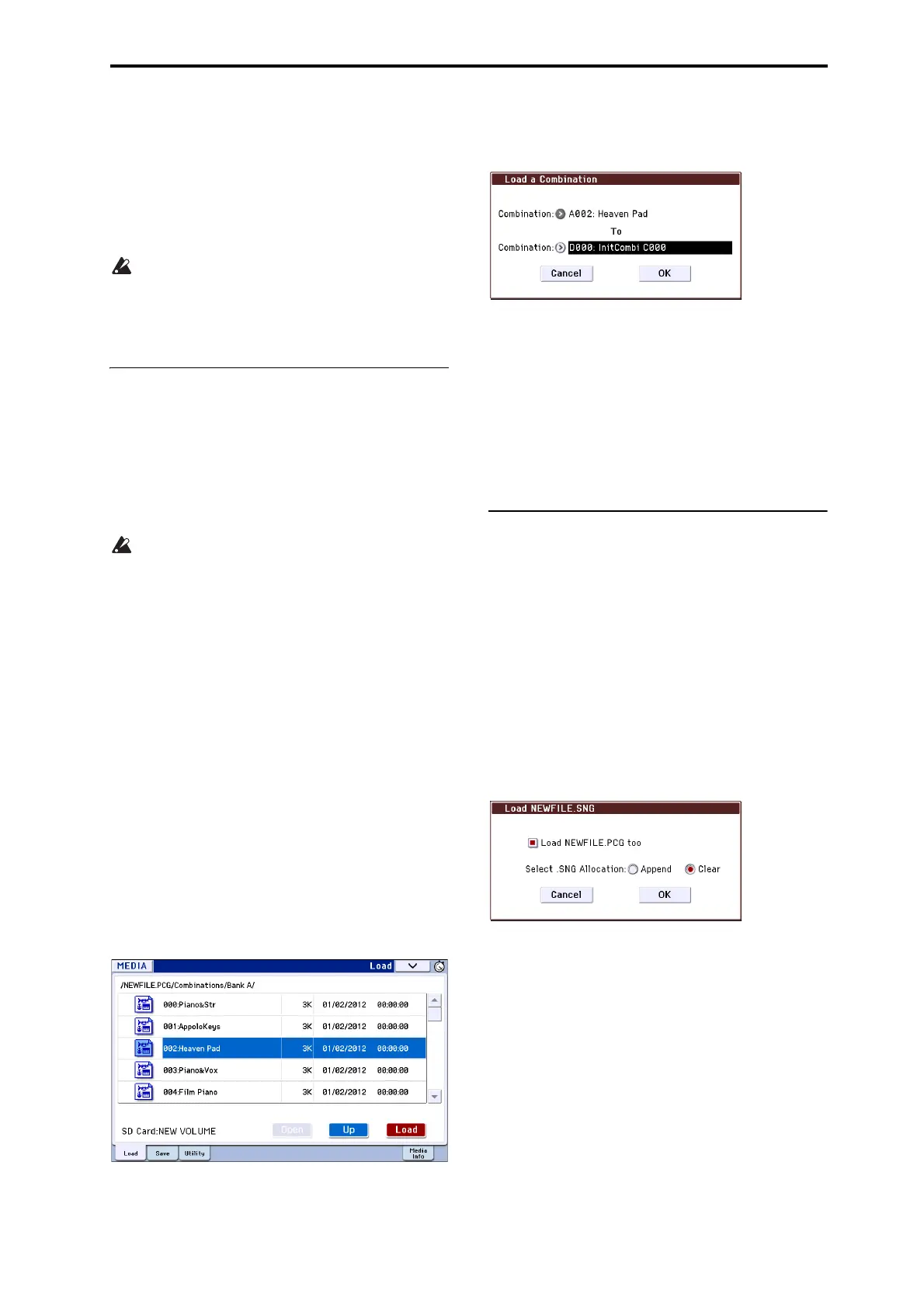
1. Movetothe“BankA”directory,andselectthe
Combinationthatyouwanttoload.(.PCGfile/
Combinations/BankA/)
Theprocedureisasfollows:
•Performsteps1–3under“LoadingallPrograms,
Combinations,DrumKitsandArpegg
iopatterns”
onpage 120.Selectthe.PCGfilecontainingthedata
youwanttoload(itwillbehighlighted),andpress
theOpenbutton.
•Press“Combinations”tohighlightit,andpressthe
Openbutton.
•Press“BankA”tohighlightit,andpresstheOpen
button.
•PressthescrollbartofindtheCombinationyou
wanttoload,andhighlightit.
Alternatively,youcouldselectanyfile,sincethe
desiredfilecanbeselectedlaterfromthedialogbox.
Note: WhenyoupressthekeyboardoftheKROME,
youwillhearthecombinationyouhaveselected.
However,theinternalprogramswill
beusedasthe
programofeachtimbre.
2. PresstheLoadbutton.Alternatively,choosethe
menucommand“LoadSelected.”
Adialogboxwillappear.
3. Usethe“Combination”(upperline)toselectthe
load‐sourcecombination,anduse“(To)
Combination”(lowerline)tospecifythe
destinationcombination.Forthisexample,select
D000.
Youcanpressthepopupbuttonandselec
tfroma
menu,orusetheBANKbuttonsandnumerickeysto
makeaselection.
4. PresstheOKbuttontoexecuteloading;theloaded
combinationwillbeassignedtoD000.
Loading songs for use in Sequencer
mode (.SNG)
Asanexamplehere,wewillexplainhowtoloada
song.We’llassumethatthissongusesedited
programs,multisamplesyousampledandprograms
thatusedrumkitanduserarpeggiopatternsetc.In
suchcases,itisbesttoload“alldata.”
1. Performsteps1–3under“LoadingallPrograms,
Combinations,DrumKitsandArpeggiopatterns”
onpage 120.Selectthe.SNGfilecontainingthe
datayouwanttoload
(itwillbehighlighted).
2. PresstheLoadbutton.Alternatively,choosethe
menucommandLoadSelected.
Adialogboxwillappear.
Note: Thecontentsandsettingsofthedialogboxwill
differdependingonthetypeoffilethatyouare
loading.
3. Checkthe“Load********.PCGtoo”checkbo
x.
Whenyouexecuteloading,the.PCGfilewillbeloaded
alongwiththe.SNGfile.
Use“Select.SNGAllocation”tospecifythedestination
towhichthesongdatawillbeloaded.
“Append”willloadthesongintothesongnumberthat
followsth
esong(s)currentlyexistingininternal
memory,without
leavingavacantnumber.
“Clear”willeraseallsongsfrominternalmemory,and
loadthesongsintothenumbersfromwhichtheywere
saved.



 To Next Page