Detailed Editing with Programs Using Filters
39
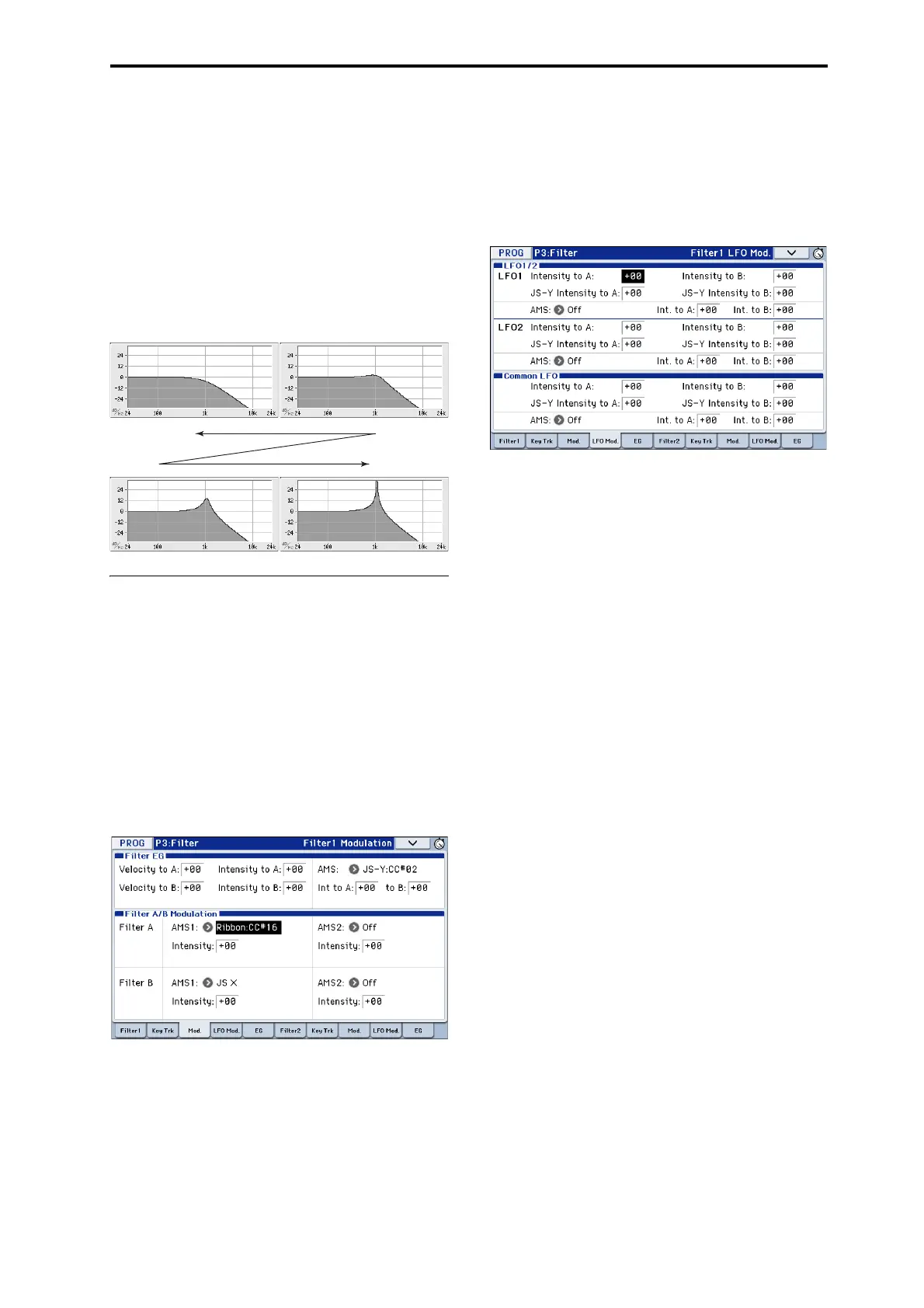
Resonance
Resonanceemphasizesthefrequenciesaroundthe
cutofffrequency,asshowninthediagrambelow.
Whenthisissetto0,thereisnoemphasis,and
frequenciesbeyondthecutoffwillsimplydiminish
smoothly.
Atmediumsettings,theresonancewillalterthetimbre
ofthefilter,makingitsoundmorenasal,ormore
extreme.Atveryhighsettings,theresonancecanbe
heardasaseparate,whistlingpitch.
Tomaketheresonancetrackthekeyboardpitch,please
see“KeyFollow”onpage 29oftheParameterGuide.
Modulating the filters
Youcanmodulatethefiltercutofffrequencyusingthe
FilterEG,theLFOs,keyboardtracking,andother
built‐inandMIDIcontrollers.Thisisagreatwayto
addarichvarietyoftonalchangetothesound.
Filter EG
TheFilterEGisamulti‐stageenvelope,whichyoucan
usetomodulatethefilteraswellasotherProgram
parameters.TheEGitselfissetupontheEGtab;the
waythatitaffectsthefiltersiscontrolledbythe
parametersdescribedbelow,ontheFilter1/2–
Modulationpage:
TheIntensit
ytoAandIntensitytoBsettingscontrol
thebasicamountofEGmodulati
onforfilter
frequenciesAandB,respectively,beforeother
modulation.
TheVelocitytoAandVelocitytoBsettingsletyouuse
velocitytocontroltheamountofEGmodulation.
TheAMSsettingselectsanAMSmodulationsourceto
scaletheamountoftheFilterEGappliedtoFiltersA
andB.Thetwofilterssharea
singleAMSsource,with
separateintensityIntoAortoBsettings.
LFO modulation
YoucanmodulatethefilterviaLFO1,LFO2,andthe
CommonLFO.Amongotherapplications,LFO
modulationofthefiltercanproducetheclassic“auto‐
wah”effect.
TheFilter1/2–LFOMod.pageletsyousetupthe
followingparametersseparatelyforeachLFO:
IntensitytoAandIntensitytoBspecifyhowmuch
theLFOchangesthetone.
JS‐YIntensitytoAandJS‐YIntensitytoBspecifythe
depthofthewaheffectproducedbytheLFOwhenthe
joystickismov
edtowardyourself,orwhenCC#2is
received.
TheAMSsettingselectsanAMSmodulationsourceto
scaletheamountoftheLFOappliedtoFiltersAandB.
Thetwofiltersshareasingl
eAMSsource,with
separateintensitysettings.
ForexampleifAMSissettoSW1:CC#80,turningSW1
onwillapplyanauto‐waheffect(seepage 37).
Keyboard Track
Mostacousticinstrumentsgetbrighterasyouplay
higherpitches.Atitsmostbasicapplication,keyboard
trackingre‐createsthiseffectbyincreasingthecutoff
frequencyofalowpassfilterasyouplayhigheronthe
keyboard.Usually,someamountofkeytrackingis
necessaryinordertomakethetimbreconsistentacross
theentirerang
e.
TheKROMEkeyboardtrackingcanalsobemuchmore
complex,sinceitallowsyouto
createdifferentratesof
changeoveruptofourdifferentpartsofthekeyboard.
Forinstance,youcan:
• Makethefiltercutofffrequencyincreasevery
quicklyoverthemiddleofthekeyboard,andthen
openmoreslowly–ornotatall–inthehigher
octaves.
• Makethecutofffrequencyincreaseasyouplay
loweronthekeyboard.
• Createabruptchangesatcertainkeys,forsplit‐like
effects.
How Key Track works: Keys and Ramps
Thekeyboardtrackingworksbycreatingfourramps,
orslopes,betweenfivekeysonthekeyboard.
Fordetails,pleasesee“Howitworks:Keysand
Ramps”onpage 28oftheParameterGuide.
Low resonance
High resonance



 To Next Page