64 Flowmaster User’s and Service Manual | LBL-000990 [B] Chapter 10
10.3.3 Select Interface Library
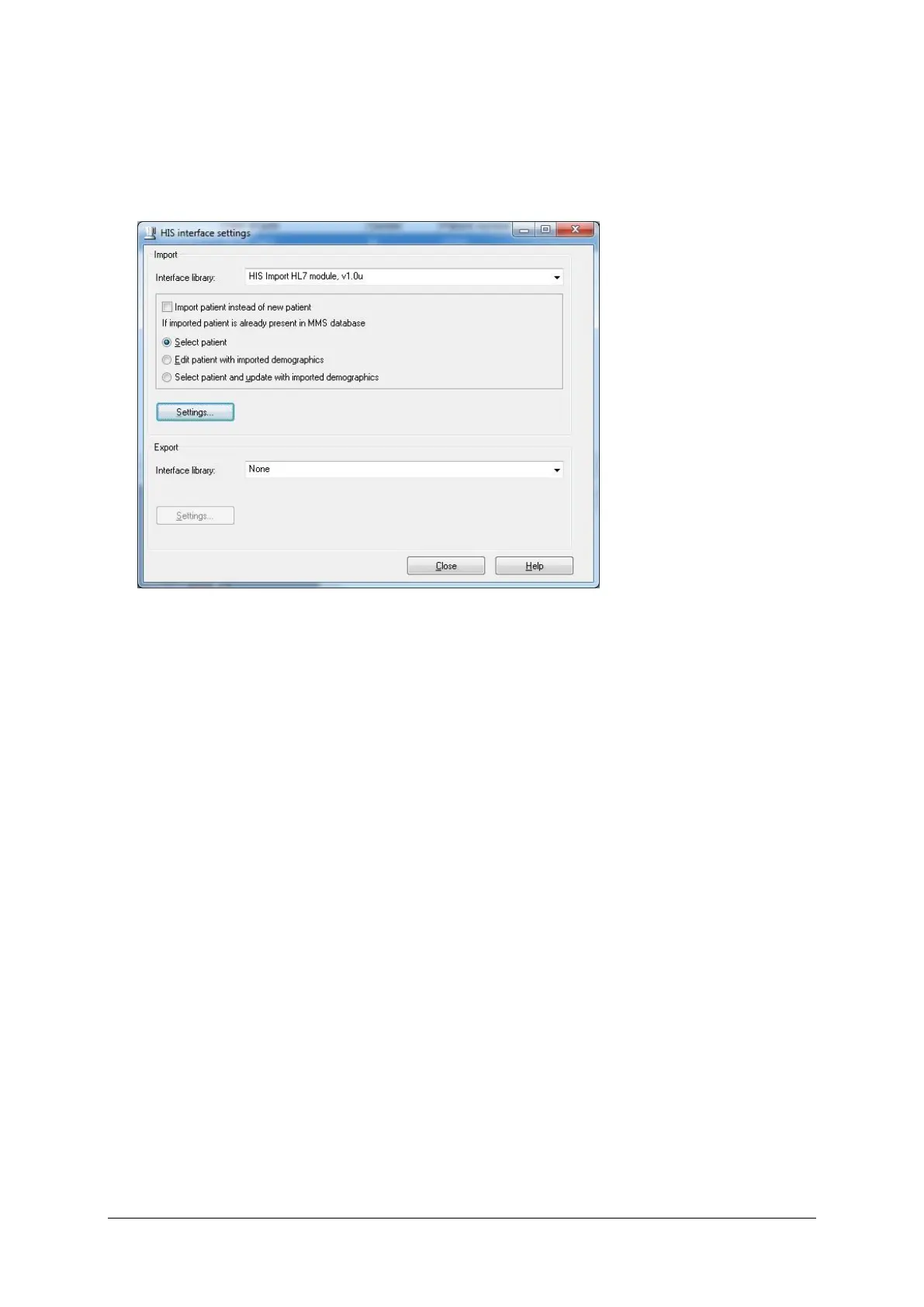
Select the correct HIS interface library from the drop-down menu (i.e. HL7 or
GDT).
Figure 10.6 HIS interface settings via database program
This setting is only available in the ‘HIS interface settings’ window in the
database. It will influence what happens when the imported patient already
exists in the Flowmaster database after choosing Patient > Read HIS info in
the database program.
The following settings are available:
• Import patient instead of new patient. Change the function of the first key
‘New patient’ in the software program into ‘Select Patient from HIS’. The
software will activate the HIS import screen. You can still bypass the HIS
import by activating menu item Patient > New Patient.
• Select patient. The patient is selected in the Flowmaster database, and
the patient demographics will not be updated with the imported
demographics.
• Edit patient with imported demographics. The ‘Edit patient’ window will
be opened with the patient demographics as found in the HIS. If OK is
clicked, the patient demographics are updated. If Cancel is clicked, the
patient demographics will be as before.
• Select patient and update with imported demographics. The patient is
selected. The demographics of the patient are updated with the patient
demographics as found in the HIS.



 To Next Page