88 General Maintenance
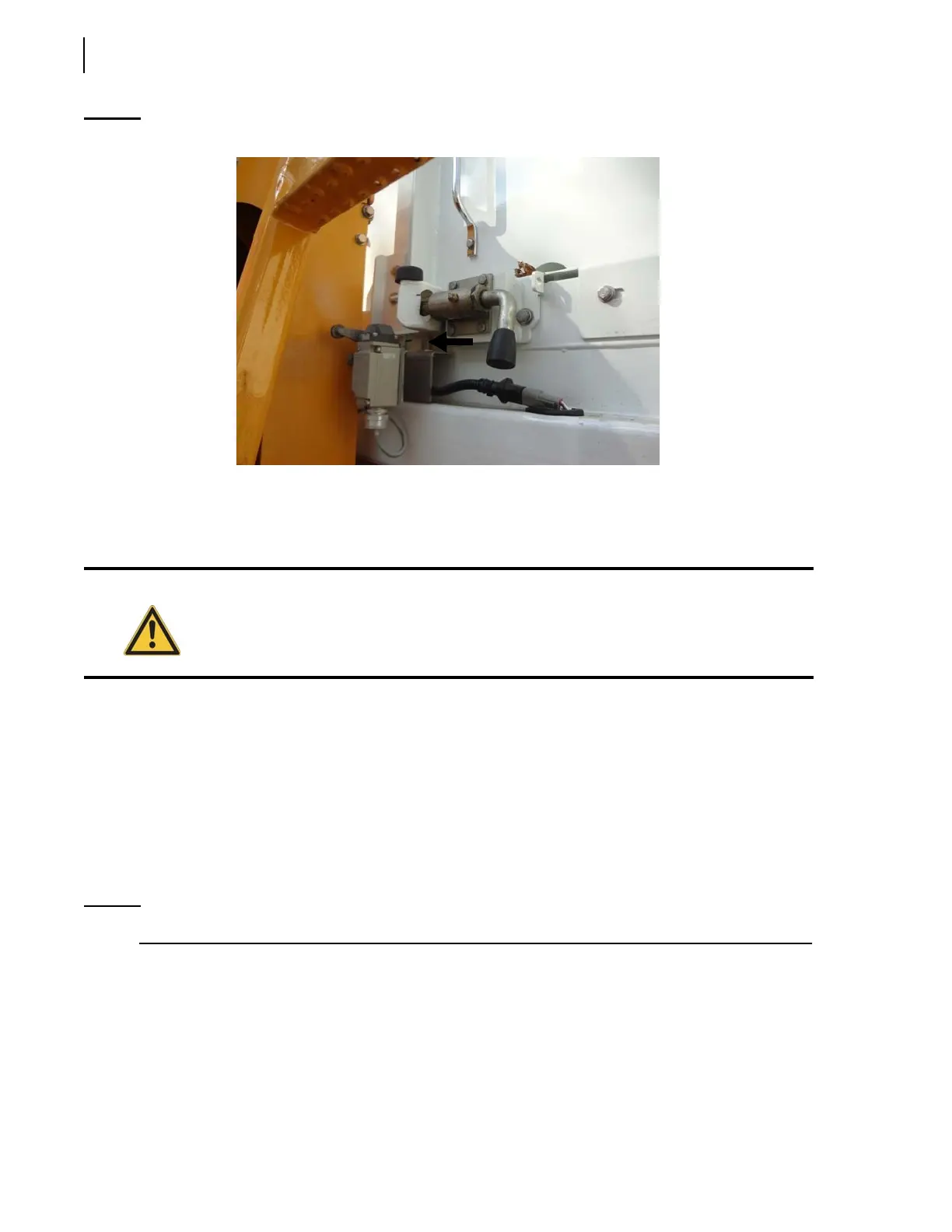
Figure 3-90
Hopper door proximity switch
This switch is located on the lower side door frame.
To verify that the switch needs adjusting, open the side access door by approximately 2 inches (5 cm)
and try to operate any hydraulic function. No hydraulic function should be working.
To adjust the hopper door proximity switch:
1. Loosen the proximity switch nuts.
2. Adjust the proximity switch so that there is a gap of approximately 3/16 inch (5 mm) between
the plate and the switch.
3. Tighten back up the nuts.
4. Test the operation.
The proximity switch light should turn on when the target is detected; if not, repeat the
adjustment procedure.
NOTE: The automated arm must be extended in order to open the hopper door and do the test.
Adjusting Crusher Panel Up Limit Switch (optional)
The crusher panel up limit switch (see Figure 3-91) disables the arm operation when the crusher
panel is not in its stowed position and redirects the arm power to the crusher panel up function when
the deadman switch on the arm joystick is activated. This forces the crusher panel to rise to the up
position in order to let the arm works.
Warning
Injury or death may occur if you attempt to enter the body while the packer or arm is in
operation.



 To Next Page