Playback/Review mode
EN
178
VIDEO PLAYBACK
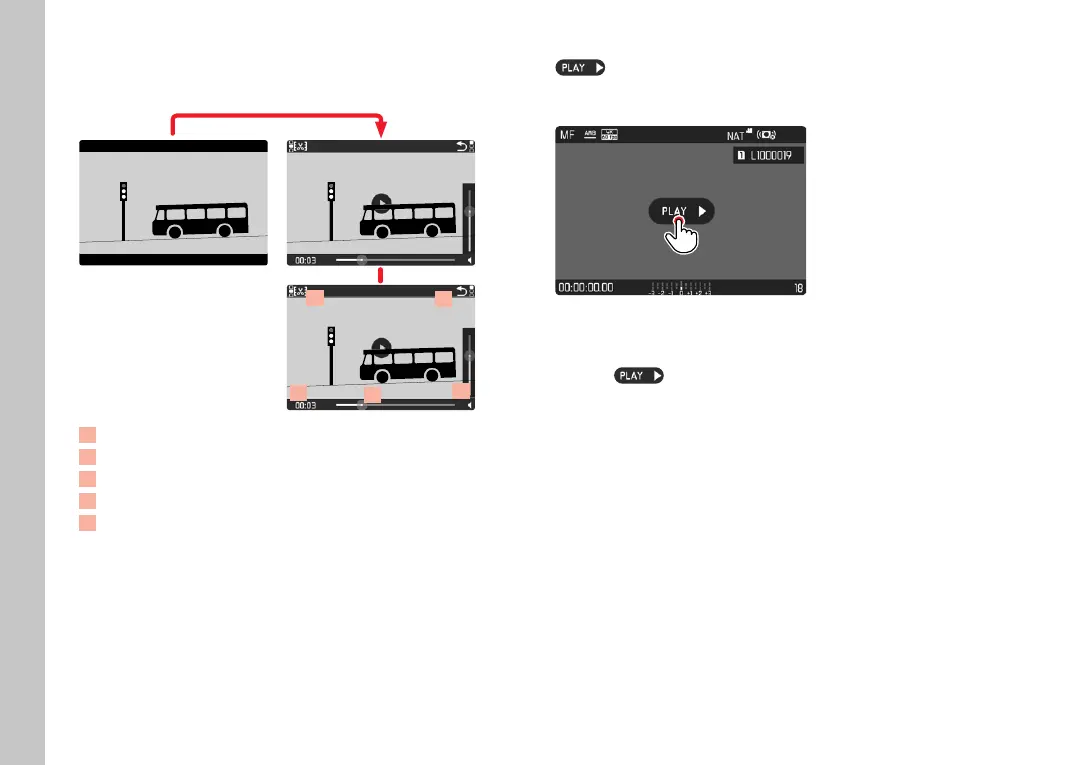
ACCESSING CONTROL ELEMENTS
69
70
68
71
72
INFO
1/80002.8F 12500ISO EV
SET
-3 2 1 0 21 3+
823412MP
68
Video editing function
69
Exiting video playback
70
Current time of the playback
71
Playback status bar
72
Playback volume
▸ Briefl y tap the LCD panel
or
▸ Press the joystick/thumbwheel
Notes
• A running playback will be interrupted if a control element is
accessed.
• The control elements disappear after about 3s. Touching the
LCD panel or pressing a button will make them reappear.
START PLAYBACK
Appears on screen if you have selected a video fi le in
playback mode.
▸ Press the joystick/thumbwheel
or
▸ touch
briefl y
PAUSE PLAYBACK
▸ Briefl y tap the LCD panel
or
▸ Press the joystick/thumbwheel



 To Next Page