Playback/Review mode
EN
166
PLAYBACK/REVIEW MODE
There are two completely independent playback/review functions
available:
– short-term rendering directly after exposure (Preview)
– normal Review mode, in which the stored recordings can be
viewed and managed for any length of time
The switchover between recording and playback/review mode, as
well as most other actions can be completed using gesture or key
control. Please see p. 51 for more information about the
available gestures.
Notes
• Recorded pictures are not automatically rotated in Review mode
to utilize the full screen area.
• It may not be possible to render files with this camera that were
not recorded with this device.
• In some cases, the screen image may not have the expected
quality, or the LCD panel will remain blank and only display the
file name.
• You can toggle back from playback mode to recording mode at
any time by tapping the shutter button.
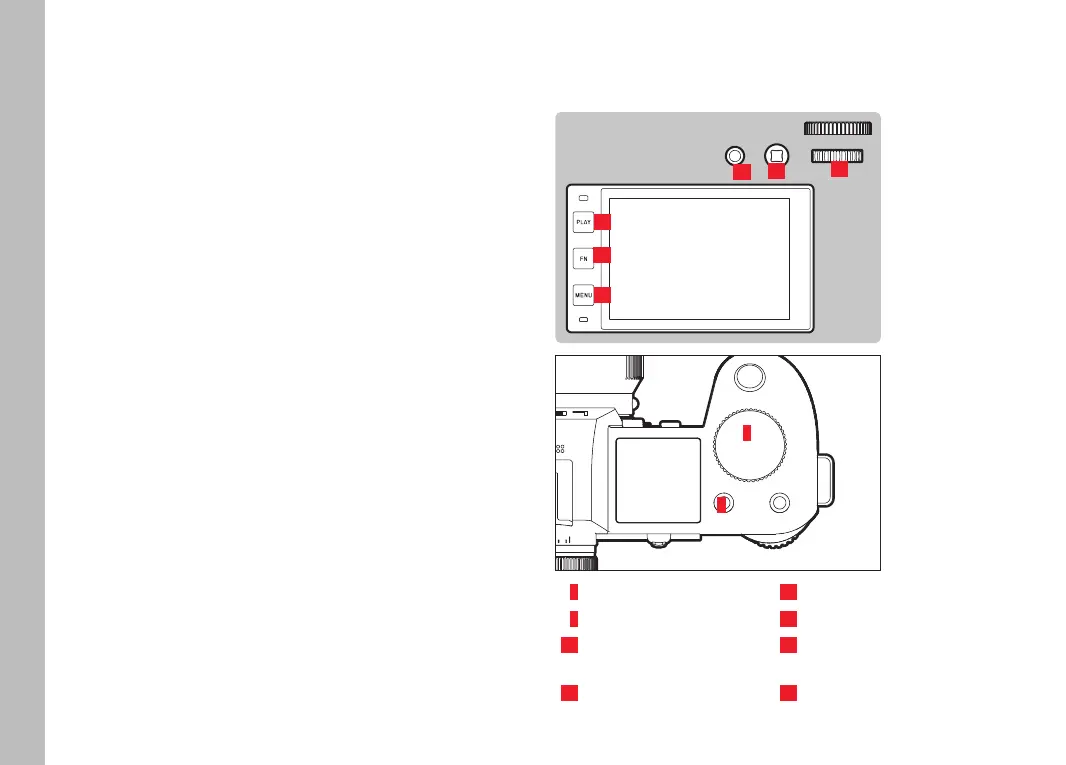
CONTROL ELEMENTS IN PLAYBACK/REVIEW MODE
CONTROL ELEMENTS ON THE CAMERA
24
26
21
22
2
4
2
Front setting wheel
22
Thumbwheel
4
FN button at the top left
24
PLAY button
20
FN button at the rear top
25
Press the FN button at the
rear left
21
Joystick
26
MENU button
25
20



 To Next Page