EN
Preparation
33
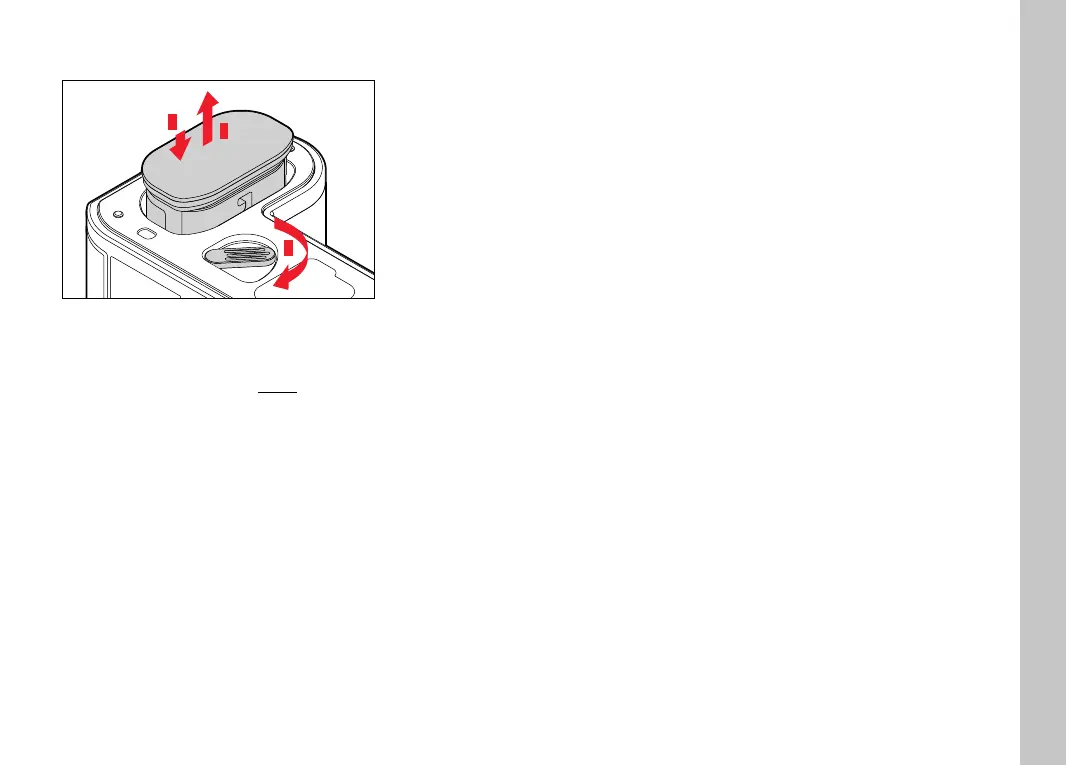
REMOVAL
1
2
3
▸ Turn the battery release lever
• Battery is pushing out slightly.
▸ Press down on the battery lightly
• The battery unlocks and pushes out fully.
▸ Removing the battery
Important
• Removing the battery while the camera is switched on may
result in the loss of custom settings or damage to the memory
card.
INSERTION/REMOVAL OF MEMORY CARDS
Leica SL2 off ers slots for two memory cards. There are various
options for use, see p.90.
The camera will save exposures to an SD (Secure Digital), SDHC
(High Capacity) or SDXC (eXtended Capacity) memory card.
Notes
• SD/SDHC/SDXC memory cards are available from various
suppliers in various sizes and with diff ering read/write speeds.
Memory cards with high storage capacities and high read/write
speeds off er quick storage and rendering.
• The memory card may not be supported (capacity) or will have
to be formated before fi rst use (see p.188). The camera will in
that case display a relevant message. Please see the section
"Technical Data" for information about supported cards.
• Check the memory card for correct alignment if you are having
diffi culties inserting it into the camera.
• Video recordings require a high write speed.
• See p. 8 and p. 11 for additional information.



 To Next Page