Recording - Basic settings (video)
EN
94
RECORDING – BASIC SETTINGS (VIDEO)
The settings described in this chapter only apply for video
operations. They are therefore part of the video menu and must
always be accessed and configured from within video mode (see
chapter "Camera operation" in the section "Menu Control"). Any
menu items of the same name in the picture menu are entirely
independent of these.
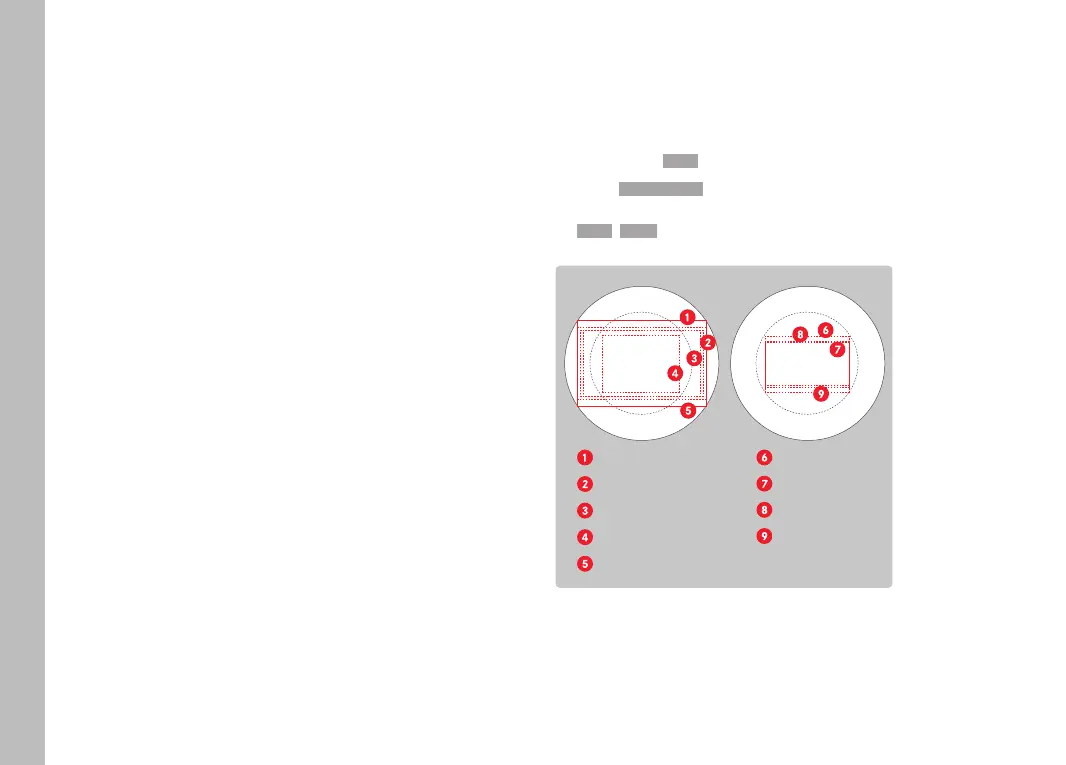
SENSOR FORMAT
The picture data of the entire 35mm sensor can be used or only a
cropped section, which corresponds to the APS-C format. This can
be helpful, e.g. when only limited storage capacity remains or a
lens developed specifically for APS-C is used.
Factory setting: 35 mm35 mm
▸ Select Sensor FormatSensor Format in the main menu
▸ Select the desired setting
(35 mm35 mm, APS-CAPS-C)
APS-C image circle
Full-frame Still 3:2
8368 x 5584
Full-frame C4k 17:9
8192 x 4320
Full-frame 4k 16:9
7680 x 4320
Full-frame 5k 4:3
4992 x 3744
Full-frame FHD 16:9
8368 x 4712
APS-C Still 3:2
5504 x 3664
APS-C C4k 17:9
5504 x 2912
APS-C 4k 16:9
5504 x 3096
APS-C FHD 16:9
5504 x 3096
Note
• The setting switches automatically to APS-C when an
APS-C-specific lens is mounted.



 To Next Page