EN
Recording - Basic settings (picture & video)
81
CHANGING THE INFO PROFILES
▸ Press the FN button with the function assignment
Toggle Info ProfilesToggle Info Profiles
• In factory settings, that will be the FN button at the back left,
next to the LCD panel (25).
Note
• The same info profiles are available in Playback/Review mode as
in recording mode. The actual info profile currently in use,
however, is saved separately.
DEACTIVATING INDIVIDUAL INFO PROFILES
You can limit the number of info profiles by activating/deactivating
individual profiles. At least one profile must always be active, but
that can be an "empty" profile.
▸ Select Camera SettingsCamera Settings in the main menu
▸ Select Capture AssistantsCapture Assistants
▸ Select a profile
▸ Select OnOn/OffOff
CUSTOMIZING THE INFO PROFILES
▸ Select Camera SettingsCamera Settings in the main menu
▸ Select Capture AssistantsCapture Assistants
▸ Select SettingSetting
▸ Select a profile
▸ Select the desired function
▸ Select the desired setting
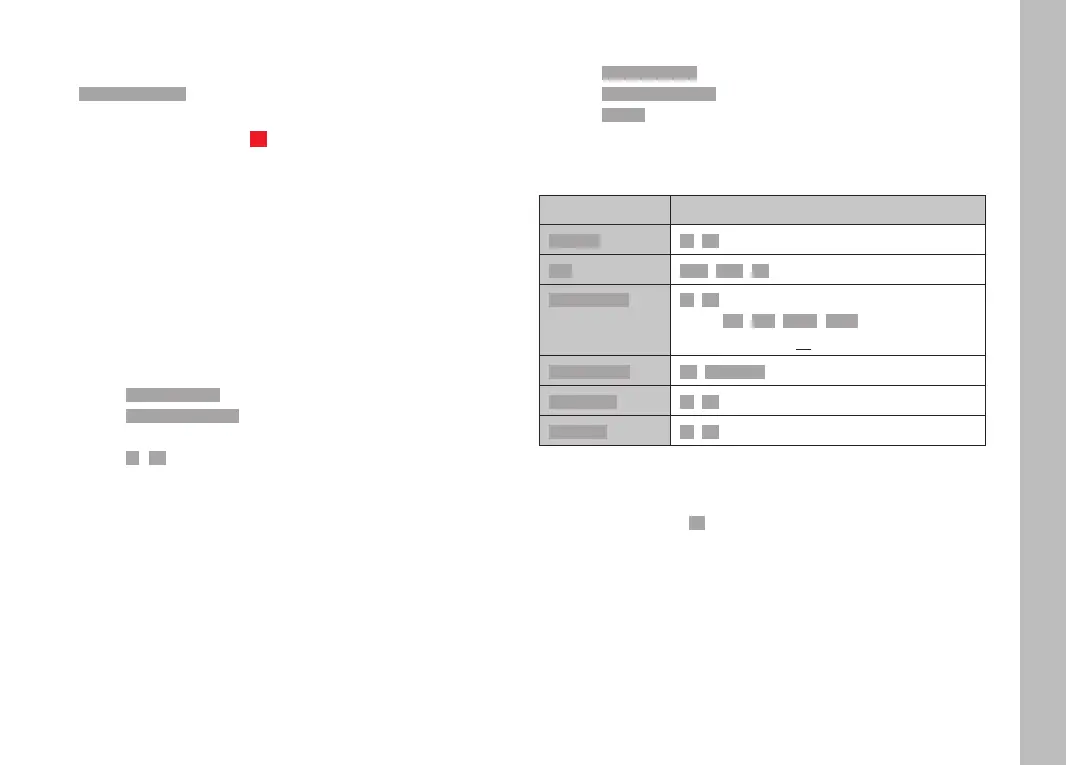
Function Available settings
Info BarsInfo Bars OnOn, OffOff
GridGrid
3 x 33 x 3, 6 x 46 x 4, OffOff
Focus PeakingFocus Peaking OnOn, OffOff
Color (RedRed, BlueBlue, GreenGreen, WhiteWhite) & sensitivity
(settings apply to all info profiles)
Clipping/ZebraClipping/Zebra OffOff, Upper limitUpper limit (value between 200 and 255)
Level GaugeLevel Gauge OnOn, OffOff
HistogramHistogram OnOn, OffOff
Note
• It is advisable to reserve one info profile as "empty", in which all
functions are set to OffOff. It allows you to temporarily hide all
displays. In effect, you get an unobstructed view of the full
screen image.



 To Next Page