EN
Camera operation
53
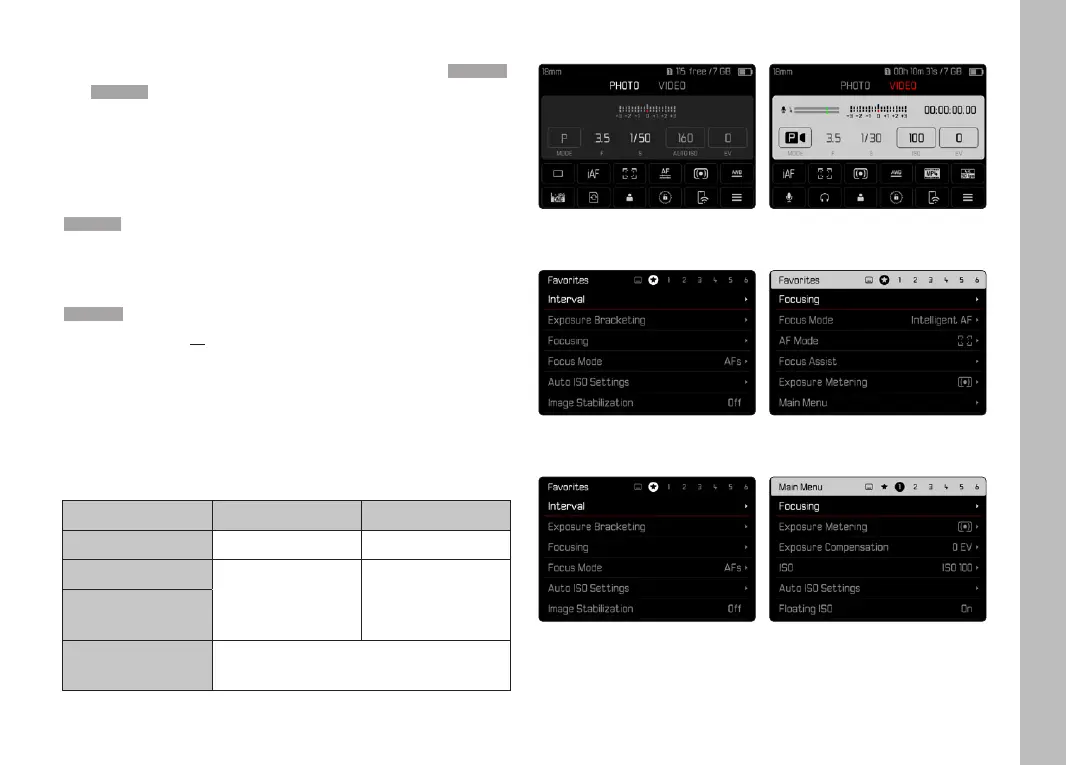
MENU SECTIONS
The following menu sections are available: Status Screen, Main MenuMain Menu
and FavoritesFavorites. At this top level, the menu sections in picture and
video mode are easily recognizable by their color:
Status-Screen:
– quick access to the most important settings
FavoritesFavorites:
– your custom list (see p.64 for details on how to manage this
list)
Main MenuMain Menu:
– offers access to all menu items
– contains various submenus
Note
• The favorites menu can only be displayed if it has at least one
menu item assigned.
SECTION PHOTO VIDEO
Status screen dark background bright background
Favorites
dark header line bright header line
Main menu
(top level)
Main menu
(Submenus)
black header line
Status screen
Favorites
Main menu



 To Next Page