Camera operation
EN
58
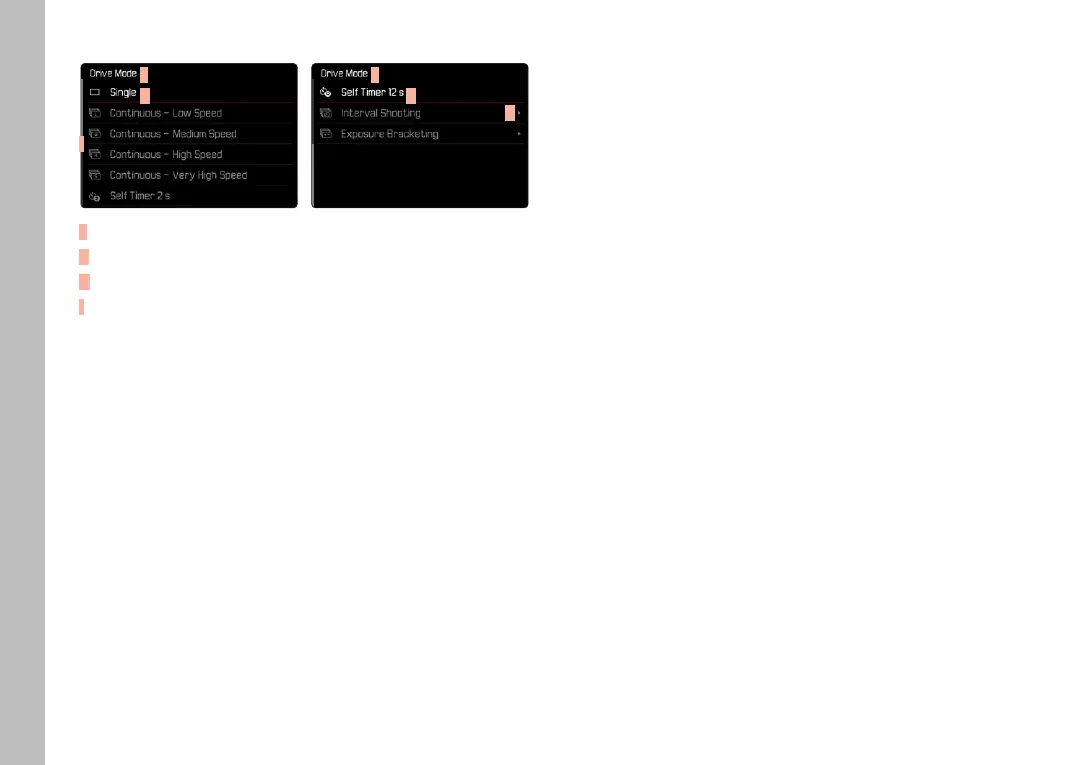
SUBMENU
F
G
I
F
G
H
F
Current menu item
G
Submenu item
H
References to other submenus
I
Scrollbar
There are various types of submenus available. The following pages
describe their operation.
MENU NAVIGATION
SCREEN BY SCREEN NAVIGATION
Scrolling forward
▸ Press the MENU button (repeatedly if needed)
or
▸ Turn the front setting wheel in clockwise direction
• The status screen will appear again after page 6 of the main
menu.
Scrolling backward
▸ Turn the front setting wheel in anti-clockwise direction
• Page 6 of the main menu will appear again after the status
screen.
LINE BY LINE NAVIGATION
(Function/function option selection)
▸ Press the joystick up/down
or
▸ Turn the thumbwheel
(to the right = down, to the left = up)
• Once the last menu item has been reached scrolling up or
down, the display will automatically jump to the previous or
next screen. The currently active menu section (Favorites,
Main Menu) is not exited.
Note
• Some menu items can only be accessed under specific
circumstances. The text in the relevant line is displayed in gray
to signify the existence of a submenu.



 To Next Page