EN
Preparation
37
CHANGING THE LENS
Important
• Make sure to always have a lens or the camera bayonet cover
attached to prevent dust or other foreign bodies penetrating the
camera.
• That is why you should always replace lenses quickly and in a
dust-free environment.
L-MOUNT LENSES
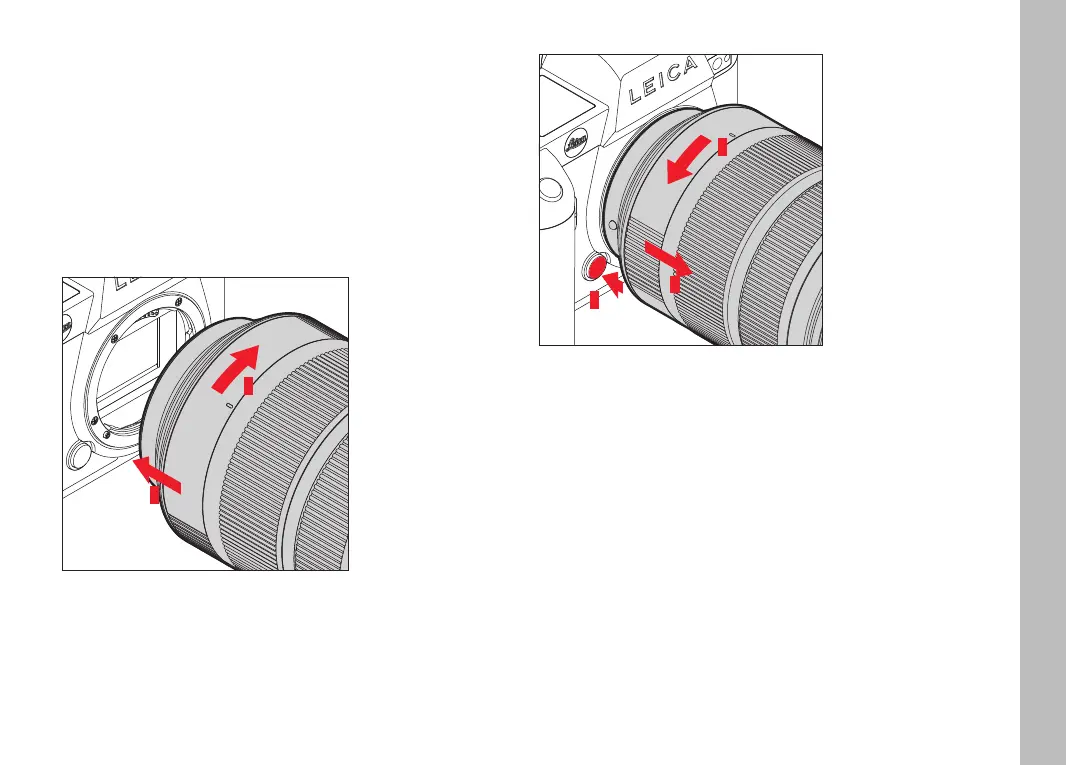
ATTACHING THE LENS
1
2
▸ Ensure that the camera is switched OFF
▸ Hold the lens on the fixed ring
▸ Position the alignment point on the lens opposite the alignment
point on the camera housing
▸ Attach the lens in this position
▸ Turn the lens clockwise until you hear and feel it click into place
DETACHING THE LENS
1
2
3
▸ Ensure that the camera is switched OFF
▸ Hold the lens on the fixed ring
▸ Press and hold the release button on the camera housing
▸ Turn the lens counter-clockwise until the alignment point is
opposite the release button
▸ Remove the lens



 To Next Page