FAQ
EN
206
Smartphones/WLAN
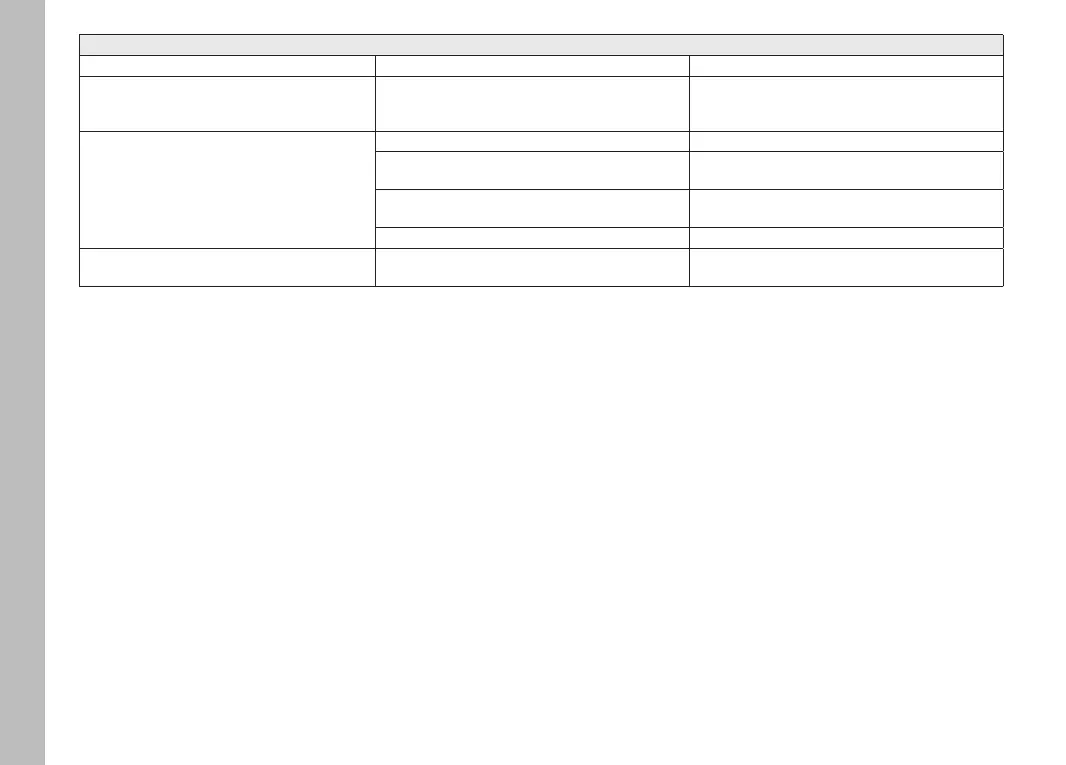
WLAN connection gets interrupted Camera deactivates when it overheats (safety feature) Allow camera to cool down
Cannot pair with a mobile device The camera was already paired with the mobile device Delete the camera registration from the Bluetooth
settings in the mobile device and repeat pairing
process
Mobile device connection/image transfer not
working
The mobile device is too far away Bring the devices closer to each other
Interference from other devices in the vicinity, e.g.
other smartphones or a microwave oven
Increase distance to interfering devices
Interference from multiple mobile devices in the vicinity Re-establish the connection/remove other mobile
devices
Mobile device is currently connected to another device Check connection
Camera does not appear on the WLAN configura-
tion screen of the mobile device
Mobile device does not recognize camera Switch the WLAN function of the mobile device off and
on again



 To Next Page