214880 88 Revision A
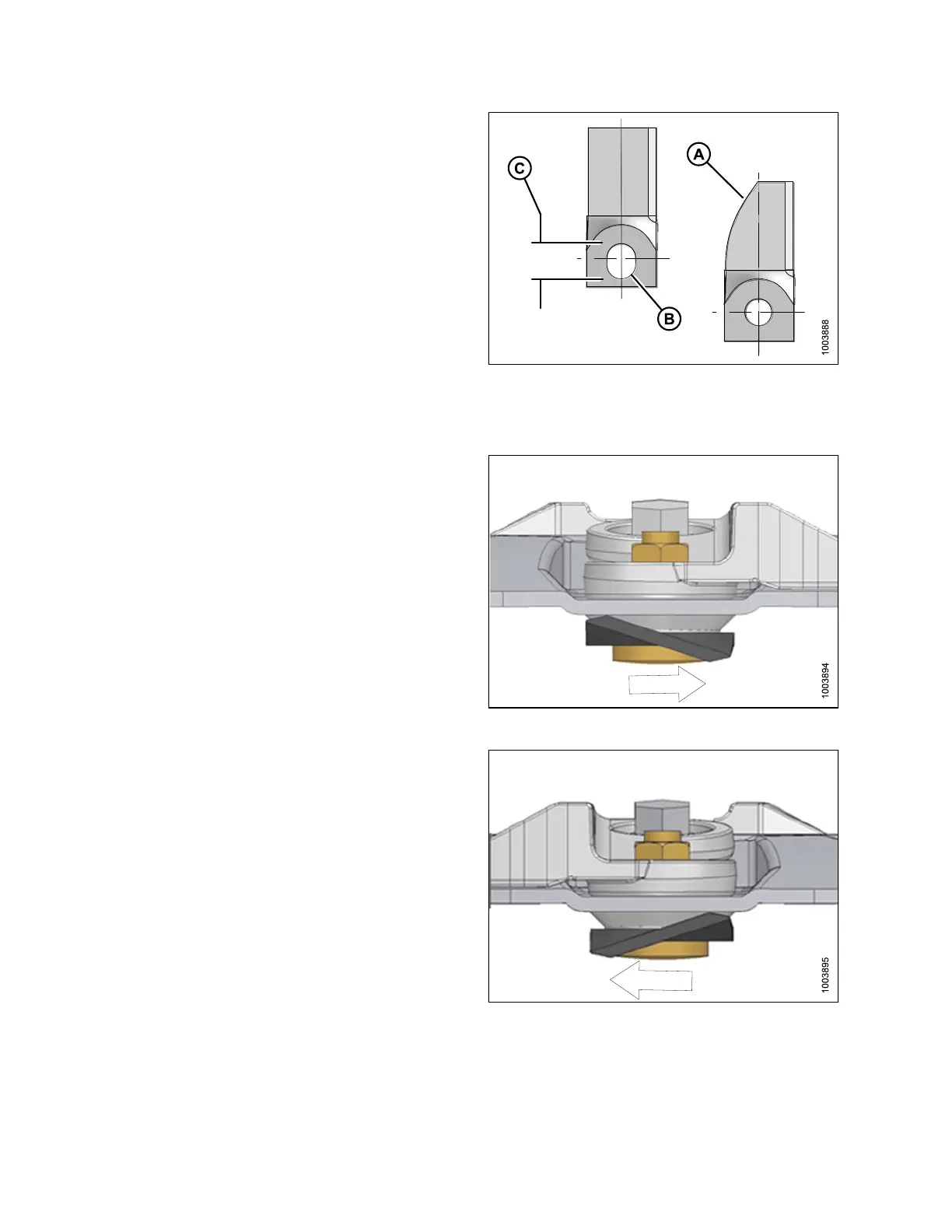
Figure 4.44: Discblades
A - Blade Wear to Center Line
B - Elongated Hole
C - Maximum Elongation 21 mm (13/16 in.)
1. Check daily that the discblades are securely attached to
the disc.
2. Inspect blades for cracks, blade wear (A), and/or elongated
hole (B) beyond safe operating limits (C).
3. Replace blades immediately when problems are noticed.
IMPORTANT:
Blades should be replaced in pairs or the disc may become
unbalanced and cause damage to the cutterbar.
Figure 4.45: Counterclockwise Disc Rotation Direction
IMPORTANT:
The discblades have cutting edges on both sides so the
blades can be turned over and reused. The twist in each
blade determines the cutting direction. If you are unsure
which direction the spindles rotate, refer to 3.9
Reconfiguring Cutterbar Crop Stream, page 47.
Figure 4.46: Clockwise Disc Rotation Direction
MAINTENANCE AND SERVICING



 To Next Page