214880 92 Revision A
Installing Discblades
CAUTION
Discblades have two sharp cutting edges that can cause serious injury. Exercise caution and wear gloves when working
with blades.
IMPORTANT:
If you are unsure which direction the spindles rotate, refer to 3.9 Reconfiguring Cutterbar Crop Stream, page 47.
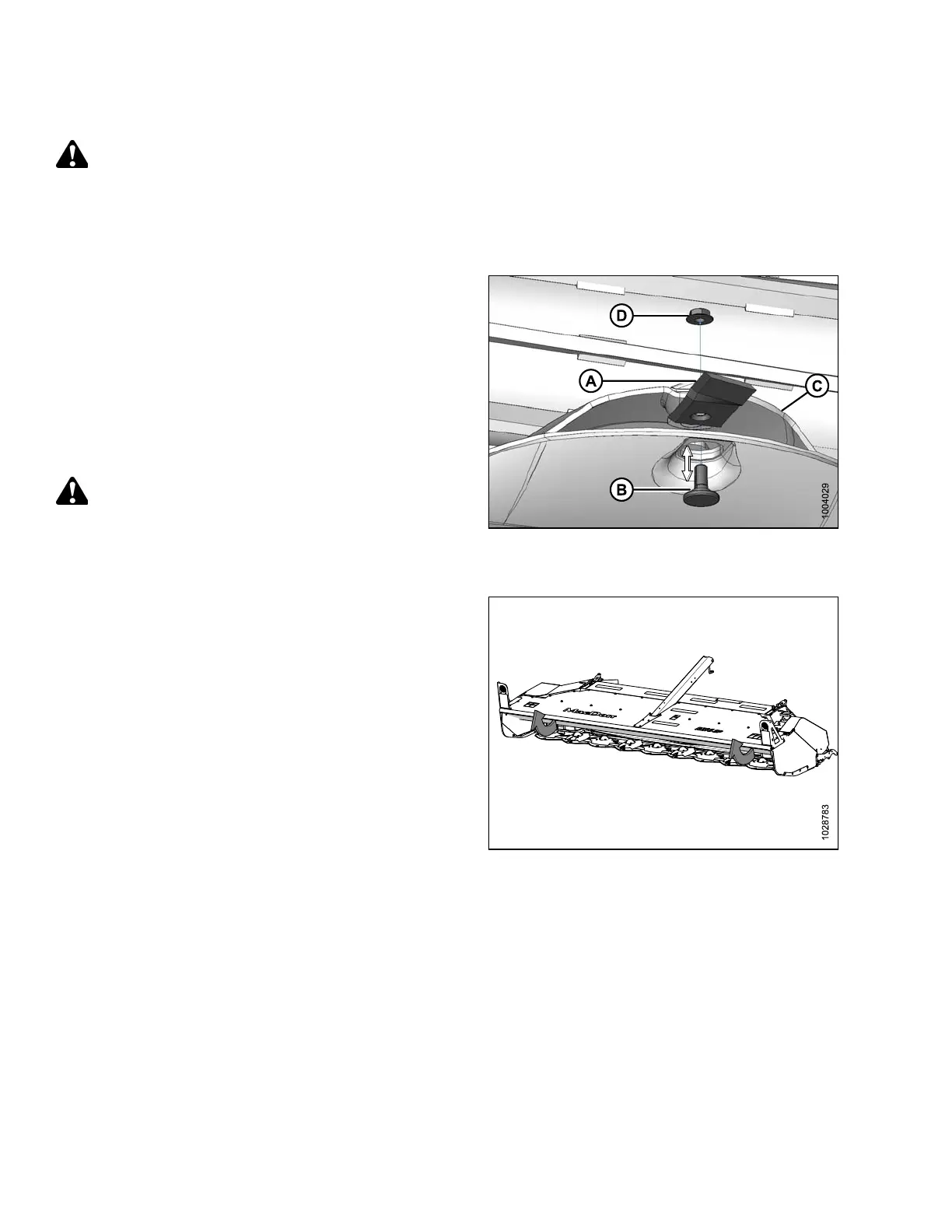
Figure 4.52: Discblade
1. Place a pin (or equivalent) in the front hole of the rock
guard to prevent disc rotation while tightening blade bolts.
2. Install new or reversed blade (A) with shoulder bolt (B)
onto disc (C).
IMPORTANT:
Nuts are one-time-use only. When flipping or changing a
blade, replace using a NEW nut only.
3. Install new nut (D) and torque to 125 Nm (92 lbf·ft).
WARNING
Ensure cutterbar is completely clear of foreign objects. Foreign
objects can be ejected with considerable force when the
machine is started and may result in serious injury or machine
damage.
Figure 4.53: R216 SP
4. Close the cutterbar curtain (A). Refer to 3.7.2 Closing
Cutterbar Curtain, page 43.
MAINTENANCE AND SERVICING



 To Next Page