214880 89 Revision A
Inspecting Discblade Hardware
CAUTION
Damaged or loose discblades or blade attachment hardware can be ejected during machine operation and may cause
personal injury or machine damage.
Inspect blade attachment hardware each time blades are changed. Refer to Removing Discblades, page 90 and Installing
Discblades, page 92 for hardware replacement procedure.
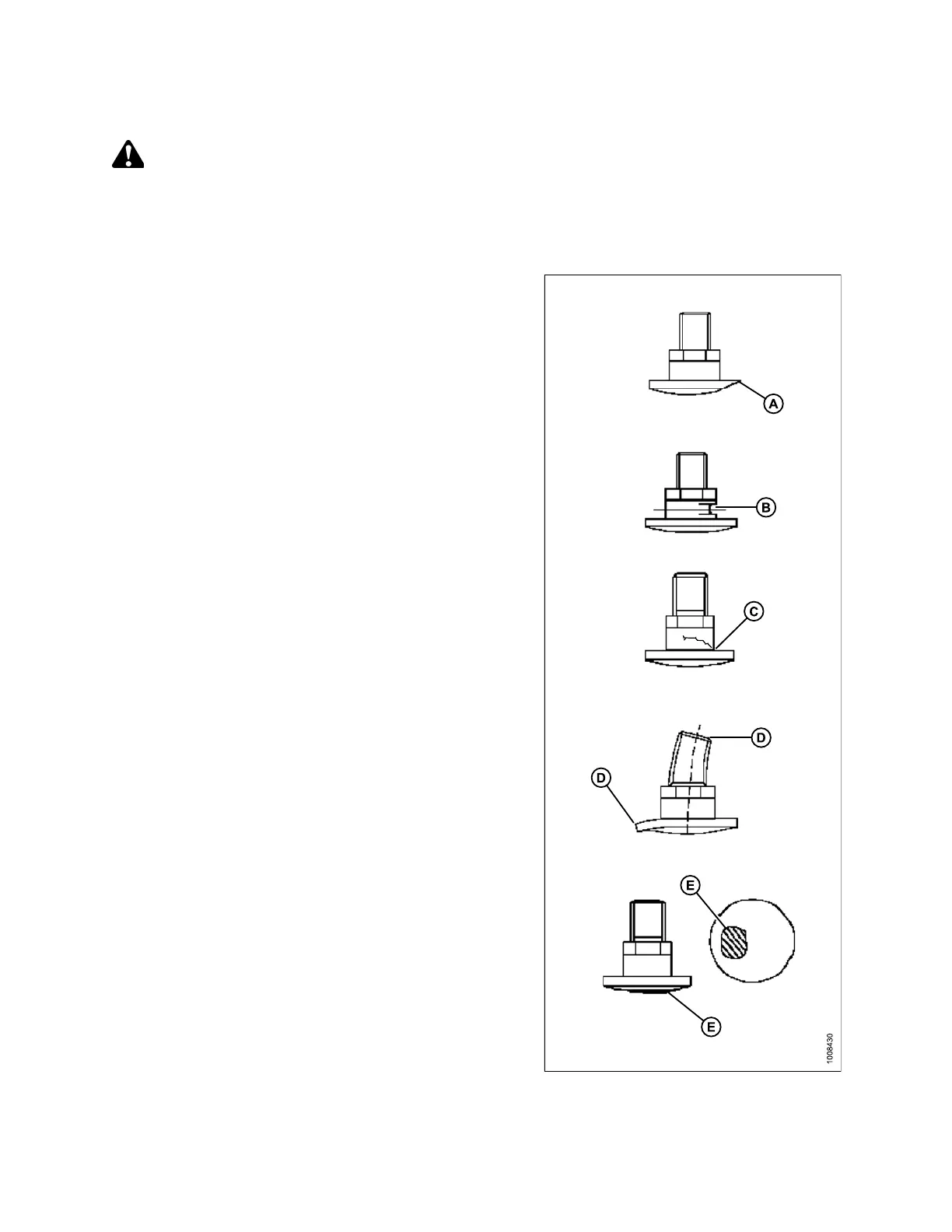
Figure 4.47: Discblade Bolts
1. Check and replace bolt if:
• Bolt has been removed and installed five times
• Head (A) is worn flush with bearing surface of blade
• Diameter of bolt neck is worn (B) 3 mm (1/8 in.)
• Bolt is cracked (C)
• Bolt is visibly distorted (D)
• Bolt shows evidence of interference (E) with
adjacent parts
MAINTENANCE AND SERVICING



 To Next Page