WRS – Installation Manual
4.12.3 Deactivating the transmitter
In order to maximise battery life, the transmitter must be deactivated (set to the “out of cycle” condition) when
it is not in use.
The transmitter may be deactivated in two ways:
• Radio deactivation: The WRP transmitter is deactivated by a deactivation signal sent by the WRI
receiver in response to a machine logic command.
• Automatic deactivation: The transmitter is deactivated automatically when the interval programmed
in the BS menu expires (see para. 4.15.3). The timer starts running when the probe is activated.
[
The timer will be reset under the following conditions:
• Upon reception of the START signal (if configured in Retrigger Mode, see para. 4.12.1 point 3);
•
If the probe is deflected (if the Retrigger Timer RT has been activated from the BS
4.12.3.1 Deactivation time
The deactivation time is normally between 100 ms and 500 ms; however the transmitter may take longer to
deactivate in the event of radio communication problems. In any event the transmitter will be deactivated
within 2 s.
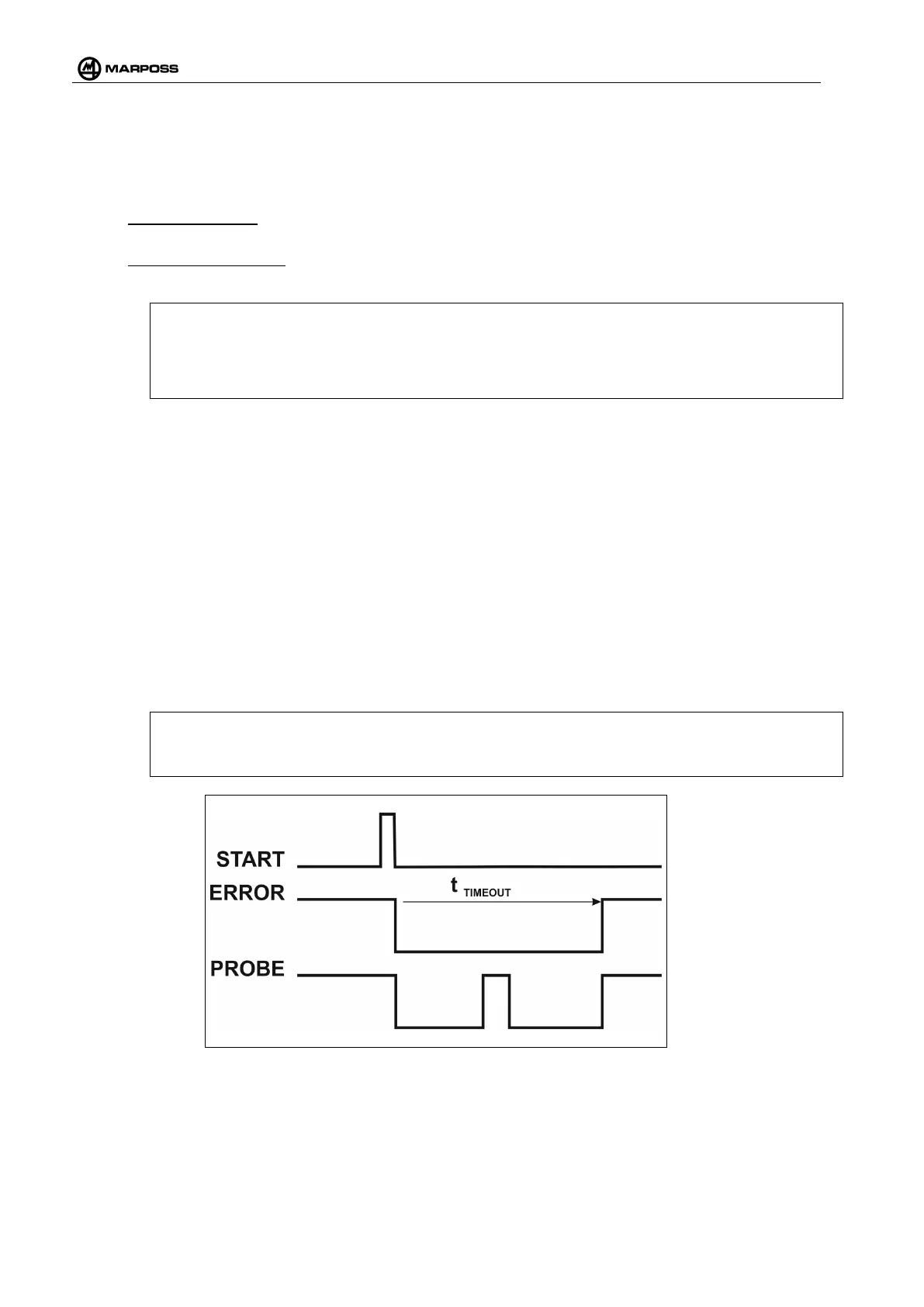
4.12.4 Stop cycle via timeout
1. Timeout option
When parameter T is set to a value other than “- -“ (infinite, no timeout), the cycle will stop automatically after
the corresponding period has elapsed, starting from the moment the transmitter was activated.
[
N.B.:
In the case of Status starting mode, the PLC must deactivate and reactivate the START signal in
order to enable the new cycle to start.
Figure 4-47. Example showing cycle measurement in Pulse mode with Timeout option.
2. Touch Retrigger option
In addition to the Timeout, the WRI receiver menu can also be used to enable a Retrigger Timer that counts
the timeout after each touch (measurement). Note that, if the timeout option is active when the measurement
cycle terminates, it is necessary to make sure that the WRP transmitter has effectively been deactivated
before it is replaced in the tool magazine. Failure to do this may result in loss of communication between the



 To Next Page