4-8
Electrical Shock Hazard
Disconnect power before servicing.
Replace all parts and panels before
operating.
Failure to do so can result in death or
electrical shock.
Open dryer top (See page 4-3).
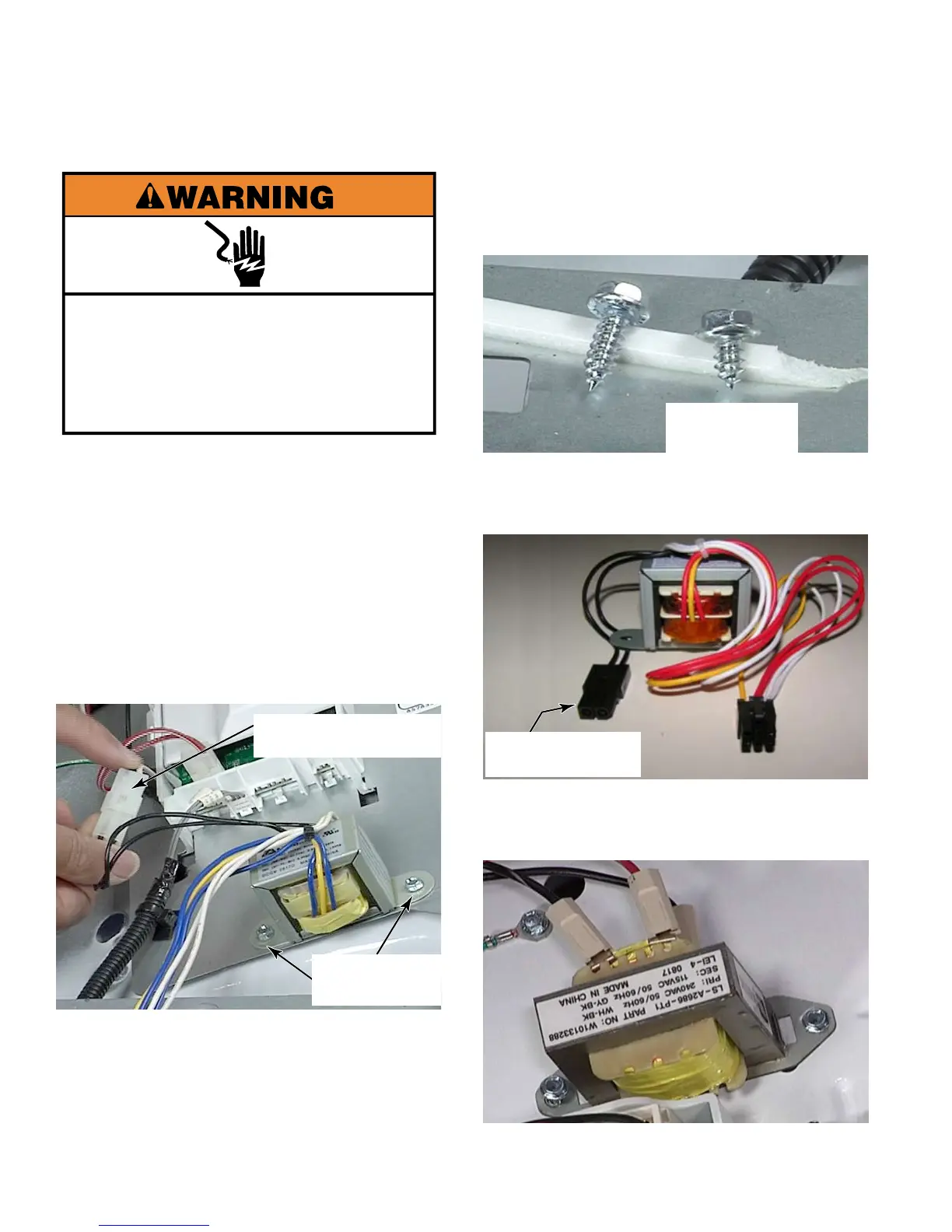
Disconnect transformer wire connector at
AA6 on the UIC (Illustration page 4-4).
Pull the wires through the opening in the
front of the dryer
Disconnect power wire to transformer. It
may be necessary to use a small flat blade
screwdriver to release the locking tab inside
the connector.
Remove two 1/4” hex head screws that
secure the transformer to the bracket and
remove transformer.
1.
2.
3.
4.
5.
Transformer Power
Connector
Two 1/4” Hex
Head Screws
The screws for the transformer are
shorter than other 1/4” hex head screws
used in the dryer so the screw will not touch
the drum below the bracket.
To avoid damage to transformer and
dryer from power surges, the transformer
has an internal fuse on its primary leg.
On model 22 dryers: Remove step-down
transformer by removing the three wire
connectors and two 1/4” hex head screws.
6.
Transformer
Screw
UIC Transformer
Primary





 To Next Page